
Hide sheet to make the sheet not visible in the window / view. You can hide any worksheet if you wants to make it hidden from the view. When you have multiple sheets and you wants to show only sheets which are important and hide all other sheets like calculations sheets, or sheets with background data.
How to Hide Sheets in Excel
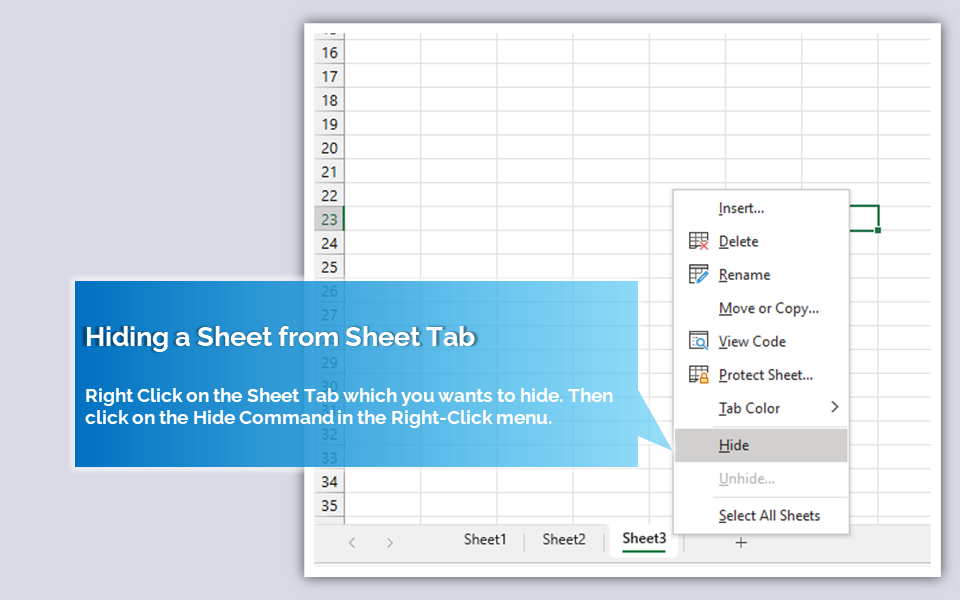
You can hide a sheet by Right-clicking on the sheet tab you want to hide, and clicking on the hide command in the right click menu.
Hide Sheets from Ribbon Command:
- Go to Home Tab
- Expand the Formats Commands in the Cells Group
- And Click on the Hide Sheet command under Visibility

Shortcut key to Hide Sheet
You can use the following shortcut keys to hide sheets in Excel.
- Press: Alt + O
- Then Press: H H
