
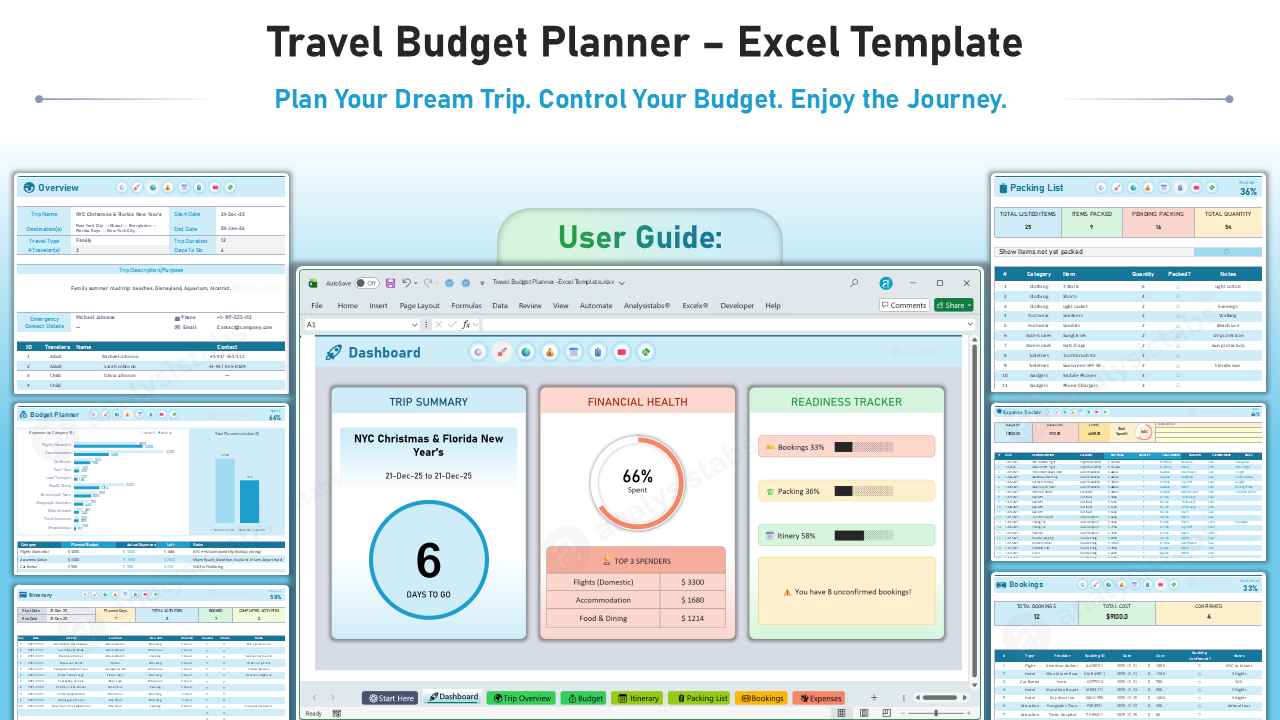
📘 User Guide: Travel Budget Planner
Introduction
Welcome to the Analysistabs® Travel Budget Planner! This tool is designed to take the stress out of travel planning. It acts as your central hub for everything: financial budgeting, itinerary scheduling, booking management, and packing.
🚀 Getting Started
1. Navigation Ribbon
Top Menu: Every sheet features a custom navigation ribbon at the top. Click the icons (Dashboard, Rocket, Globe, Wallet, etc.) to instantly jump between sheets without scrolling through bottom tabs.
2. The "Start Here" Sheet
This is your control center. Set up the workbook before you begin planning.
- Set Your Currency: Select your preferred currency symbol (e.g., $, €, £, ₹) from the dropdown. This will update all financial cells across the workbook.
- Editable Mode: Toggle this to ON.
- Checked (ON): All editable input cells will turn Yellow. This helps you see exactly where you need to enter data.
- Unchecked (OFF): Removes the yellow fill for a clean, presentation-ready look.
- Custom Lists: Define your drop-down options here (e.g., "Packing Categories," "Travel Types," "Payment Modes").
📝 Sheet-by-Sheet Instructions
1. 🌍 Trip Overview
- Trip Details: Enter your Trip Name, Destination(s), Start Date, and End Date.
- Summary: The sheet automatically calculates the Trip Duration and Days To Go based on today’s date.
- Travelers: List all travelers (Adults/Children) and their contact details. This is useful for group trips to keep track of who is coming.
2. 💰 Budget Planner
- Step 1: Set Targets: In the Planned Budget column, estimate how much you want to spend for each category (Flights, Accommodation, Food, etc.).
- Step 2: Track Actuals: The Actual Expenses column updates automatically based on data you enter in the Expenses sheet (or can be manual depending on your preference).
- Analysis:
- Left Column: Shows your remaining budget per category.
- Charts: Use the bar charts to visually compare your Plan vs. Actual spending.
3. 🎫 Bookings
Use this to track big-ticket reservations before the trip starts.
- Enter Details: Log flights, hotels, car rentals, and tour tickets.
- Booking ID: Store your reference numbers/PNR here for quick access.
- Confirmed? Check the box once you have received the confirmation email.
- Stats: The header displays the total value of bookings and how many are confirmed.
4. 🗓️ Itinerary
Plan your day-by-day schedule.
- Details: Enter the Date, Activity, Location, and Time Slot.
- Status Checkboxes:
- Booked: Check this if the activity requires a reservation that is secured.
- Status/Done: Check this during the trip when the activity is completed.
- Tip: Use the notes section for addresses or reservation times.
5. 🧳 Packing List
Never forget your passport or toothbrush again.
- Add Items: List items by category (Clothing, Toiletries, Gadgets).
- Quantity: Specify how many of each item you need.
- Packed? Check the box as you pack your bag.
- Smart Filter: Check the "Show items not yet packed" box at the top to hide everything you've already done—perfect for last-minute checks!
6. 💸 Expense Tracker
Use this sheet during your trip to log daily spending.
- Log Expenses: Enter the Date, Description, Category, and Cost.
- Payment Mode: Track if you used Cash, Card, or Digital Wallet.
- Budget Health: The "Spent %" gauge at the top gives you instant feedback on whether you are overspending.
7. 🚀 Dashboard
Your high-level summary view.
- Trip Summary: Countdown to your trip and quick stats.
- Financial Health: See exactly what percentage of your budget is gone.
- Readiness Tracker: Progress bars show how close you are to being "Ready" (Bookings made, Bags packed, Itinerary planned).
- Alerts: The dashboard will warn you if you have unconfirmed bookings or incomplete tasks.