
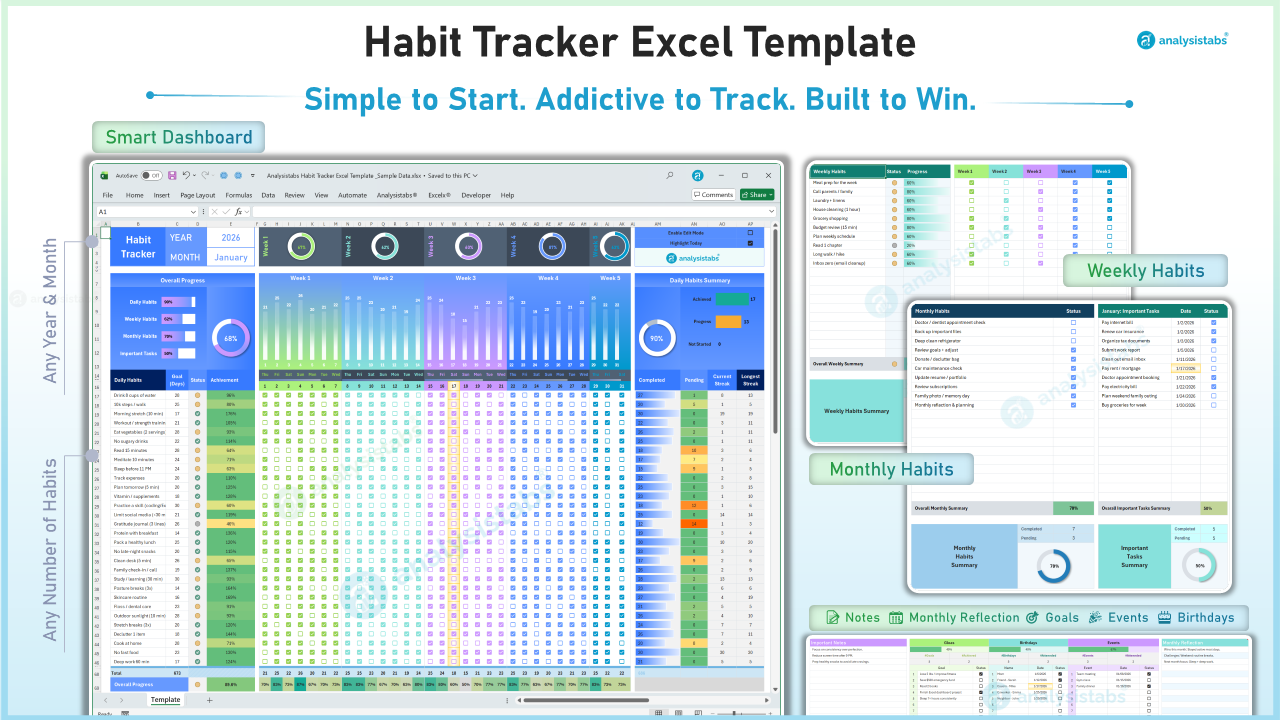
📘 User Guide: Ultimate 2026 Habit Tracker Dashboard
Welcome to Analysistabs® Habit Tracker Excel Template, your new Personal Command Center. This template is designed to be "Simple to Start" but powerful enough to track your entire life. Follow these steps to set up your board and start building streaks.
🛠️ 1. The "Smart Edit Mode" (Crucial Feature)
To prevent you from accidentally deleting complex formulas, this sheet is locked by default. You cannot type in the grid unless you enter Edit Mode.
How to Add/Change Habits:
- Locate the "Edit Mode" toggle switch (Top Right of the Dashboard).
- Switch it to ON.
- LOOK FOR THE YELLOW: Once ON, all editable fields will turn BRIGHT YELLOW.
- If a cell is Yellow: You can type in it (Rename habits, change goals, add dates).
- If a cell is White: Do not touch it (It contains automatic formulas).
- Finished? Switch Edit Mode to OFF. The yellow highlights will disappear, and the sheet is ready for daily tracking.
📅 2. Setting Up Your Month
- Year & Month: Use the dropdown menus in the top left corner (blue box) to select the current Year (2026) and Month (e.g., January).
- Automatic Dates: The calendar grid (Mon, Tue, Wed...) will automatically update based on your selection.
✅ 3. Tracking Daily Habits
- Enter Habits: Turn "Edit Mode" ON. Type your habit names in the left column (e.g., "Read 30 Mins", "No Sugar").
- Set Goals: In the "Goal (Days)" column, enter how many days you aim to do this habit (e.g., 31 for daily, 15 for every other day).
- Marking Progress: Turn "Edit Mode" OFF. Simply click the checkbox for today.
- The "Highlight Today" Feature: You will see one column in the grid highlighted in Orange/Gold. This automatically follows the current date so you never check the wrong box.
Understanding Your Stats (Right Side):
- Current Streak: How many consecutive days you have kept the habit alive.
- Longest Streak: Your personal best record.
- Heat Map: These numbers change color (Green/Gold) as they get higher to gamify your progress.
🗓️ 4. Weekly & Monthly Tracking (Middle Section)
Life isn't just about daily grinds. Use the middle section for broader goals.
- Weekly Habits: Enter items like "Gym 3x" or "Call Parents".How to use: There are 5 checkboxes (Week 1 to Week 5). Check one box for every week you achieve your target.
- Monthly Habits: Enter one-off tasks like "Pay Rent" or "Deep Clean". Check the box once completed.
- Important Tasks: Use this list for specific deadlines. Enter the Due Date and check the box when done.
📝 5. The Integrated Life Planner (Bottom Panel)
Use the bottom section to organize your life beyond habits. (Remember to turn Edit Mode ON to type here)
- 📌 Important Notes: For brainstorming.
- 🎯 Goals: Top 3-5 big goals.
- 🎂 Birthdays: Never forget a date.
- 📅 Events: Key appointments.
- 🧠 Reflection: End-of-month summary.
📊 6. Reading Your Dashboard
- Overall Progress (Top Left): This breakdown shows how much of your entire system (Daily + Weekly + Monthly) is complete.
- Daily Health Summary (Top Right): A "Battery Meter" showing today's status.
- ● Green: Completed tasks.
- ● Orange: Pending tasks remaining for today.
- Progress Bars: The horizontal bars visually fill up as you check off boxes, giving you instant dopamine hits!