• Excel 2016+ & Microsoft 365
  • Instant download

  • .xlsx – no macros, no passwords
  • Secure checkout

Questions before you buy? Email us – we reply within one business day.

Ultimate Project Management Excel Template – Gantt, Kanban & RAID

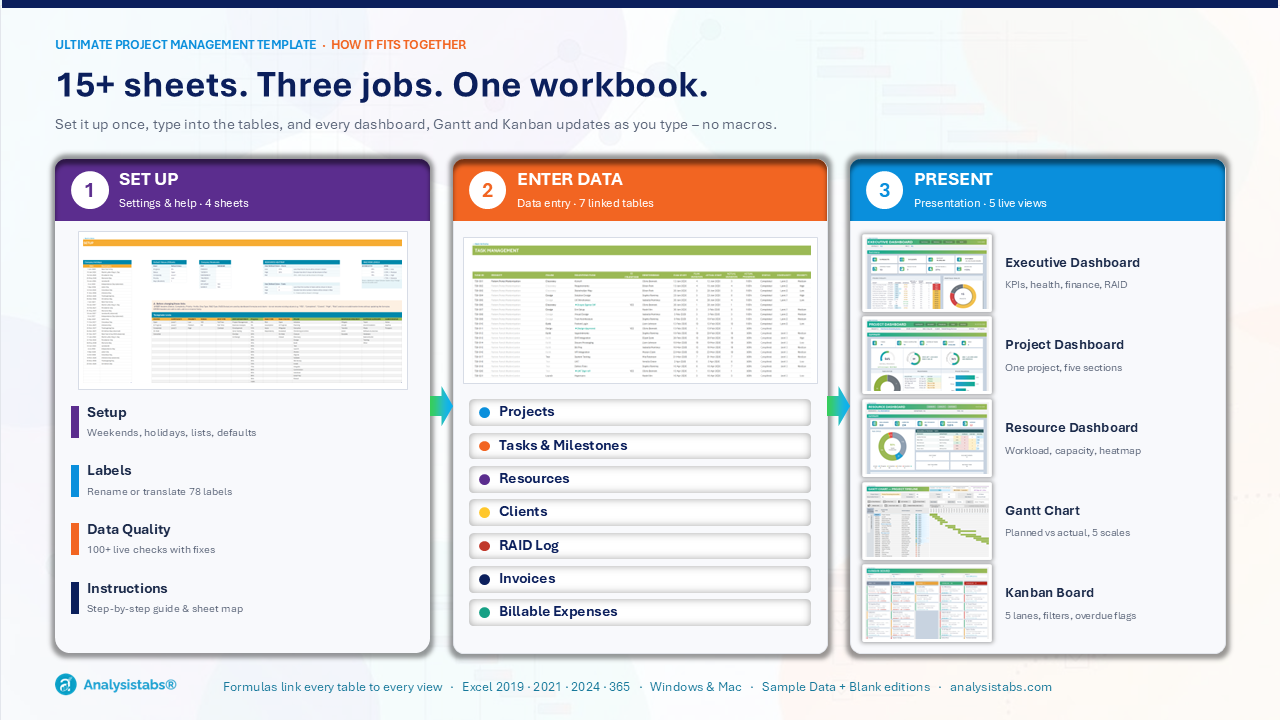
Plan, track and report every project from one Excel file. Projects, tasks, people, clients, RAID, invoices and expenses – feeding three live dashboards, an interactive Gantt chart and a Kanban board. No add-ins, no macros, no subscription.

  • Visual Dashboards: Executive, Project & Resource + Gantt chart + Kanban board.
  • Progress Gantt: Bars fill with real task progress.
  • Full RAID Log: Risks, issues & dependencies with risk matrix.
  • 100+ Data Checks: Catch mistakes before stakeholders do.
  • Ready to Use: Sample data + clean blank copy.
  • Fully Editable: .xlsx, no macros – Excel 2019+ / 365.

Original price was: $149.Current price is: $99.

34% Off

EXCEL PROJECT MANAGEMENT TEMPLATE · NO MACROS · NO SUBSCRIPTION

The Most Complete Project Management Excel Template

Is this really Excel? Yes – one standard .xlsx workbook.

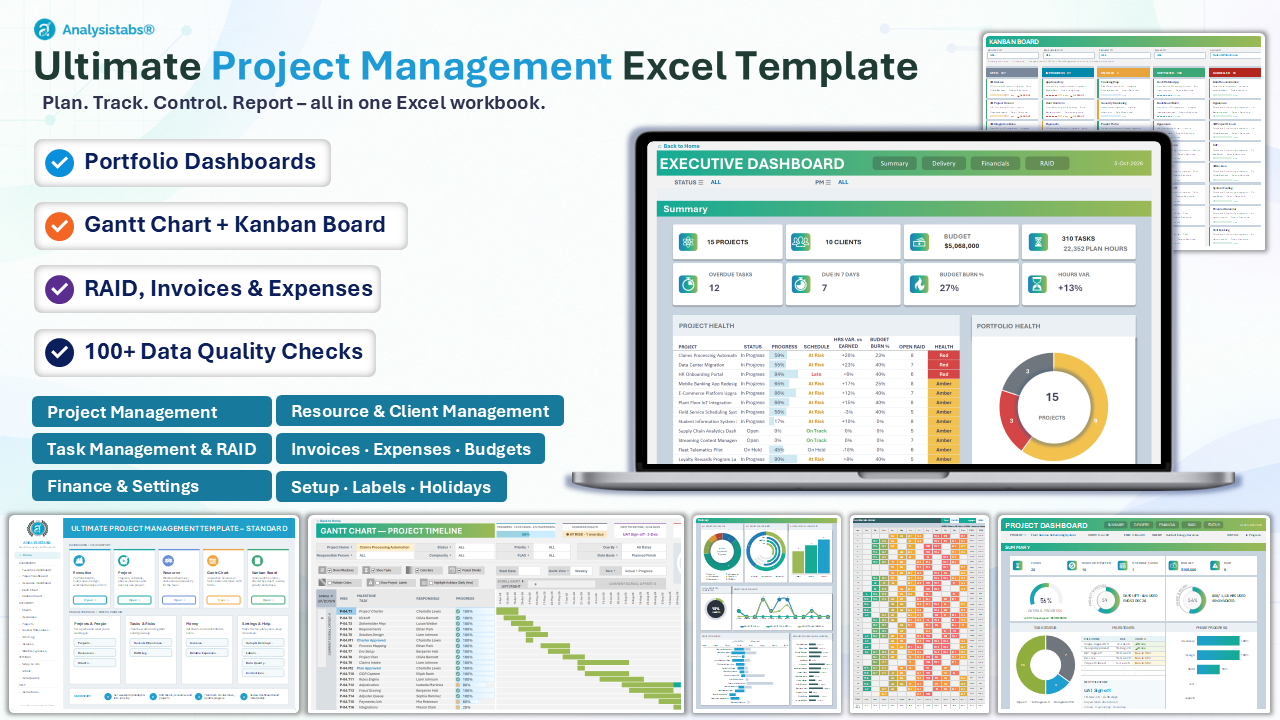
Live dashboards, an interactive Gantt chart, a Kanban board, a RAID log and finance tracking that look like expensive PM software. No installs, no logins, no macros – open it in Excel 2016 or Microsoft 365 and start planning in minutes.
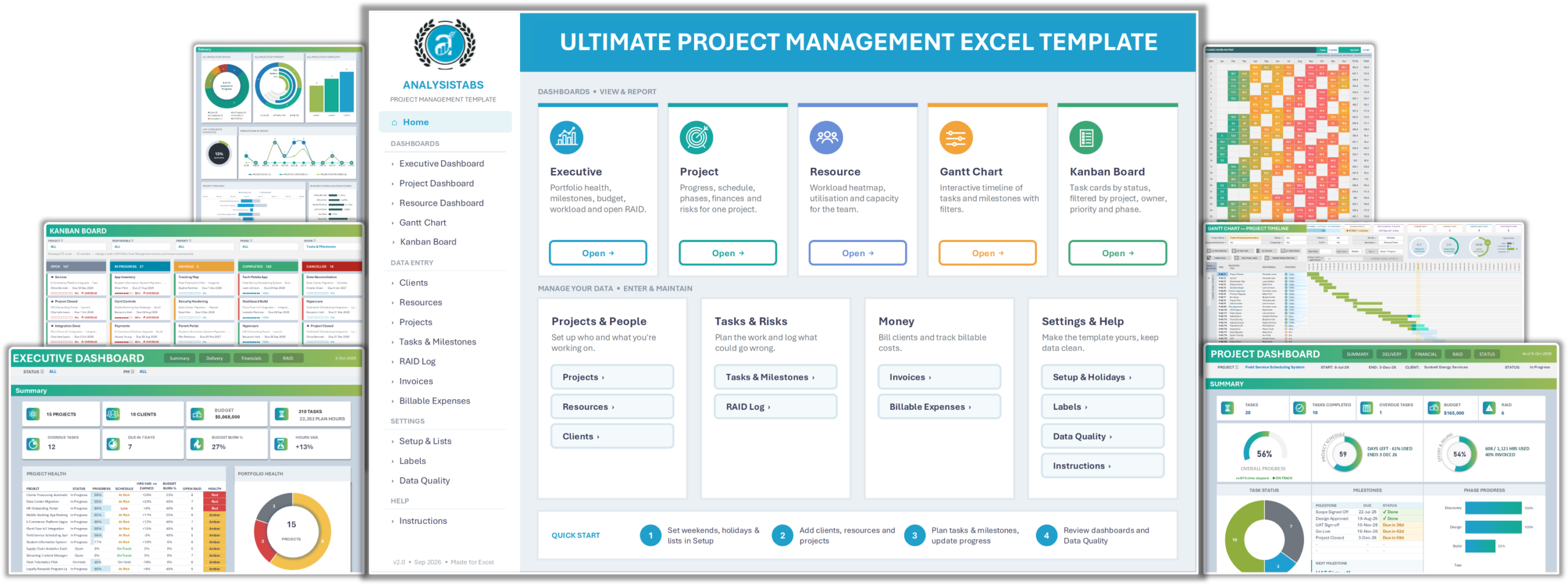
Excel project management template workbook showing an executive dashboard, Gantt chart and Kanban board

WORLD-CLASS TEMPLATE WITH POWERFUL FEATURES.

Built and refined with project managers, PMOs and consultants around the world – everything you need to plan, track and report, inside one Excel file.

WHAT YOU CAN MANAGE

12 PM CAPABILITY AREAS – ONE WORKBOOK.

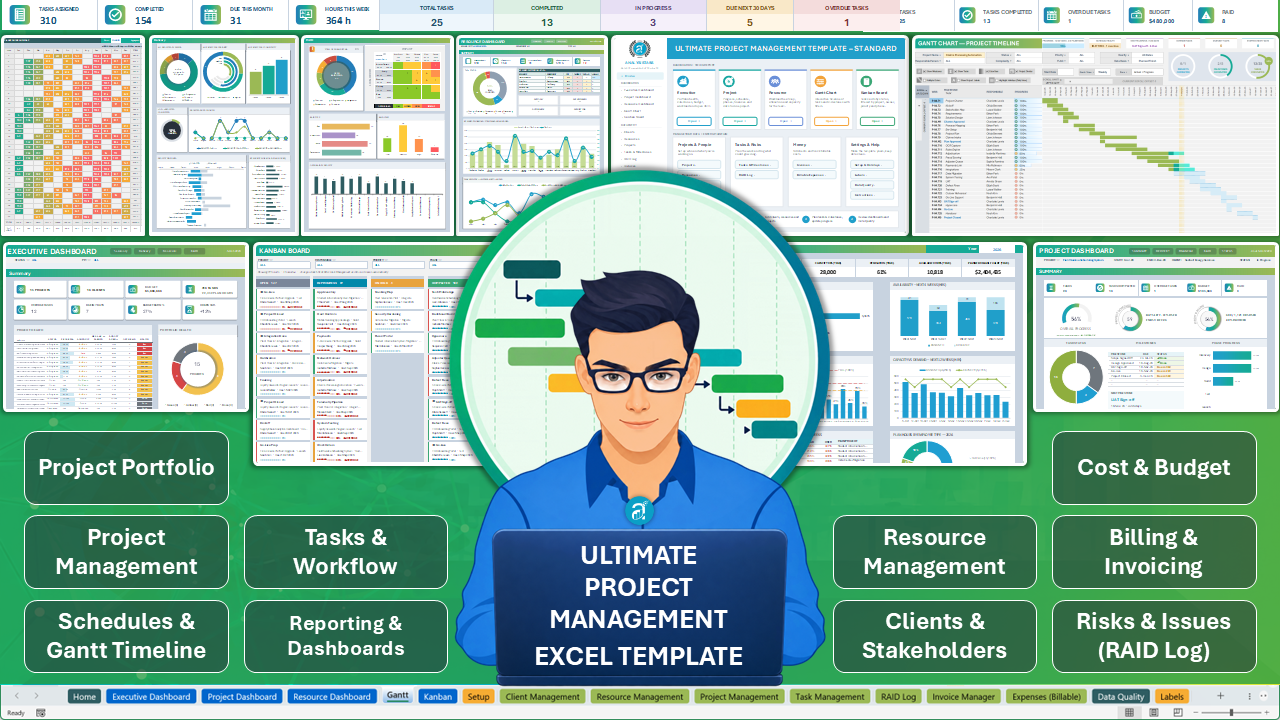
Most teams juggle five or more files to run a project. This template connects all twelve areas in a single Excel workbook – enter data once and every dashboard, the Gantt and the Kanban stay in sync.
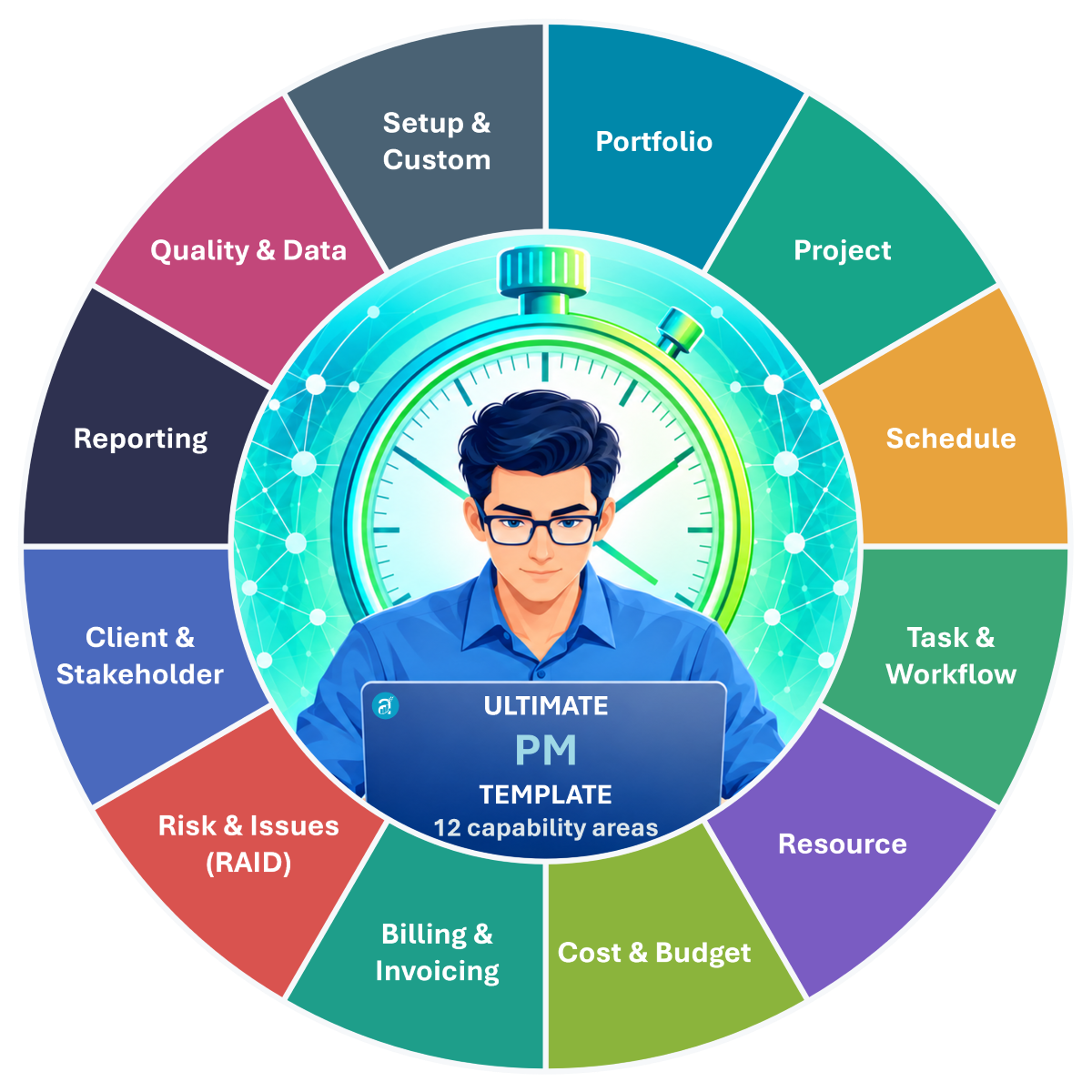
12 project management capability areas covered in one Excel template – portfolio, schedule, resources, finance and risk
12
PM areas
7
linked tables
5
live views
1
Excel file

TAKE THE QUICK TOUR

Five views that build themselves

Type into the data sheets – the dashboards, Gantt chart and Kanban board recalculate instantly. No refresh buttons, no pivot tables.

Take the 1-minute tour: Home → dashboards → Gantt → Kanban → setup → data sheets – all inside one Excel file.

HOME SHEET · EASY TO NAVIGATE

Everything is one click from Home

A clean start page links to every dashboard, data sheet and setting – so you never hunt through tabs to find what you need.
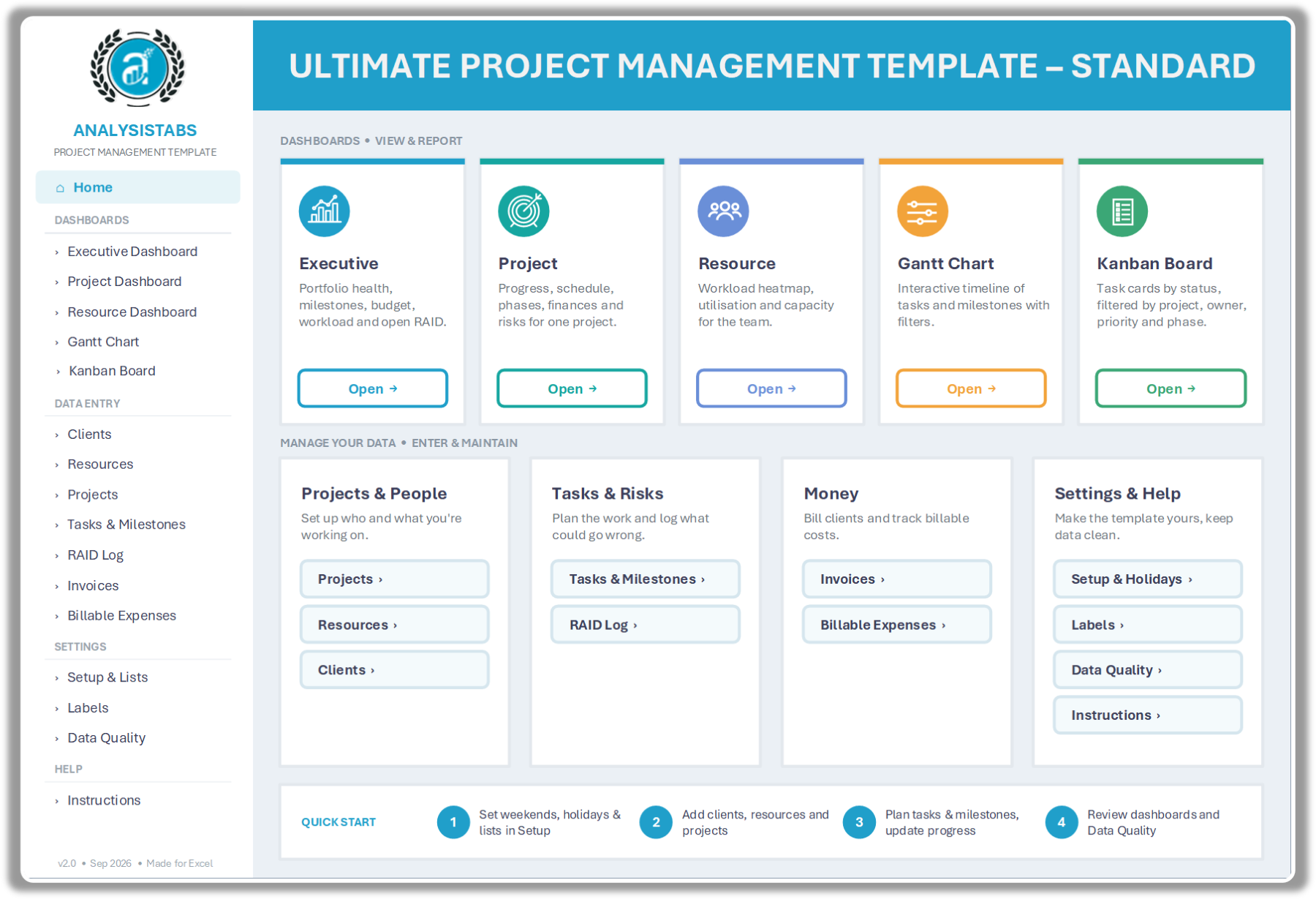
  • Sidebar menu grouped into Dashboards, Data Entry, Settings and Help
  • Dashboard cards jump straight to Executive, Project, Resource, Gantt and Kanban
  • Data sheets grouped by job: Projects & People, Tasks & Risks, Money
  • Settings & Help card: Setup & Holidays, Labels, Data Quality, Instructions
  • Built-in 4-step Quick Start for first-time users
  • Plain-English descriptions on every card – no training needed
Excel project management template home page – sidebar menu, dashboard cards and quick start
STEP 1
Set up
Set weekends, holidays and lists in Setup.
STEP 2
Add your data
Add clients, resources and projects.
STEP 3
Plan & update
Plan tasks and milestones, then update progress.
STEP 4
Review
Review the dashboards and Data Quality checks.

DYNAMIC DASHBOARDS.

Dynamic dashboards turn your data into portfolio, project and people insight. Pick a status, manager, project or person and every chart, KPI and table updates instantly. All graphics are native Excel charts and shapes – no pivot tables and no refresh buttons.
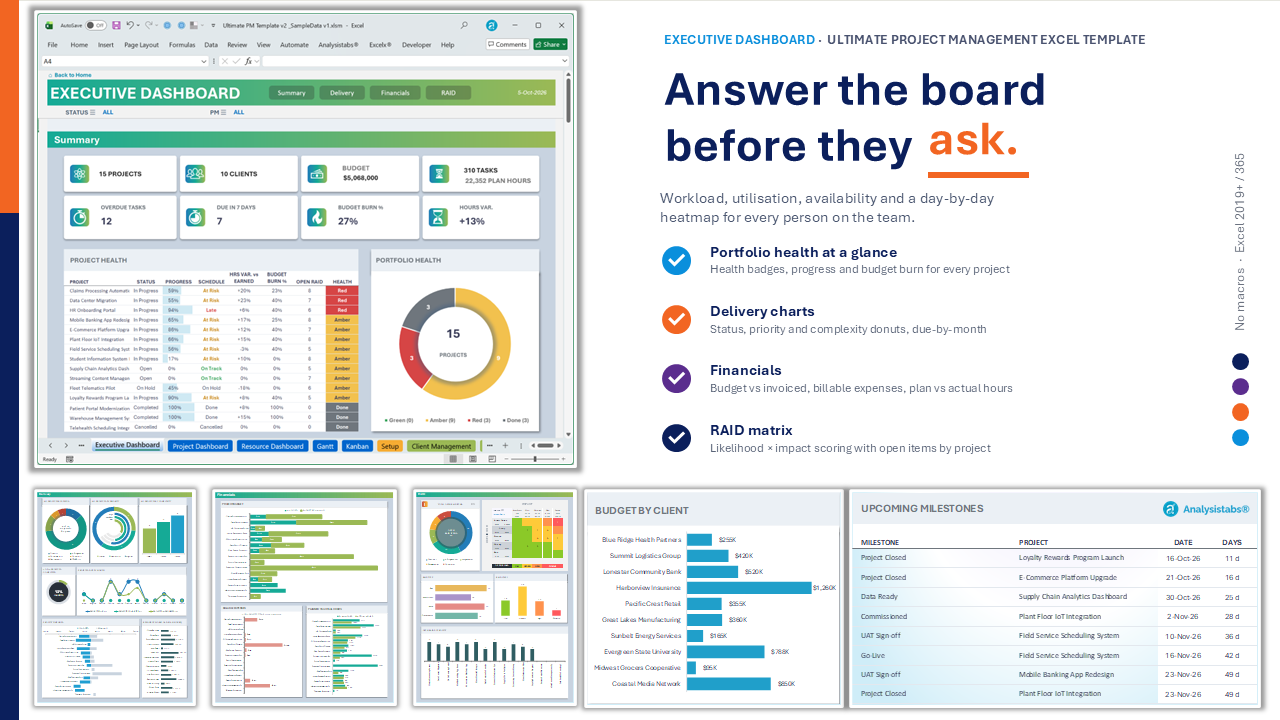
Excel executive dashboard – portfolio KPIs, project health, budget and RAID summary for multiple projects

EXECUTIVE DASHBOARD

A high-level view of every project’s health, milestones, budget, hours and open risks, filtered by status and manager.
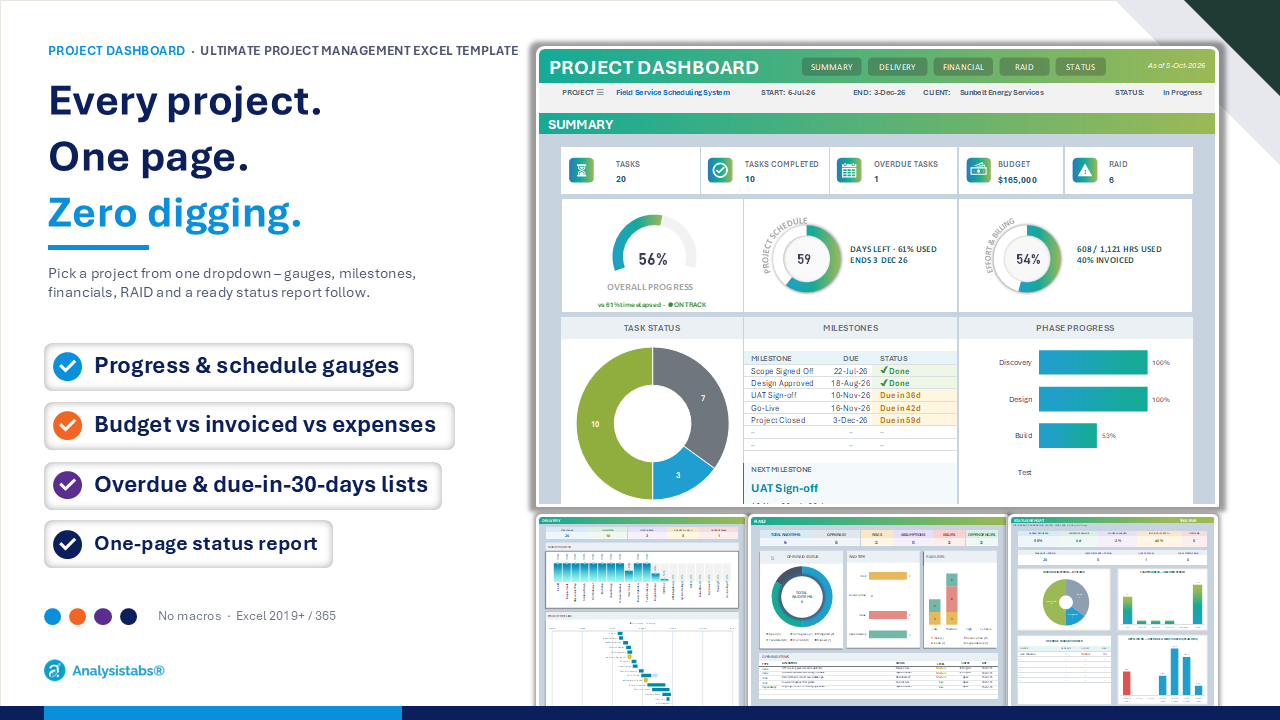
Excel project dashboard – progress and schedule gauges, milestones, budget and status report for one project

PROJECT DASHBOARD

Pick any project to see its progress, milestones, phases, tasks, finances, risks and a one-page status report.
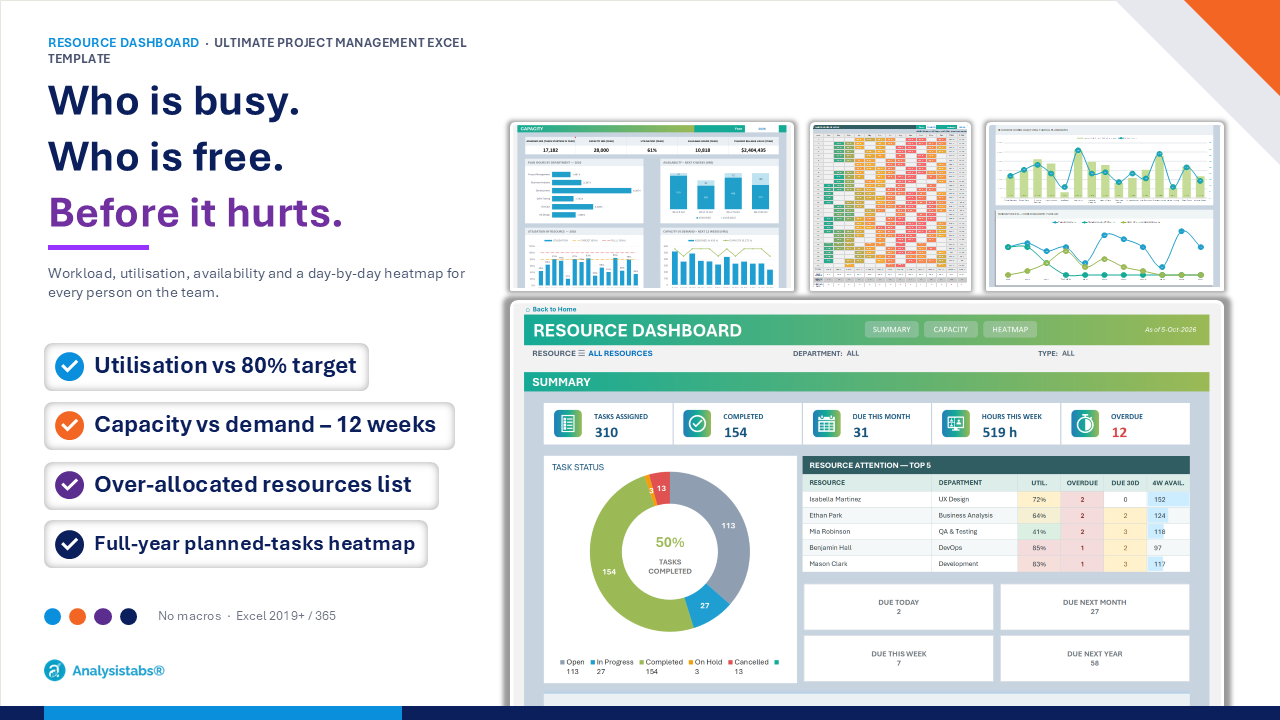
Excel resource dashboard – team workload, utilisation, capacity vs demand and daily heatmap

RESOURCE DASHBOARD

See workload, utilisation, capacity vs demand and a daily heatmap for a single person or for the whole team.

ADVANCED GANTT CHART WITH DRILL-DOWN ANALYSIS.

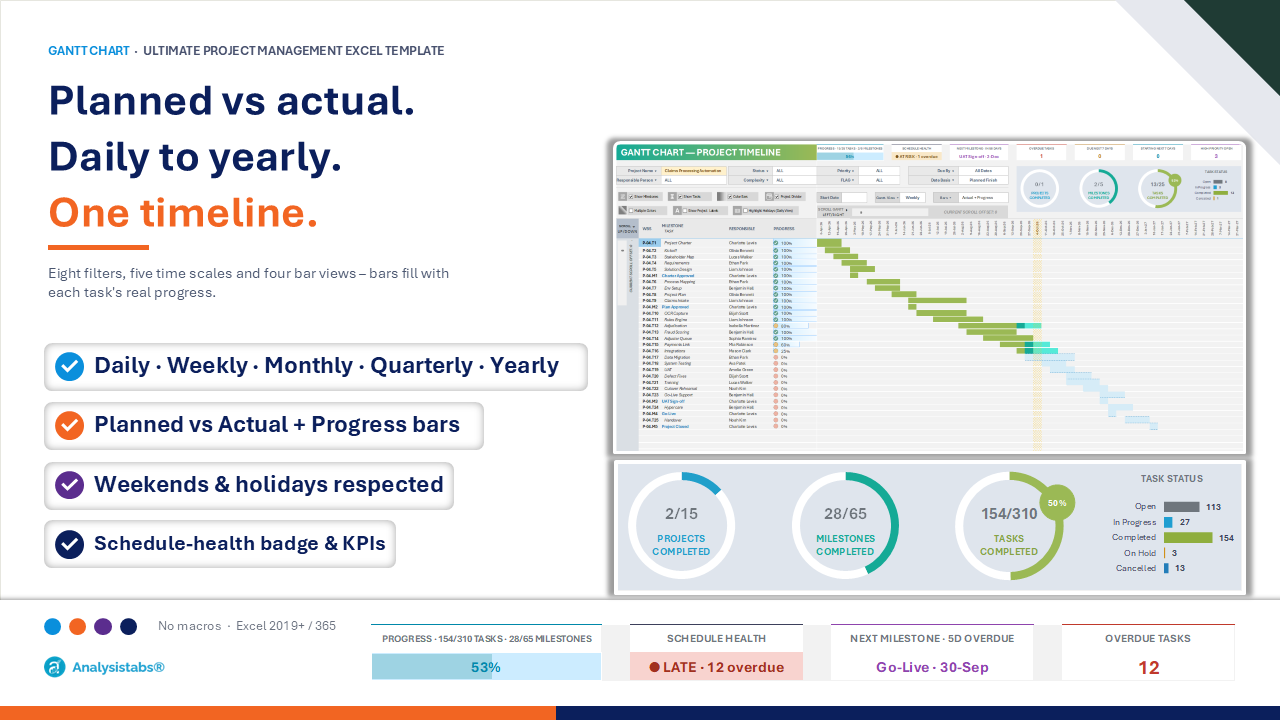
A powerful, formula-driven Gantt chart with the tools you need to drill into any level of the plan – from the whole portfolio down to one person’s tasks.
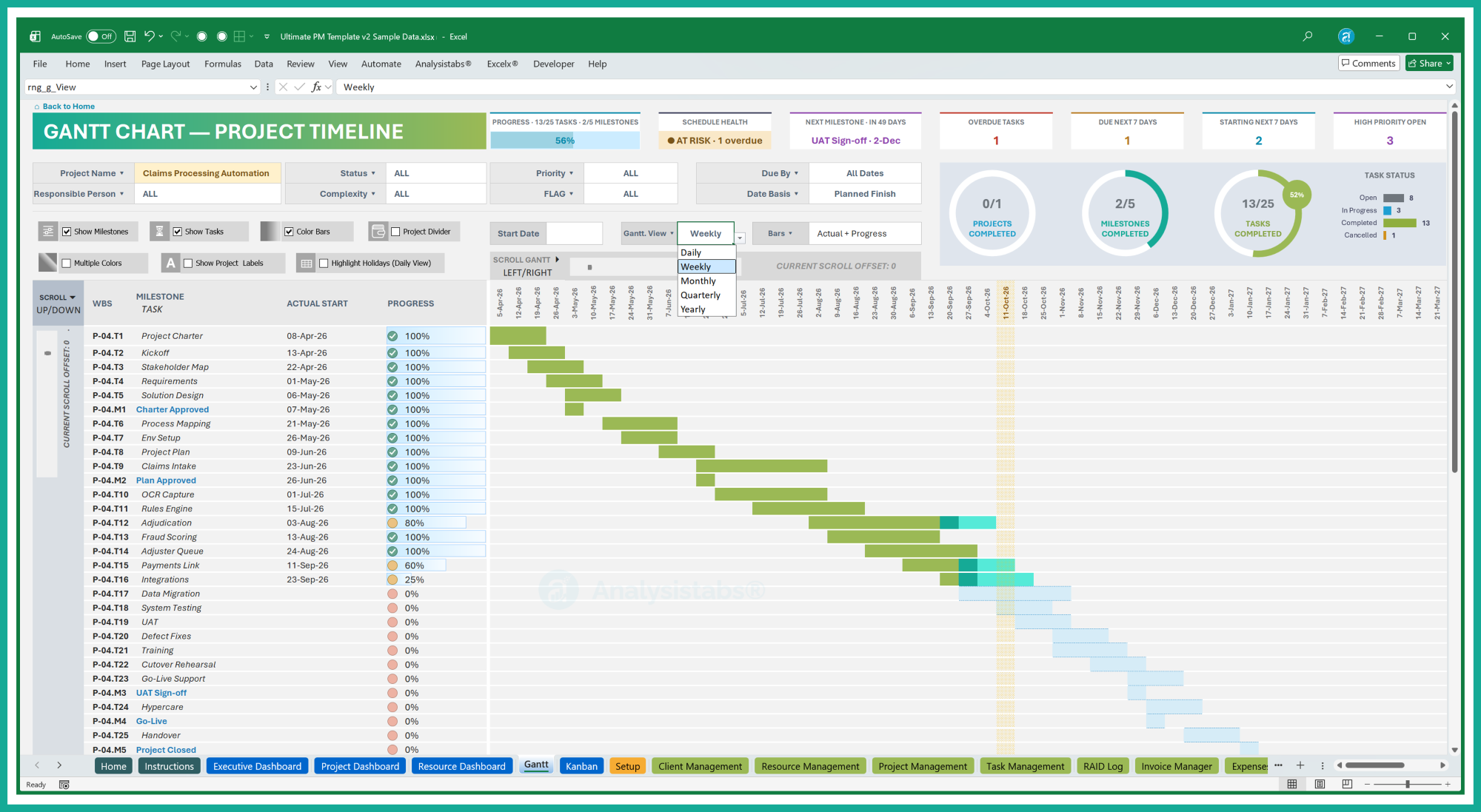
Interactive Excel Gantt chart – planned vs actual bars filled by % complete, with project and date filters

And many more Gantt options

Apply several filters together to drill down into any level of the portfolio.
Show or hide milestones on the timeline.
Show or hide tasks to see a milestone-only roadmap.
Company weekends and holidays from Setup are respected on every bar.
Progress, schedule health, next milestone, overdue, due and starting in 7 days, hours used vs plan.
Task and milestone completion shown as rings above the chart.
Choose which date the timeline is based on, and where the scroll starts.
Every bar is driven by visible formulas on a separate calculation sheet.

KANBAN BOARD.

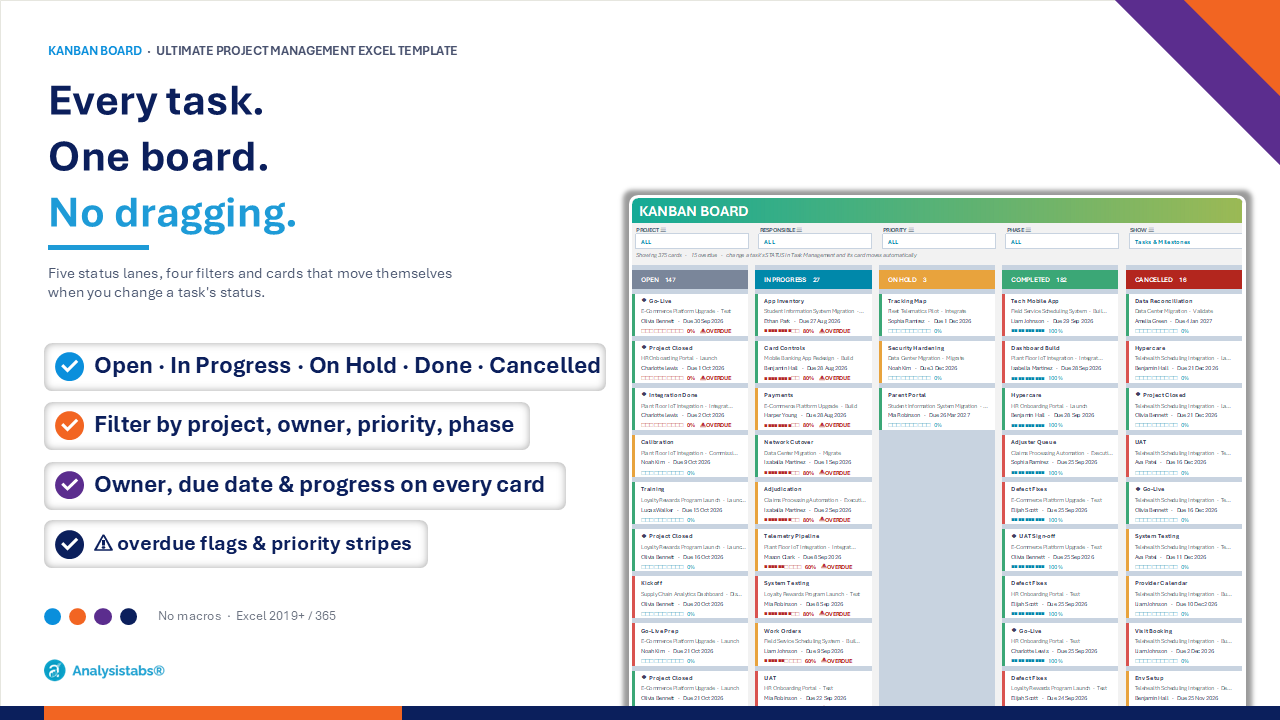
See every task on one board, grouped by status. Change a task’s status in Task Management and its card moves itself – no dragging and no macros.
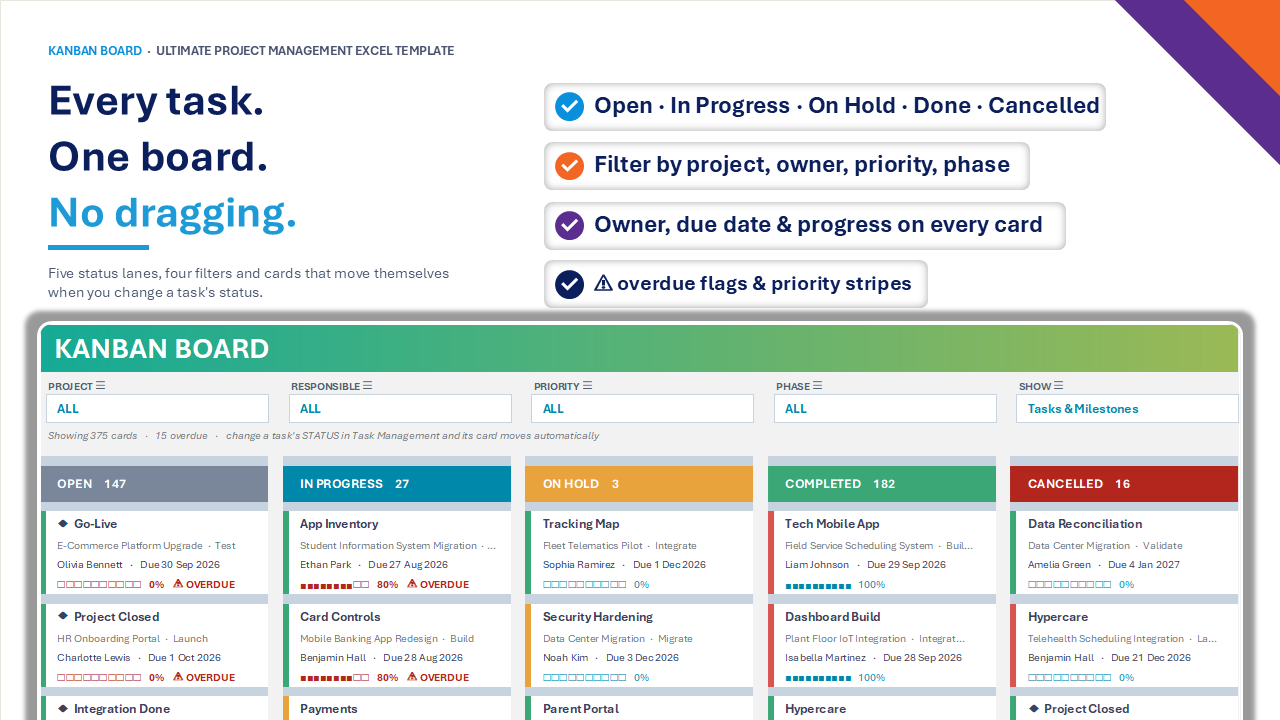
Excel Kanban board – tasks by status with owner, due date, progress bars and overdue flags

Kanban details

Up to 20 cards per lane, with a ‘+N more’ count when there are more.
High, Medium and Low priority shown as coloured stripes on each card.
The board reads STATUS from Task Management – update the task and the card moves.
Milestones can be shown alongside tasks or on their own.

PROFESSIONAL AND EASY TO USE DATA SHEETS.

Seven linked Excel tables hold all your project data – the only sheets you type into. Dropdowns keep entries consistent, calculated columns do the maths, and every view follows automatically.
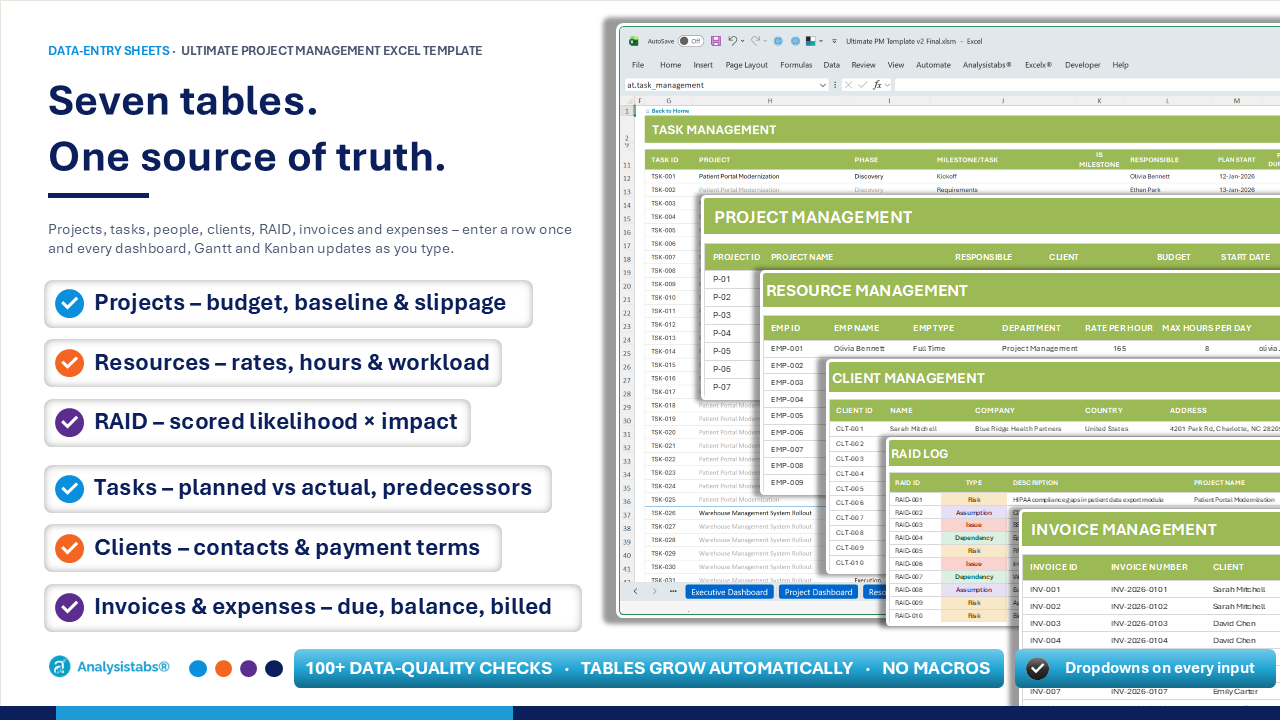
Excel project tracker sheets – projects, tasks, resources, clients, RAID log, invoices and expenses tables

Data sheets included

Project ID, name, responsible, client, budget, start, days, complexity, priority, status, description, sponsor, baseline end – with end date, invoiced, budget remaining, progress, milestones, tasks, hours, expenses, risks and slippage calculated.
Project, phase, milestone/task, owner, plan and actual start/duration, % progress, status, complexity, priority, flag, plan and actual hours, predecessor, 6 custom fields and remarks – with Task ID, WBS and end dates calculated.
Name, type, department, bill rate, cost rate, max hours per day, email, start and end date – with workload and task counts calculated.
Contact, company, country, address, email, phone, status and payment terms.
Risks, assumptions, issues and dependencies with owner, dates, likelihood, impact, status, response strategy and action – scored into a risk level.
Invoice number, client, project, date, amount and paid – with due date, balance due and payment status calculated.
Project, date, merchant, PO and ticket number, amount, category, billed-to-client flag and invoice number.
13 dropdown lists – status, complexity, priority, departments, phases, RAID types and statuses, response strategies, expense categories, client status and more.

TEMPLATE SETTINGS.

Set your calendar, lists, thresholds and wording once – the whole workbook follows. No formulas to touch and no macros to enable.
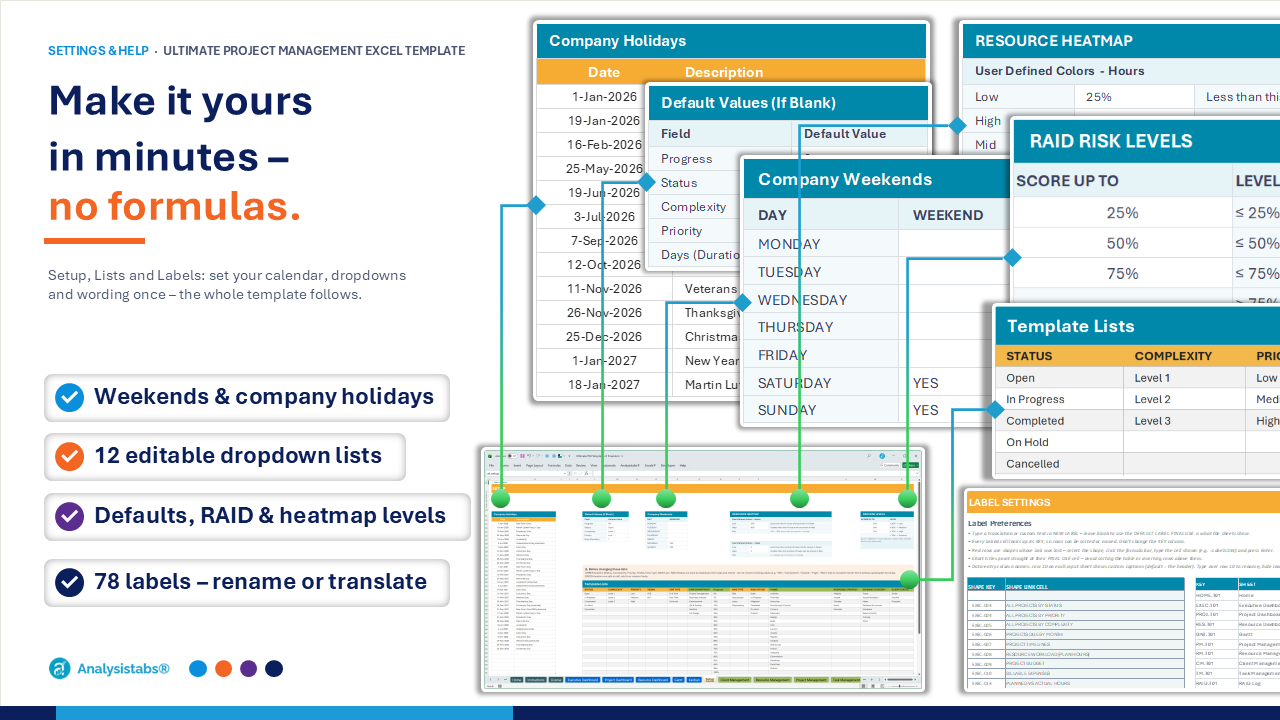
Project management template settings – weekends, holidays, 13 dropdown lists and translatable labels in Excel

Take Control of Your Template. Yeah, There’s An Option For That.

Every option you need to fit the template to your organisation – all in plain Excel cells.

COMPANY WEEKENDS

Tick your weekend days and every duration, end date, Gantt bar and heatmap skips them.

COMPANY HOLIDAYS

List your public and company holidays so every working-day calculation leaves them out.

DEFAULT VALUES

Set the default values the template uses whenever a cell in a data sheet is left blank.

DROPDOWN LISTS

Edit 13 lists including departments, phases, response strategies and expense categories.

RAID RISK LEVELS

Set the score bands for Low, Medium, High and Extreme risks on the RAID log and matrix.

HEATMAP THRESHOLDS

Choose the colour thresholds the resource heatmap uses for daily hours and task counts.

LABEL PREFERENCES

Rename or translate 78 labels across dashboard titles, block headings, filters and Gantt.

DATA QUALITY

Over 100 live checks grouped by sheet, each showing the first problem and how to fix it.

SHEET PROTECTION

Dashboards are protected without a password to prevent accidents – unprotect any time.

GANTT STYLES

Pick one of two Gantt colour styles for planned, actual, in-progress and completed bars.

HOME NAVIGATION

A Home hub with a sidebar and cards, plus a Back-to-Home link on every single sheet too.

INSTRUCTIONS

A step-by-step quick start, sheet guide, tips and troubleshooting, plus online help docs.

More Noteworthy Additions | Requested Features

Built from customer requests – the sheets and tools that make the template easy to run every day.

Excel template home page with sidebar navigation and dashboard cards

HOME HUB

A start page with sidebar and cards linking to every dashboard, data sheet and setting.
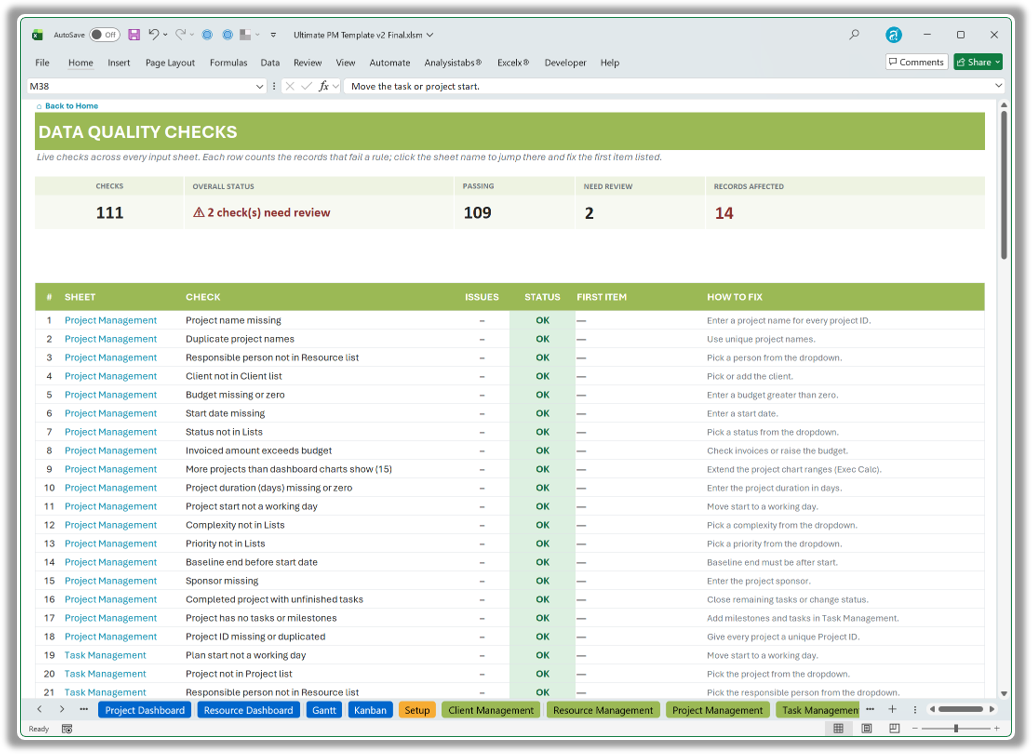
Data Quality sheet with 100+ automatic checks for project data errors

DATA QUALITY

Over 100 live checks across every input sheet show what to fix before stakeholders see it.
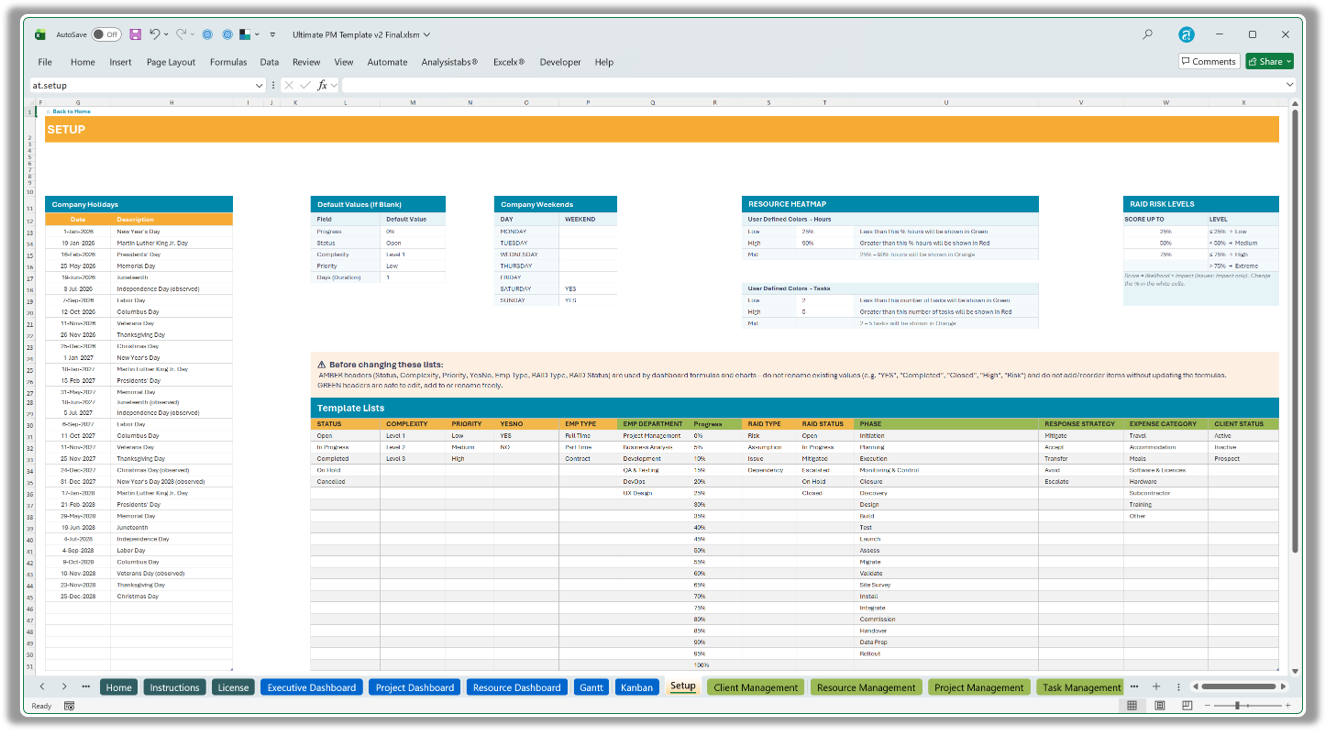
Setup sheet for weekends, holidays, dropdown lists and risk thresholds

SETUP SHEET

Weekends, holidays, defaults, risk levels, heatmap thresholds and 13 lists in one place.
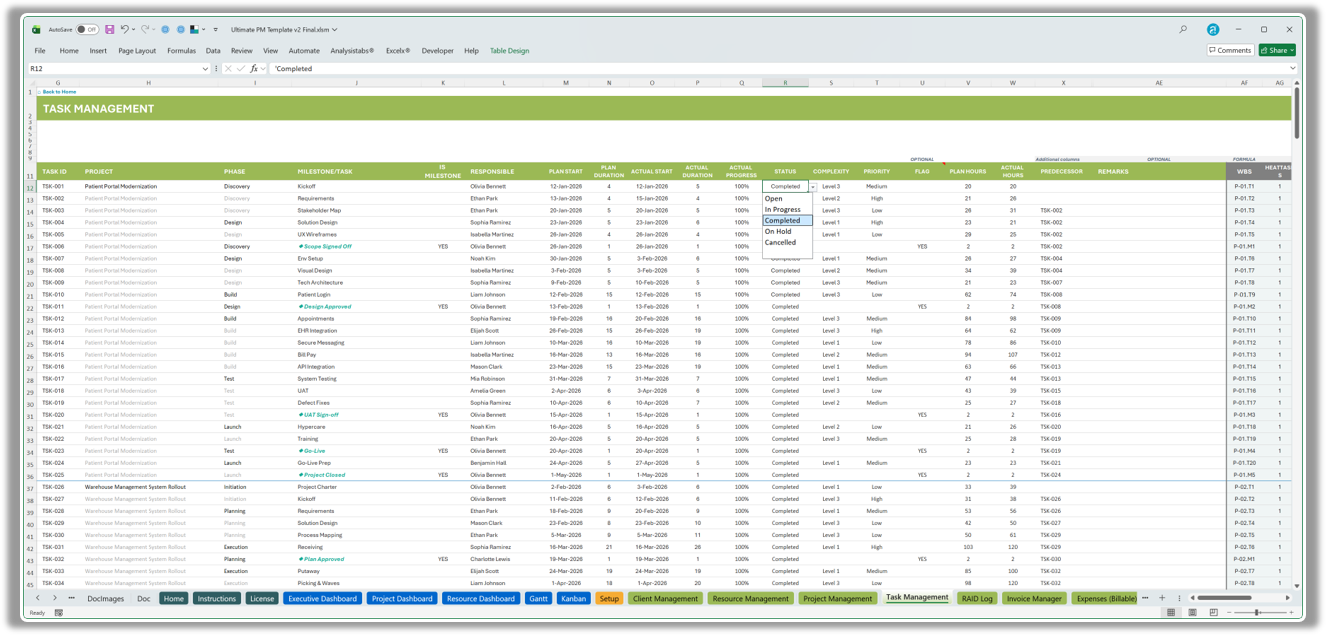
Task Management table with planned and actual dates, hours and progress

TASK MANAGEMENT

Planned and actual dates, hours, progress, predecessors and custom fields for every task.

Seven linked Excel data tables for projects, tasks, resources and finance

SEVEN LINKED TABLES

Projects, tasks, resources, clients, RAID, invoices and expenses – all connected together.

Template settings for labels, translations, weekends and dropdown lists

LABELS & SETTINGS

Rename or translate 78 labels and set weekends, holidays and lists without touching formulas.

Those Are Just A Few Main Features, There Are Plenty More

Full List of Incredible Features:

EXECUTIVE DASHBOARD

  • Project Health – Green / Amber / Red
  • Projects, clients and budget KPIs
  • Overdue and due-in-7-days KPIs
  • Budget burn and hours variance
  • Milestone list with countdown
  • Tasks by status, priority, complexity
  • Project timelines and workload
  • Budget vs invoiced vs remaining
  • 5 × 5 RAID risk matrix

PROJECT DASHBOARD

  • Select any project in one click
  • Progress, schedule and effort rings
  • Days remaining and budget summary
  • Milestone tracker
  • Tasks by phase and status
  • Overdue and due-in-30-days lists
  • Planned vs actual timeline
  • Invoices, expenses and RAID
  • One-page status report

RESOURCE DASHBOARD

  • One person or the whole team
  • Department and type filters
  • Tasks assigned, completed, due
  • Resource Attention – top 5
  • Workload and tasks by week
  • Utilisation vs target
  • Availability next 4 weeks
  • Capacity vs demand – 12 weeks
  • Daily planned-tasks heatmap

GANTT FILTERS & VIEWS

  • Project and responsible filters
  • Status and complexity filters
  • Priority and FLAG filters
  • Due By / Due Within window
  • Show tasks and/or milestones
  • Daily and weekly views
  • Monthly and quarterly views
  • Yearly view
  • Choose the timeline start

GANTT BARS & KPIs

  • Planned Schedule bars
  • Actual Schedule bars
  • Planned vs Actual bars
  • Actual + Progress bars
  • Two colour styles
  • Weekends and holidays respected
  • Schedule health and next milestone
  • Overdue, due and starting in 7 days
  • Hours used vs plan

KANBAN BOARD

  • Open and In Progress lanes
  • On Hold, Completed, Cancelled lanes
  • Project and responsible filters
  • Priority and phase filters
  • Tasks / milestones / both
  • Owner, due date and progress bar
  • Priority colour stripes
  • ⚠ Overdue flags, overdue first
  • 20 cards per lane, +N more

RAID LOG

  • Risks and assumptions
  • Issues and dependencies
  • Owner, project and dates
  • Likelihood and impact
  • Automatic risk score
  • Low to Extreme risk levels
  • Response strategy
  • Action / mitigation
  • Due and closed-on dates

FINANCE

  • Project budgets
  • Budget remaining
  • Invoices by client and project
  • Due date from payment terms
  • Balance due
  • Paid / Part Paid / Open / Overdue
  • Billable expenses by category
  • Billed-to-client flag
  • Invoice link on expenses

DATA SHEETS

  • 7 linked Excel tables
  • Dropdowns on key fields
  • Calculated columns
  • Baseline end and slippage
  • Planned and actual dates
  • Plan and actual hours
  • Task predecessors
  • 6 custom task fields
  • Tables grow automatically

SETTINGS

  • Company weekends
  • Company holidays
  • Default values
  • 13 editable dropdown lists
  • RAID risk-level bands
  • Heatmap colour thresholds
  • 78 translatable labels
  • Two Gantt colour styles
  • No-password sheet protection

DATA QUALITY

  • 100+ live checks
  • Grouped by sheet
  • Records affected per check
  • First problem row shown
  • How-to-fix guidance
  • Missing and invalid values
  • Duplicate IDs and names
  • Overdue items flagged
  • Chart-capacity warnings

HELP & COMPATIBILITY

  • Home hub and sidebar
  • Back-to-Home on every sheet
  • Step-by-step Instructions
  • Online documentation
  • Sample Data + Blank editions
  • Excel 2016, 2019, 2021, 2024
  • Microsoft 365
  • Windows and Mac
  • No macros or add-ins

BUILT FOR EVERY ROLE

One file – the right view for everyone

Project Manager

Plans and delivers the work

Task Management · Gantt · Kanban · Project Dashboard

Executive / Sponsor

Oversees the portfolio

Executive Dashboard · status reports

Team Lead

Balances people and capacity

Resource Dashboard · Kanban by person

Finance / PMO

Controls money and data

Invoice Manager · Expenses · Data Quality

WHY THIS TEMPLATE

The power of PM software – the simplicity of Excel

This template Online PM software DIY spreadsheet
Price $99 once $10–$30 per user / month Your time
Ready-made dashboards & Gantt ✔ ✔ ✖
Kanban board ✔ ✔ ✖
Works offline, data stays on your PC ✔ ✖ ✔
No logins, installs or IT approval ✔ ✖ ✔
Fully editable formulas ✔ ✖ ✔
Built-in data-quality checks ✔ 100+ checks Varies ✖
Set up in under 30 minutes ✔ Days of onboarding Weeks of building

Online PM software prices are typical published per-user plans; check current pricing for any tool you compare.

CUSTOMER REVIEWS

What project managers say about Analysistabs

WHAT’S IN THE DOWNLOAD

Everything you need, in one download

  • Sample Data edition (.xlsx) – see every feature working
  • Blank edition (.xlsx) – ready for your own projects
  • 3 dashboards, Gantt chart and Kanban board
  • 7 data-entry sheets, Setup, Labels and Data Quality
  • Home hub, Instructions and License
  • Free updates for 12 months from purchase

REQUIREMENTS

Will it work on my computer?

  • Excel 2016, 2019, 2021, 2024 or Microsoft 365
  • Windows or Mac desktop Excel
  • No add-ins, macros or internet needed
  • Not for Excel 2013 or older
  • Not for Google Sheets, Numbers or LibreOffice

Excel for the web: view and light edits only.

CHOOSE YOUR EDITION.

Simple, Ultimate or Everything – one-time payment, instant download.

SIMPLE
Simple Multiple Project Tracker
$49 $99
Deadlines, progress and workload for many projects on one dashboard.
  • ✓  One multi-project dashboard
  • ✓  Daily, scrollable Gantt chart
  • ✓  Projects, people and tasks
  • ✓  Resource workload view
  • ✓  Overdue task tracking
  • ✓  Weekends and holidays

VIEW SIMPLE →

ULTIMATE · BEST FOR MOST
Ultimate PM Template
$99 $149
The complete PM system – dashboards, Gantt, Kanban, RAID and finance.
  • ✓  3 dashboards + Gantt + Kanban
  • ✓  Planned vs actual timelines
  • ✓  Full RAID log and risk matrix
  • ✓  Invoices and billable expenses
  • ✓  Resource capacity and heatmap
  • ✓  100+ live data-quality checks

GET ULTIMATE →

EVERYTHING · BEST VALUE
120+ PM Templates Pack
$299 $1,999
Every template in Excel, PowerPoint & Word – includes both templates.
  • ✓  Simple Tracker + Ultimate included
  • ✓  60+ Excel templates
  • ✓  50+ PowerPoint templates
  • ✓  25+ Word templates
  • ✓  Charters, plans and status reports
  • ✓  Lifetime free updates

VIEW BUNDLE →

FREQUENTLY ASKED QUESTIONS.

Excel 2016, 2019, 2021, 2024 and Microsoft 365 on Windows or Mac. Excel 2013 and older, Google Sheets and Numbers are not supported.
No. It is a standard .xlsx workbook – formula-based, with no macros, add-ins or internet connection needed.
No. The Instructions sheet walks you through setup step by step, and the Sample Data edition shows every feature working. See also the online documentation.
Yes. Everything is formula-driven and linked to the data tables, so charts, the Gantt and the Kanban update as you type.
Yes. Nothing is password-locked. Dashboards are protected without a password to prevent accidents – Review › Unprotect Sheet to edit.
As many as you need – every table grows automatically as you add rows, so there’s no limit on projects, tasks, resources or clients. The Project and Resource dashboards work for any project or person you pick, and the Kanban board handles up to 1,000 tasks. Portfolio charts keep things readable by showing 15 projects at a time – use the filters to focus on the ones that matter.
No. Pay once and use it forever, with free updates for 12 months from the date of purchase.
Yes. Copy your rows into the matching tables; the new columns are optional. See the changelog for what’s new.

Stop chasing spreadsheets. Start delivering projects.

Ultimate Excel Project Management Template · Sample Data + Blank editions · one-time payment

⚡ Instant download · 🔒 Secure checkout · .xlsx – no macros · Excel 2016+ / Microsoft 365

Deliver Successful Projects
with Analysistabs Templates

Whether you are a beginner, project manager, or executive, our templates provide the automated dashboards and data insights you need to succeed.

Original price was: $149.Current price is: $99.

34% Off

Ultimate Project Management Excel Template featuring dashboards, a Gantt timeline, Kanban board, and project management tools

Get Instant Access in 3 Simple Steps

Yes! Pay once for use it forever. No monthly subscriptions, no hidden fees.
Questions? Contact us at Info@analysistabs.com

Trusted by 6,500+ users worldwide

Project Managers from the biggest brands in the world choose us for managing their Projects, Tasks and Resources.

Why choose us!