
Welcome to Analysistabs®!
The Ultimate Automated Meal Planning System
Plan Smart. Eat Healthy. Shop Instantly.
Stop asking “What’s for dinner?” and start saving money. The Analysistabs® Weekly Meal Planner isn’t just a calendar—it’s a smart database. It replaces scribbled notes with an intelligent system that automatically calculates your grocery needs, estimates your weekly bill, and tracks your daily calories. Whether you are budget-conscious, health-focused, or just busy, this Excel template acts as your personal Nutritionist and Accountant.
✨ SMART FEATURES
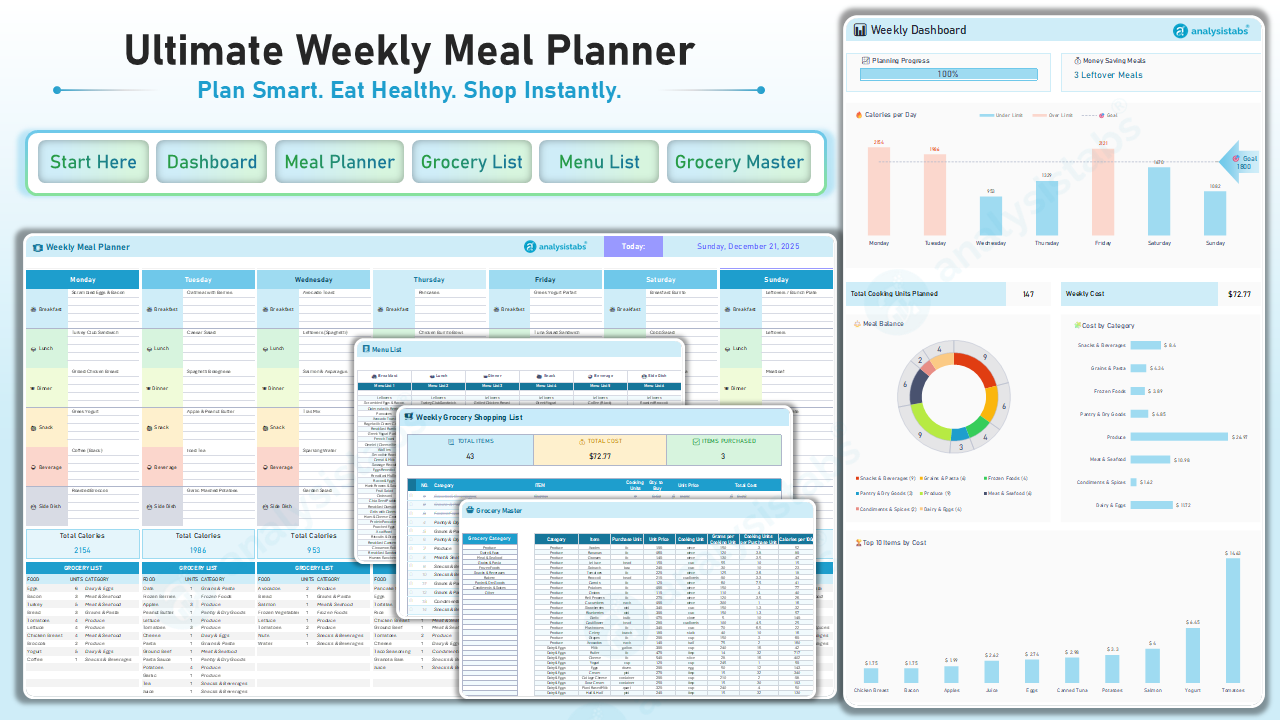
🚀 Smart Dashboard: Your weekly command center. View your “Calories per Day” chart, track your “Weekly Cost,” and see your “Planning Progress” gamified bar all in one view.
🟡 Smart Edit Mode: Toggle “Edit Mode” ON to highlight all input cells in YELLOW. Customize your recipes and meal plans without ever breaking a complex formula.
🛒 Automated Grocery List: Forget writing lists. The template aggregates every ingredient from your plan into a tidy checklist. It even converts units (e.g., summing up “2 eggs” from three different recipes into “6 eggs” total).
💰 “Leftover Logic” Engine: Save money automatically. Select “Leftovers” for a meal, and the smart engine will skip adding ingredients to your grocery list for that slot—preventing food waste and over-buying.
🥗 Dynamic Calorie Tracking: Don’t just plan food; plan health. Visual bars turn Blue when you are under your daily calorie goal and Red if you exceed it, giving you instant nutritional feedback.
This isn’t just an Excel Sheet; it is a Kitchen Management System. Professionally developed with optimized Excel formulas, this workbook guides you through the cycle of:
- Planning (Menu Selection)
- Analyzing (Cost & Calories)
- Shopping (Automated List)
- Cooking (Stress-Free Week)
📂 What’s Inside?
The workbook contains 6 Worksheets managed from a central “Start Here” hub:
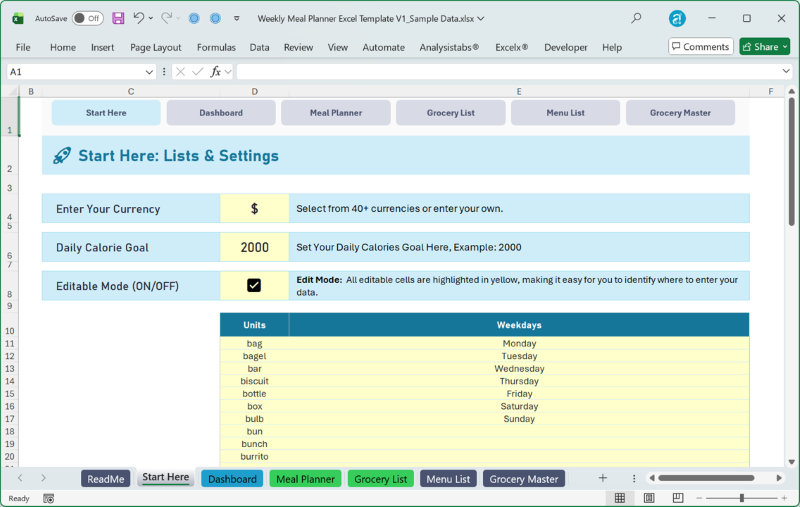
⚙️ Start Here: The settings hub. Set your Currency ($, €, £), define your Daily Calorie Goal (e.g., 2000), and toggle “Edit Mode.”
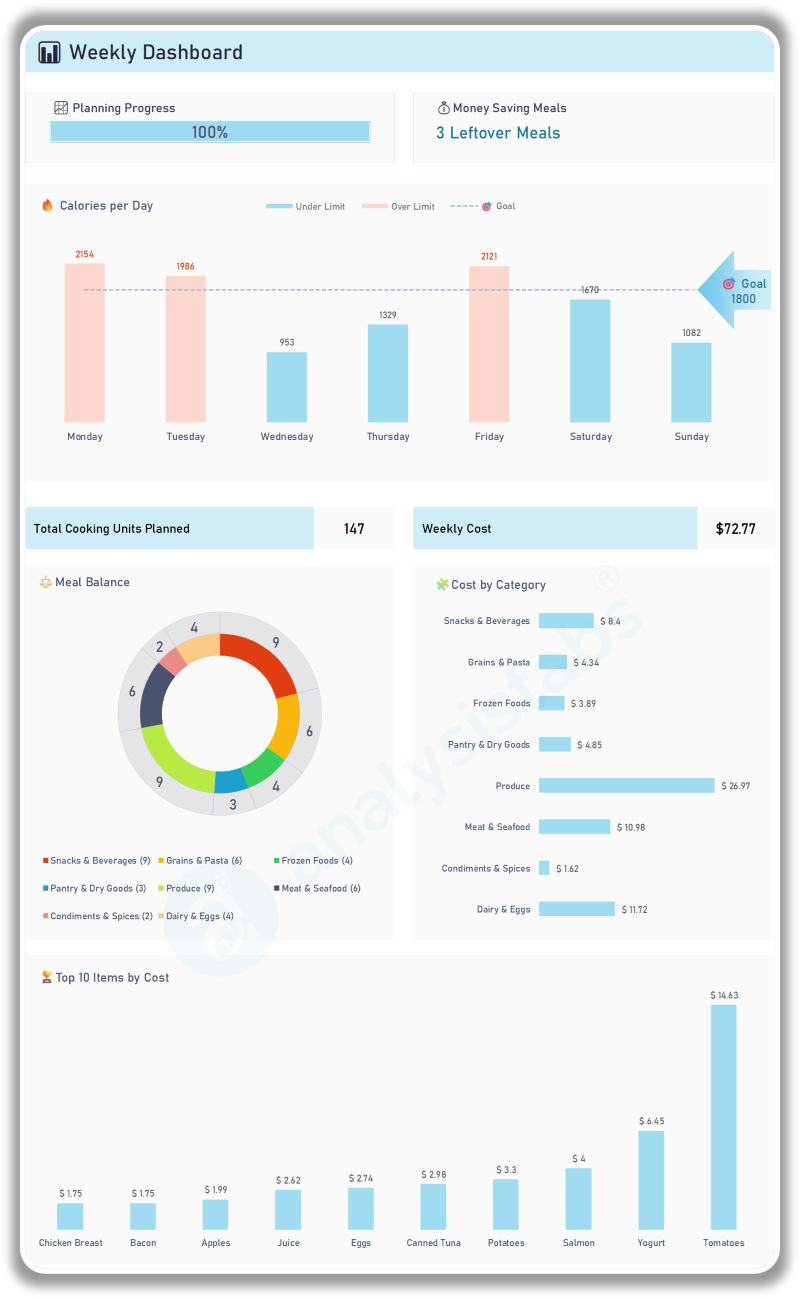
📊 Weekly Dashboard: The command center. Visualize your “Calories per Day” vs. Goal, track your “Money Saving Meals” count, and see your “Top 10 Ingredients by Cost.”
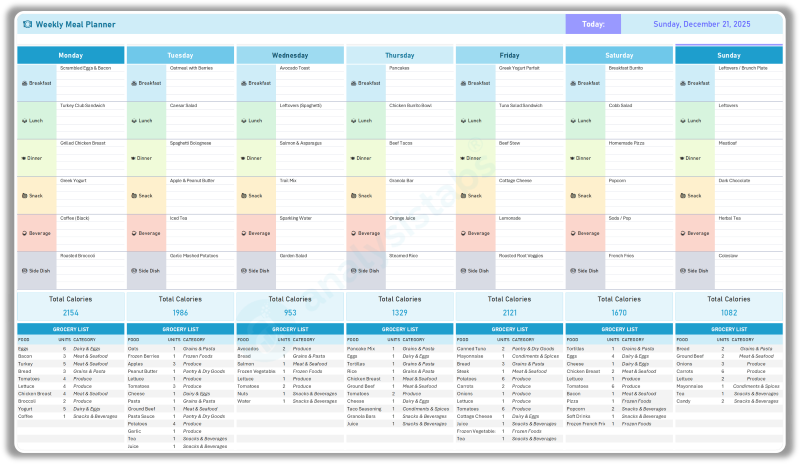
🗓️ Meal Planner: The heart of the system. Select Breakfast, Lunch, and Dinner from dropdowns. See real-time calorie totals for each specific day right at the bottom of the column.
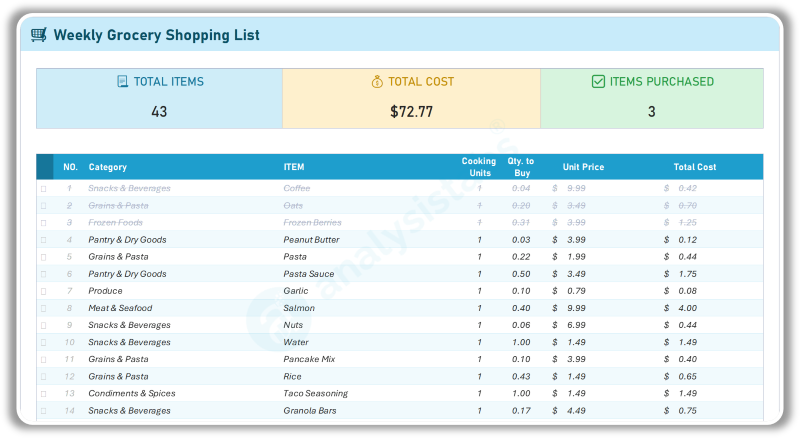
🛒 Grocery List: The output engine. A print-ready, interactive checklist. Mark items as “Purchased” as you shop, and watch them gray out automatically.
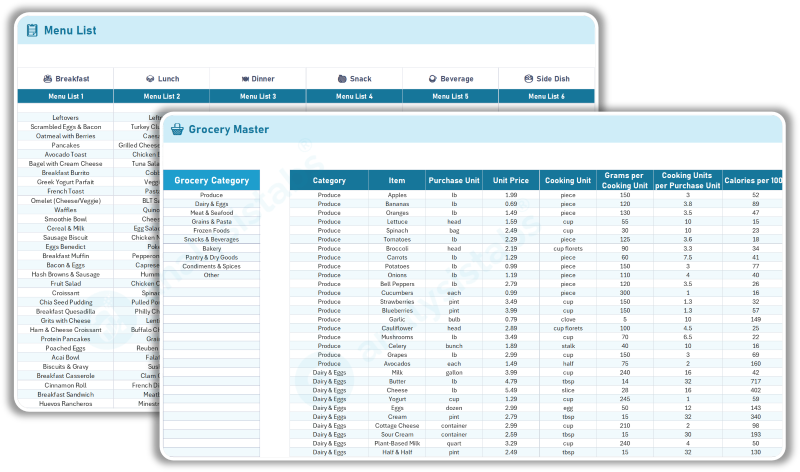
📝 Menu List: The database. Rename meals or add your own custom recipes (e.g., “Grandma’s Lasagna”) to the dropdown menus.
🥫 Grocery Master: The brain. Define ingredients, prices, and calories for your recipes. Update “Unit Prices” here to match your local store for accurate budget estimates.
Start Here Tab
⚙️ Your Command Center.
Setup & Navigation: This is the central hub where you configure the system rules.
Smart Edit Mode: A simple checkbox to toggle “Edit Mode” ON/OFF. When ON, all input fields turn Yellow so you know exactly where to type.
Global Settings: Set your local Currency Symbol and your Personal Calorie Goal here once, and it updates the entire workbook.
Weekly Dashboard Tab
📊 Your Week at a Glance.
Visualize Your Plan. Don’t just guess; know exactly where your week stands.
Calorie Charts: Visual bars compare your planned intake vs. your goal. If you plan a “Cheat Day” that goes over the limit, the bar turns Red instantly.
Cost Breakdown: See your estimated total bill (e.g., “$72.77”) before you even leave the house to ensure you stay on budget.
Gamified Progress: A “Planning Progress” bar (0-100%) encourages you to fill in every meal slot for the week.
Waste Reduction Tracker: The “Money Saving Meals” counter highlights how often you utilize leftovers, helping you minimize food waste and cooking time.
Budget Leak Detector: The “Top 10 Items by Cost” chart reveals exactly which specific ingredients are inflating your bill (e.g., knowing that “Tomatoes” are costing you $14.63).
Dietary Balance: A visual “Meal Balance” sunburst chart ensures you have a healthy mix of food groups (e.g., Produce vs. Frozen Foods) rather than just snacks.
Meal Planner Tab
🗓️ The Drag-and-Drop Experience.
Plan in Minutes. A clean, column-based view of your Monday–Sunday.
- Dropdown Selection: Quickly pick meals for Breakfast, Lunch, Dinner, Snack, Beverage, and Side Dish.
- Daily Grocery Preview: A mini-list at the bottom of each day shows you exactly what ingredients are needed for that specific Tuesday—perfect for daily prep.
- Health Check: A blue “Total Calories” bar at the bottom of every day lets you balance heavy days with light days instantly.
Grocery List Tab
🛒 Your Automated Shopping Buddy.
Shop Faster. No more forgotten items or double-buying.
- Auto-Aggregation: The sheet combines duplicates. If Monday needs “Onions” and Friday needs “Onions,” they appear as one line item with the total quantity.
- Interactive Checkboxes: Click the box next to an item to mark it “Purchased.” It turns grey and strikes through, giving you the satisfaction of a completed trip.
- Budget Check: A “Total Cost” counter at the top updates in real-time as you buy items, keeping your budget on track.
Menu List & Grocery Master Tabs
📝 The ‘Backend’ Engine.
Fully Customizable. Make the template 100% yours.
- Custom Recipes: Add your own family favorites to the “Menu List.”
- Local Pricing: Go to the “Grocery Master” and input the actual prices from your local supermarket (e.g., “Eggs = $4.99”). The entire workbook will recalculate your weekly costs based on your reality.
- Unit Conversion: The “Grocery Master” handles the math. It knows that “1 Cup of Rice” means you need to buy “1 Bag,” preventing you from buying too little.
Simple to Start, Powerful to Use
Whether you are a busy parent, a fitness enthusiast, or a student on a budget, the Meal Planner helps you regain control of your kitchen. This isn’t just a calendar; it is a Nutrition & Budget Calculator. You start by choosing a meal. You instantly see the Calorie Impact. You instantly see the Cost Impact. Finally, you get a Shopping List that does the work for you.
Why Choose This Template?
- It’s Not Just a List: Basic templates just let you type text. This one does the Math (Calories + Dollars + Units).
- Visual Feedback: Red/Blue calorie bars and “Money Saving Meal” counters provide instant feedback on your choices.
- Forgiving Design: “Edit Mode” protects complex formulas so you can’t accidentally break the automation.
Stop wasting food. Start saving money.
Download the Ultimate Meal Planner System today!
Here’s What You’ll Receive:
✅ Blank Template:
This is your fresh canvas, ready for your new plan. It is clean and waiting for your specific dietary preferences.
- Immediate Start: Jump straight into the Start Here tab, set your currency, and begin planning immediately.
- Clean Slate: All days are empty, ready for you to build your perfect week.
✅ Template with Sample Data:
This is your hands-on manual. We have populated every single sheet with realistic "Balanced Week" examples so you can see exactly how the system functions.
- Visual Learning: See exactly how the "Leftover Logic" works on Wednesday, how a "High Calorie" day looks on the Dashboard, and how the Grocery List aggregates ingredients.
- Best Practices: Look at how we set up the "Grocery Master" with realistic unit prices and calorie counts.
🧾 Comprehensive Support & Documentation
You are never left guessing how to use the system.
- Built-in Start Guide: Quick-start instructions are embedded right inside the Excel file (Start Here tab) for offline access.
- Full Online Guide: You get a direct link to our Official Documentation Page, featuring step-by-step breakdowns of every feature.
Get Instant Access in 3 Simple Steps
Trusted by 6,500+ users worldwide
Project Managers from the biggest brands in the world choose us for managing their Projects, Tasks and Resources.

Reviews
There are no reviews yet.