• Excel 2016+ & Microsoft 365
  • Instant download

  • .xlsx – no macros, no passwords
  • Secure checkout

Questions before you buy? Email us – we reply within one business day.

Simple Multiple Project Tracking Excel Template – Dashboard & Gantt

The free Multiple Project Tracker – unlocked, unlimited, yours to edit.
The same file you’ve been using, with the passwords removed and the 10-project / 100-task limits gone. Or step up to Pro and get a full portfolio dashboard on top.


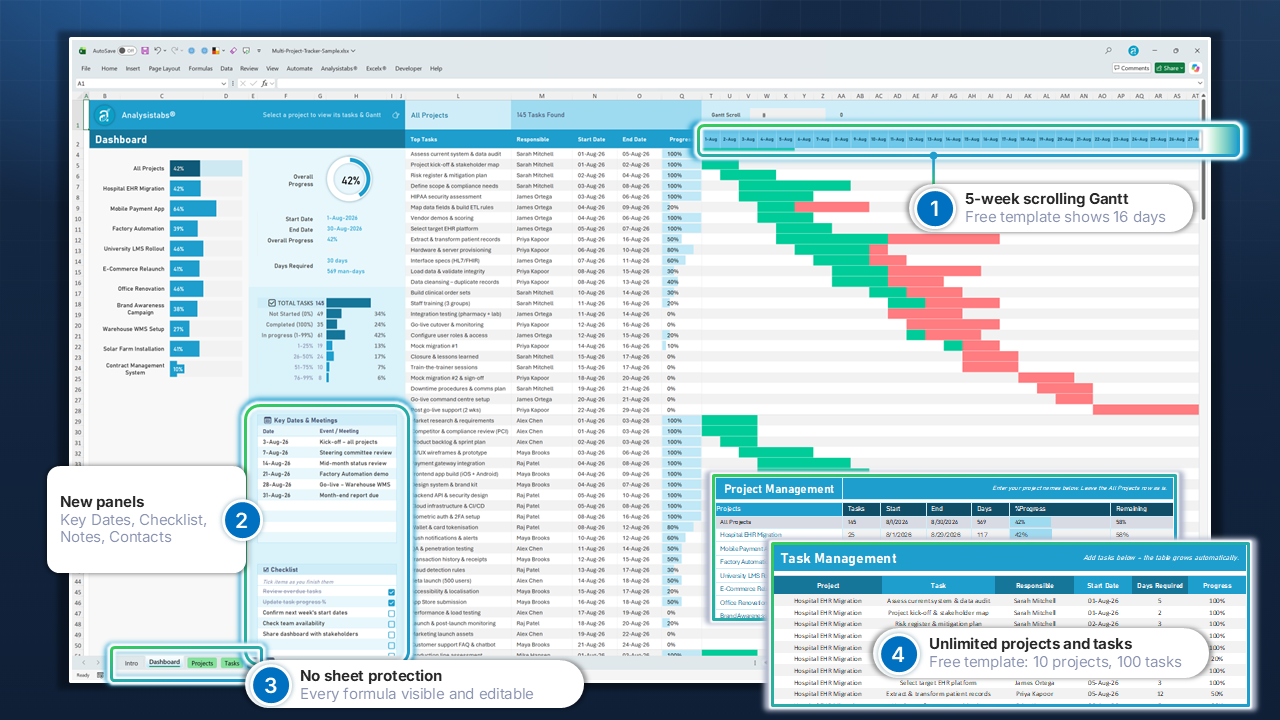
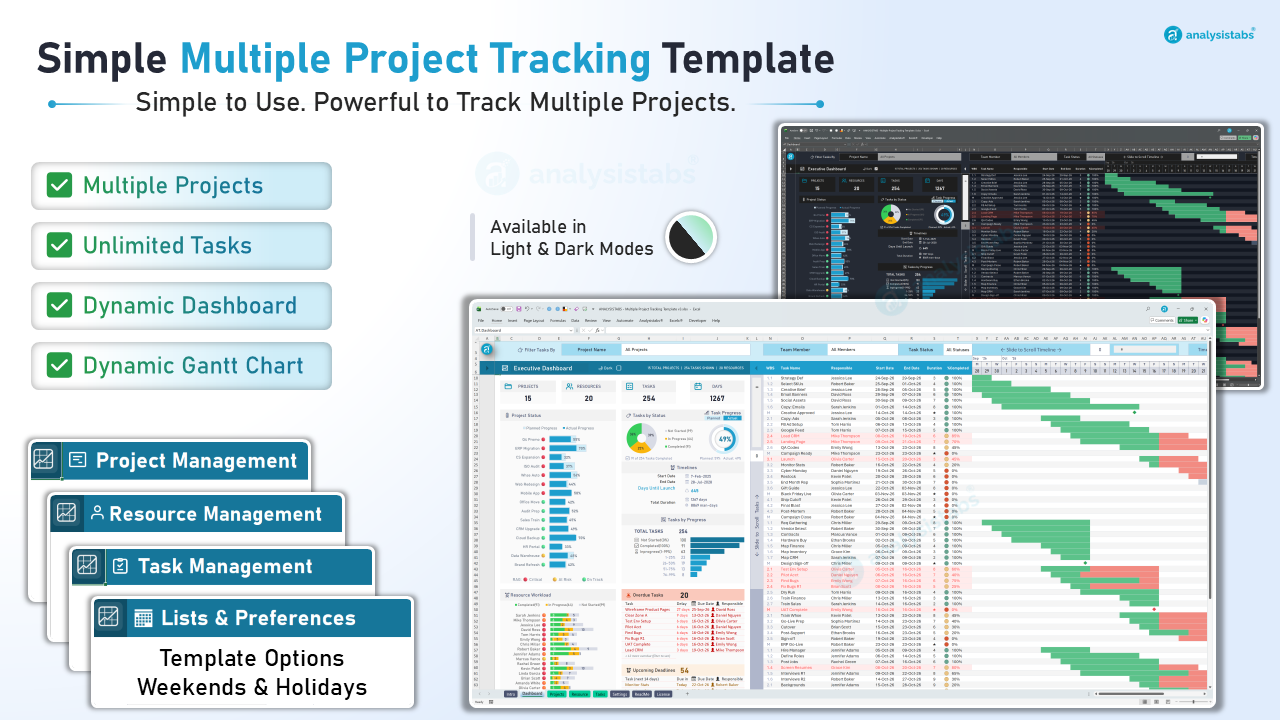
  • Unlocked Edition – $49: your free tracker, every lock removed. Unlimited projects and tasks, every formula editable, 5-week Gantt, plus Key Dates, Checklist, Notes and Contacts panels.
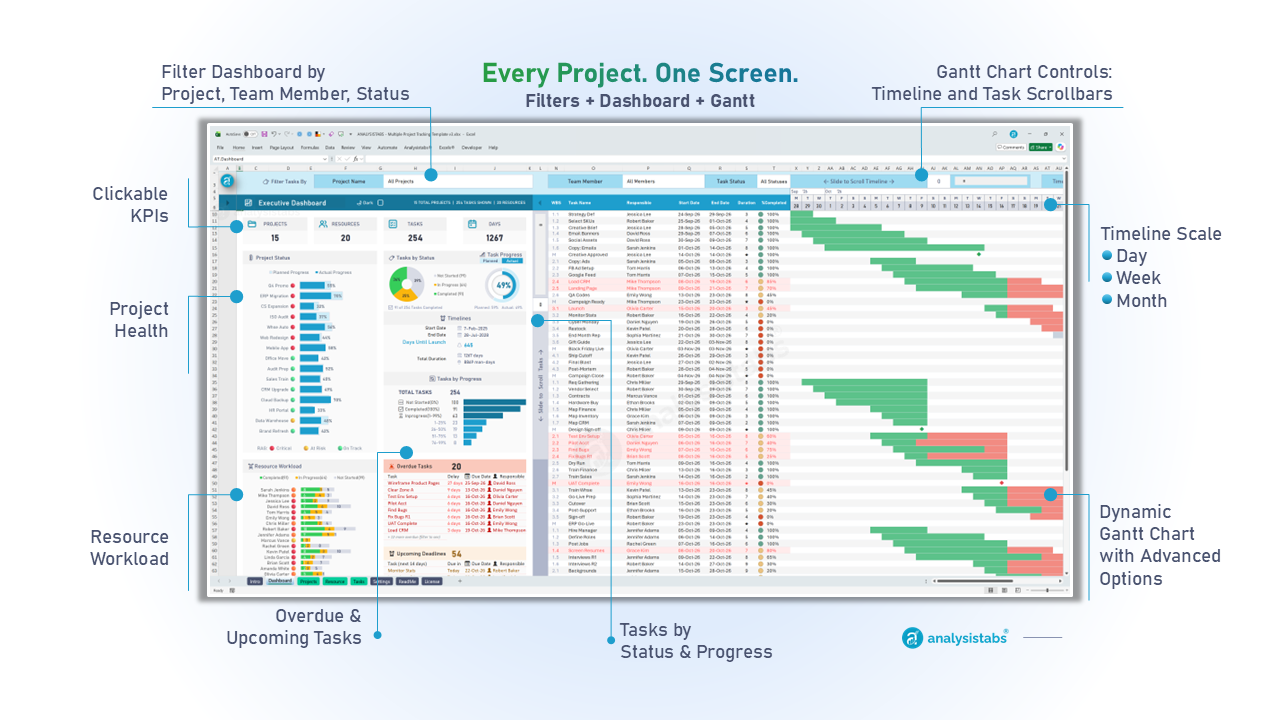
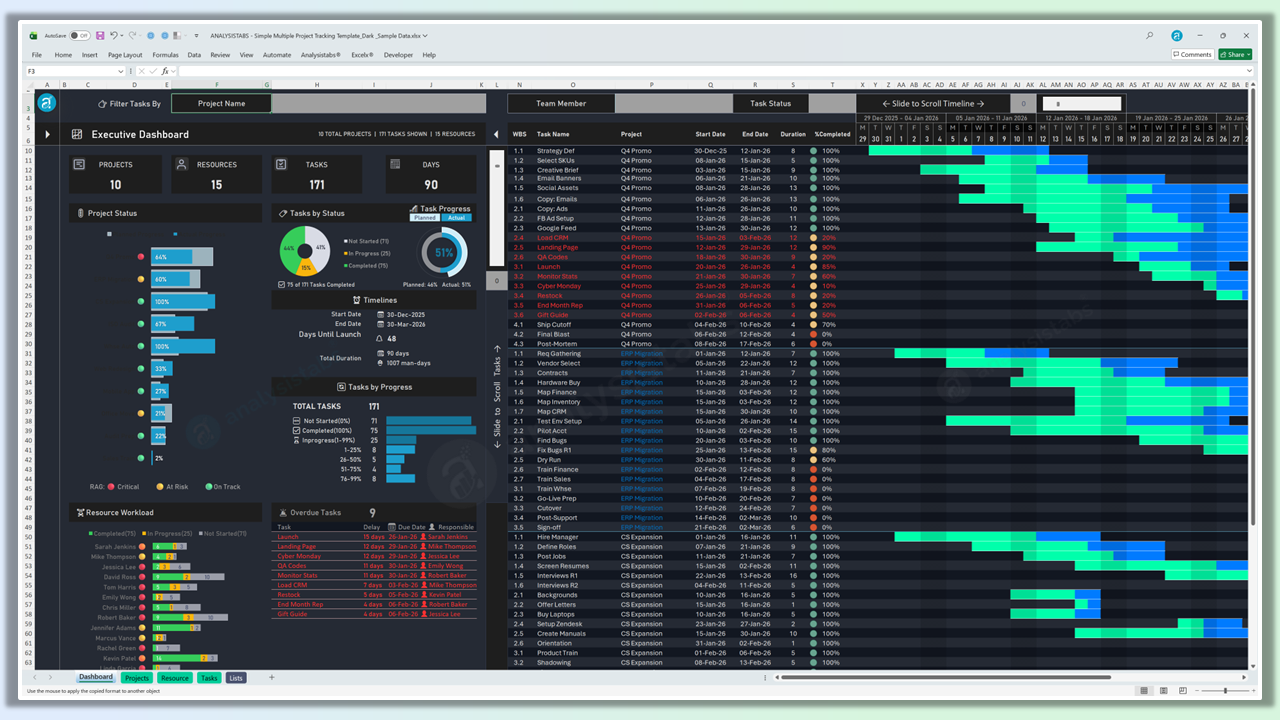
  • Pro Edition – $69 (includes Unlocked): adds the Pro tracker – live portfolio dashboard, Day / Week / Month Gantt, filters by project, person or status, workload per person, overdue and upcoming alerts, light and dark mode.
  • Ready to use: sample data + clean blank copy.

From $49

30% Off

Upgrading from the free template? Here’s exactly what changes.

Same rows as the “Free vs Premium” sheet inside your free download.

Swipe sideways to see all editions →

Feature Free templateWhat you have now Unlocked Edition$49 one-time Pro Edition Includes Unlocked$69 one-time
Projects 10 Unlimited Unlimited
Tasks 100 Unlimited Unlimited
Formulas & sheets Locked 100% unlocked 100% unlocked
Gantt timeline 16 days, 25 tasks 5-week scrolling Day / Week / Month scrolling
Dashboard Basic progress Same + Key Dates, Checklist, Notes, Contacts Full portfolio dashboard
Filters — — Project, member, status
Resource workload — — Chart & workload bands
Overdue & upcoming alerts — — Both lists
Weekends & holidays Standard Standard Your own
Themes Light Light Light & dark
Unlocked free file — This is it Included
Price Free $49 Choose Unlocked $69 Choose Pro

Downloaded the free template before November 2026 and expected Pro features at $49? Email us and we’ll honour the earlier price.

Unlocked Edition · $49 Also inside Pro

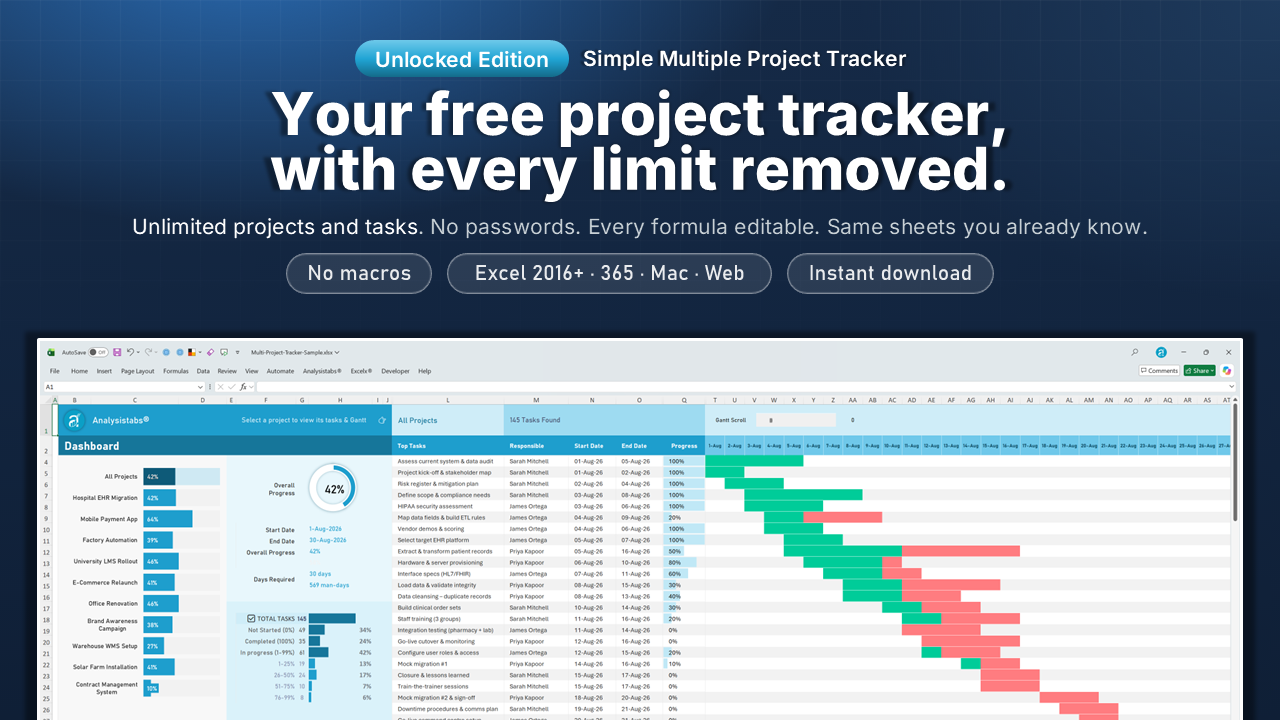
Your free tracker, with every limit removed.

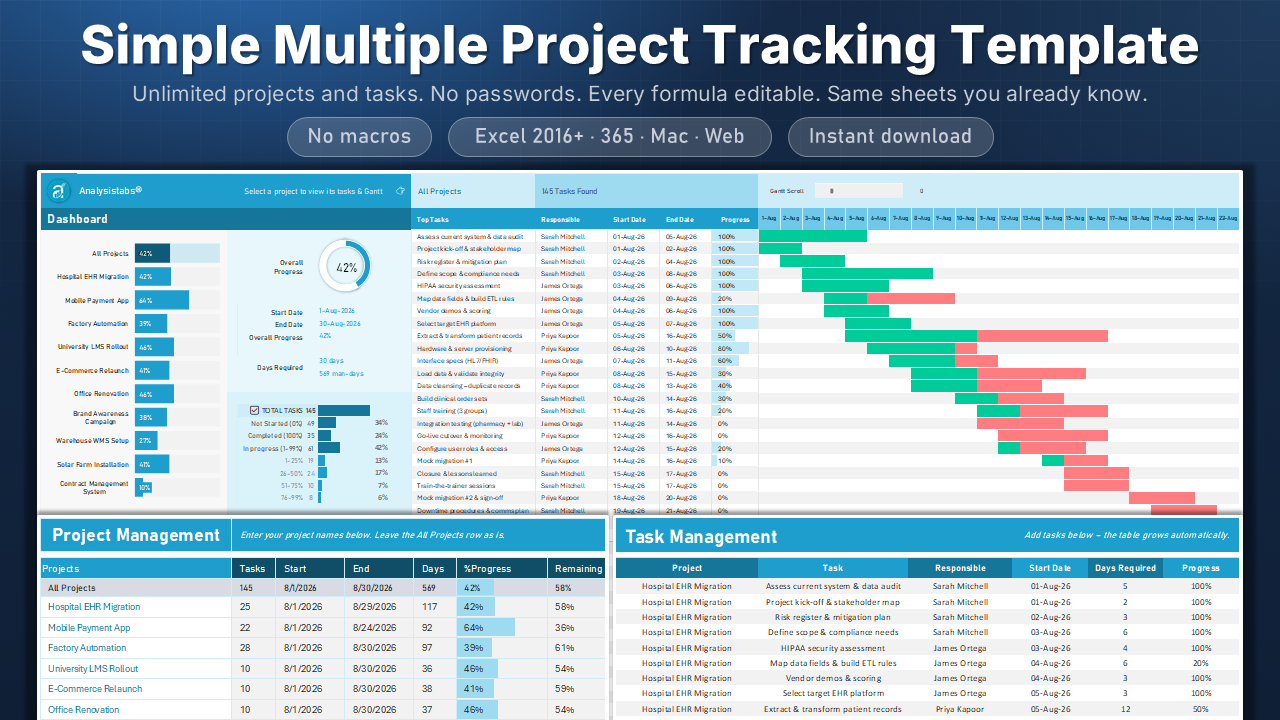
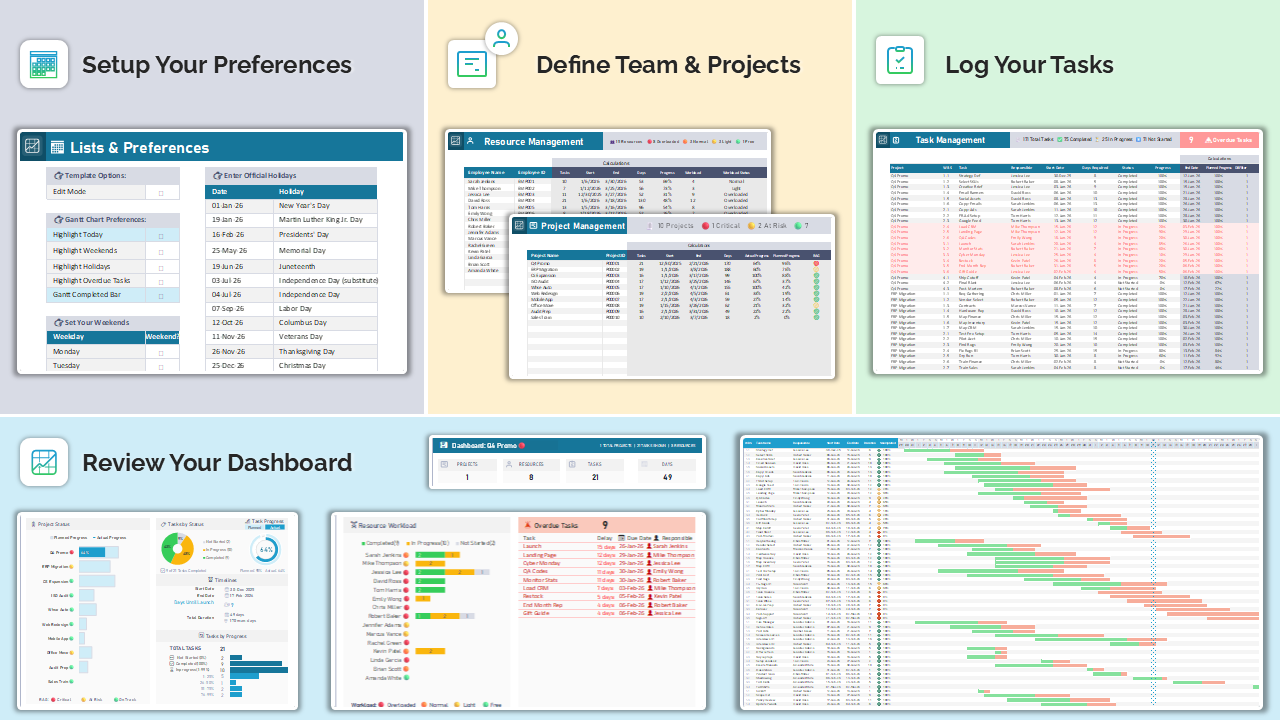
Same three sheets you already know – Dashboard, Projects, Tasks – so nothing to relearn. Open it, paste your data in, keep going.

Unlocked Edition – what changes from the free template
  • Unlimited projects and tasks. Set up for 50 projects and 500 tasks out of the box, and because nothing is locked you can extend both as far as you need.
  • No passwords, every formula visible. Edit any sheet, add columns, change the logic, replace the logo. It’s your file now.
  • 5-week scrolling Gantt. Up from the 16-day window in the free version. 100 tasks visible in the dashboard list at once.
  • Four new dashboard panels. Key Dates, a tick-off Checklist, Notes and Key Contacts, next to your task list and Gantt.
  • Blank + sample-data files. Start clean, or explore with the sample projects loaded first.
  • Same compatibility. No macros. Excel 2016+, Microsoft 365, Mac and Excel for the Web.

Or keep reading to see what Pro adds.

Pro Edition · $69 · includes Unlocked

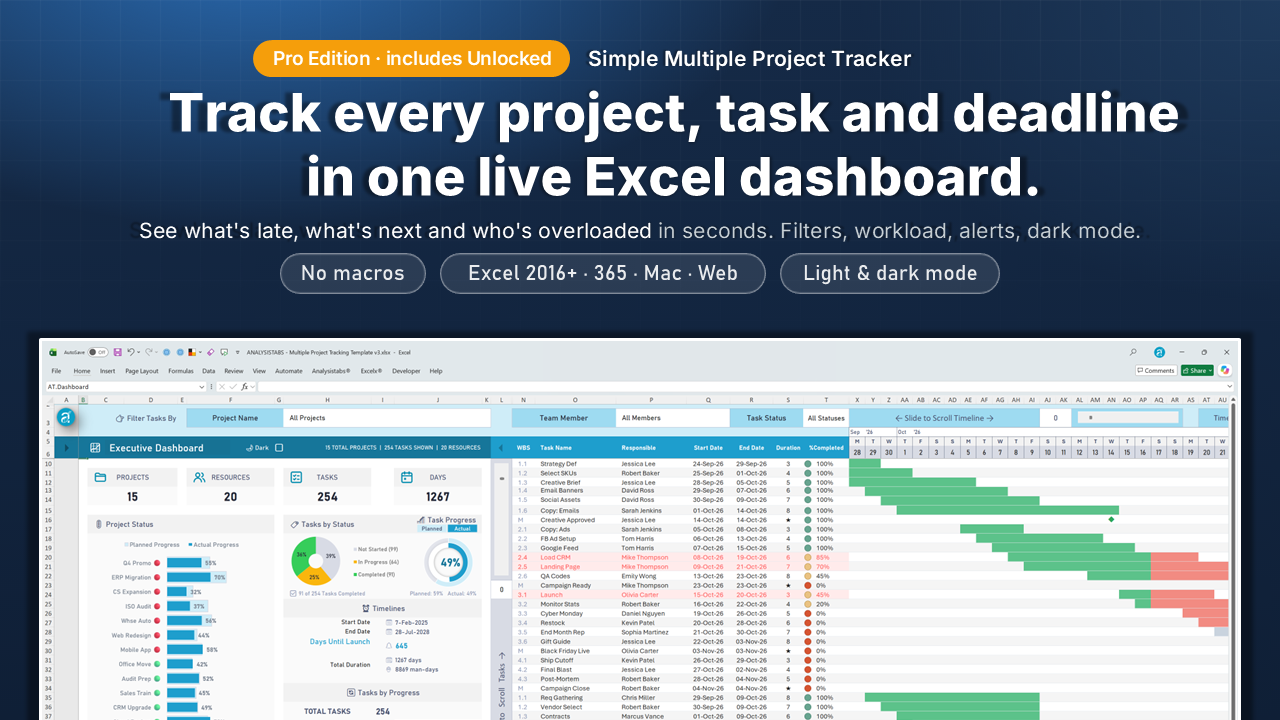
Pro adds a second file: a live portfolio dashboard across all your projects.

Everything below this line is the Pro tracker. If the Unlocked Edition already does what you need, you can stop here.

Three problems Pro fixes the first week.

Built by a Microsoft Excel and project-management specialist with 20+ years’ experience, and refined by thousands of PMs’ feedback.
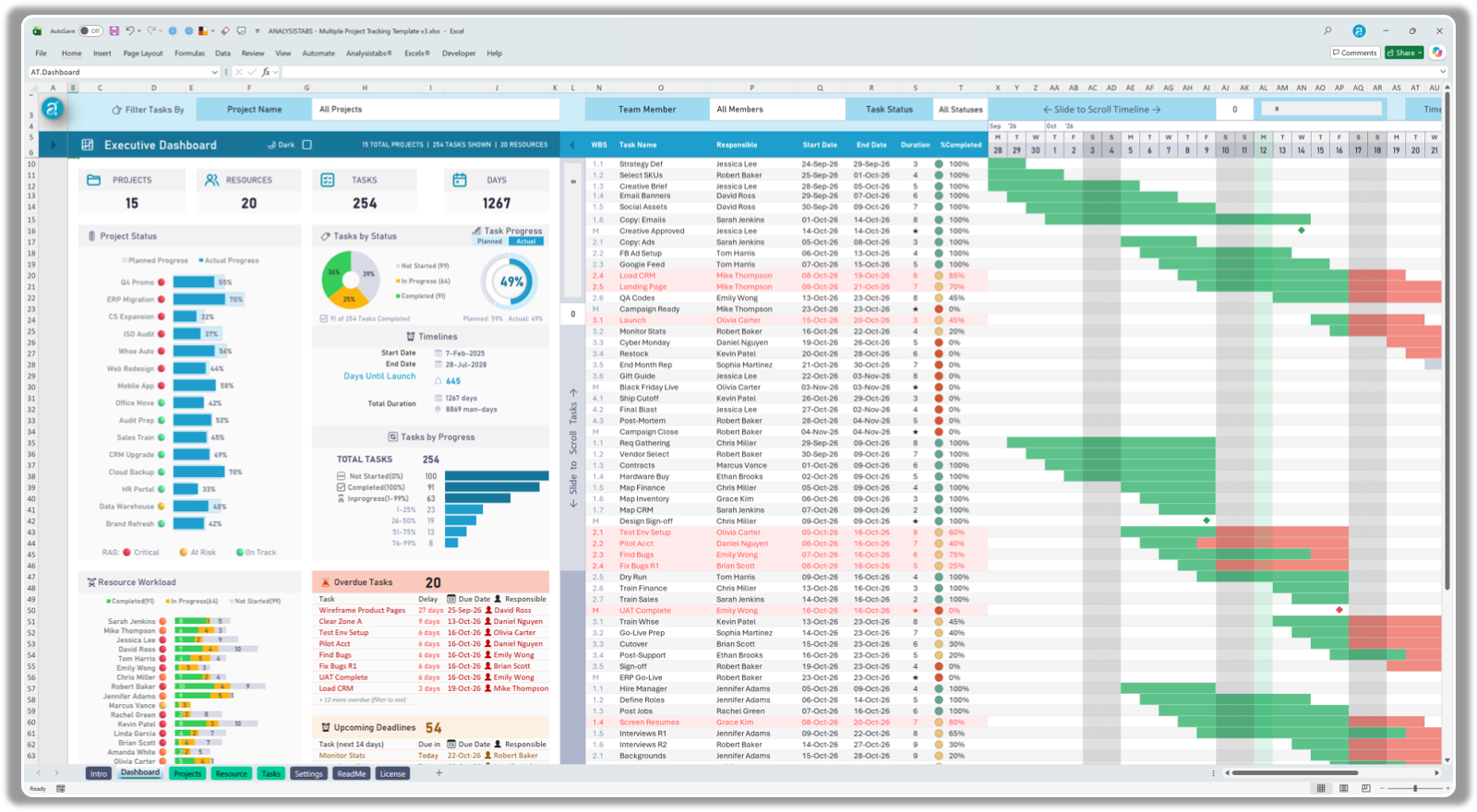
Multiple Project Tracking Dashboard v3 Light Theme

Four spreadsheets, four versions of the truth

One portfolio dashboard

Every project, its RAG status, planned-vs-actual progress and owner on a single sheet. Filter by project, person or status and everything updates together.
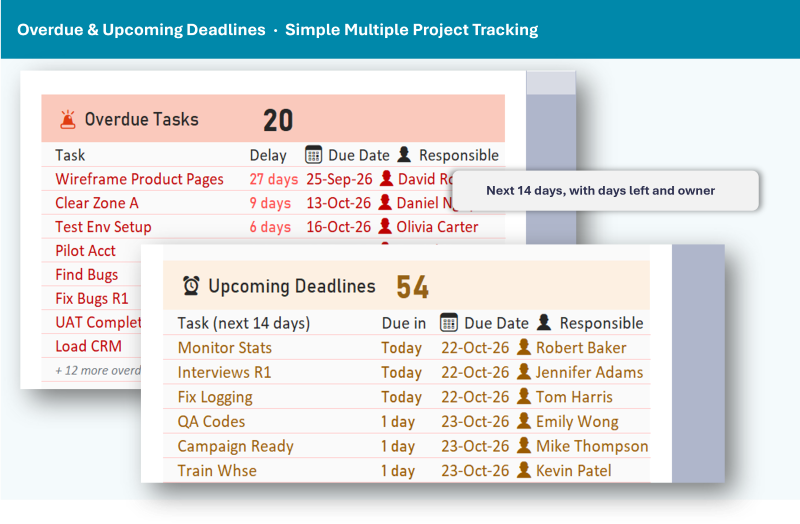
Upcoming deadlines panel – tasks due in the next 14 days

Deadlines you find out about afterwards

Overdue and next-14-days alerts

Late tasks are listed with days overdue and owner. Everything due in the next two weeks sits right beside them, so Monday’s stand-up runs itself.
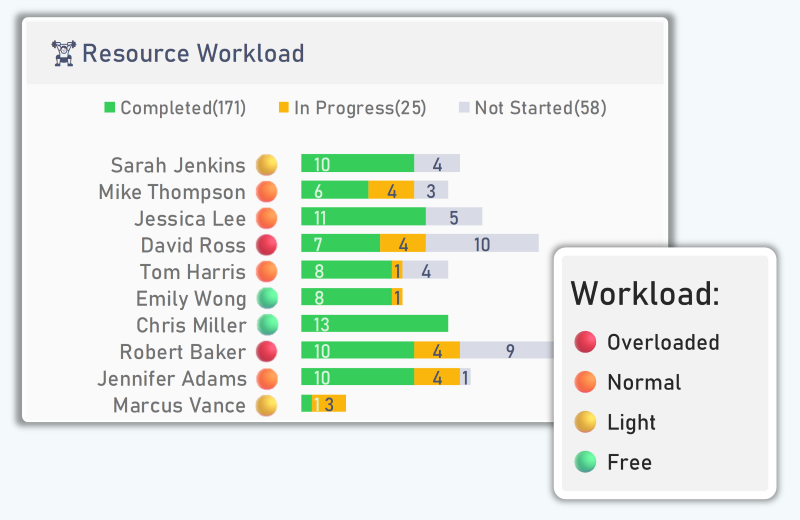
Resource workload chart in the Pro tracker showing completed, in-progress and not-started tasks per team member, with each person flagged Overloaded, Normal, Light or Free

One person quietly carrying six projects

Workload per team member

Open tasks per person, banded Free / Light / Normal / Overloaded with limits you set. Rebalance before someone burns out, not after.

See the Pro dashboard working.

Native Excel charts and formulas. No pivot tables, no macros, no refresh button.
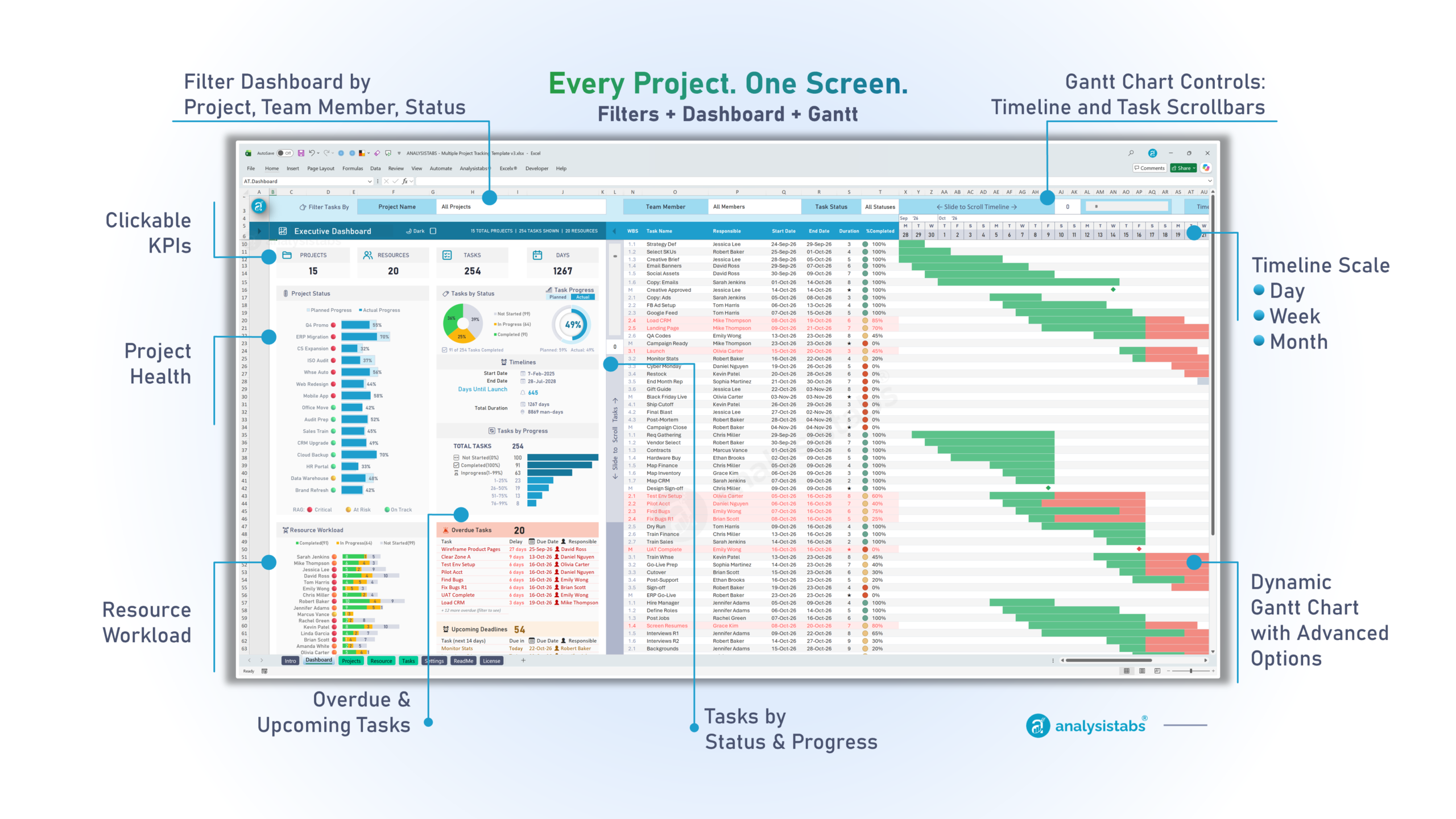
Pro: from blank file to live dashboard in about 15 minutes.

Fill in two sheets. The dashboard and Gantt build themselves.

Weekly routine afterwards: update Progress %, glance at the dashboard, done. A sample-data file is included so you can explore before you enter anything.

What buyers say.

Replaced four messy spreadsheets with this template in an afternoon. Team leads finally speak the same language across projects and milestones.
Richard, Verified buyer
Our interns onboarded in an hour. Nothing feels overengineered — it’s opinionated, minimal, and friendly to non-PMs tracking dates and owners.
Sophia, Verified buyer
The executive view shows schedule health at a glance. Colouring overdue tasks and highlighting due-this-week kept our release on track.
Marcus, Verified buyer

What’s in the download.

Unlocked Edition gets the first two files. Pro Edition gets all of them.

  • Unlocked tracker – blank. Your free tracker with limits and passwords removed. Both editions.
  • Unlocked tracker – sample data. Same file with sample projects loaded. Both editions.
  • Pro tracker – blank + sample data. The portfolio dashboard file. 15 projects, 20 people, 234 tasks in the sample. Pro Edition only.
  • Quick-start ReadMe. One page. Most people don’t need it.
  • Email support. We reply within one business day.
Simple Multiple Project Tracking Excel template v3 – portfolio dashboard and Gantt chart

Need more than one tracker?

Pay once, keep forever. Instant download, no subscription.

This template · you are here

Multiple Project Tracker

$49 Unlocked · $69 Pro

Your free tracker unlocked, or Pro with the full portfolio dashboard.

  • One multi-project dashboard
  • Day / week / month Gantt
  • Milestones and upcoming deadlines
  • Projects, people and workload
  • Light and dark modes
  • Unlocked free tracker included

Ultimate · best for the most

Ultimate PM Template

$99 $149

The complete PM system – dashboards, Gantt, Kanban, RAID and finance.

  • 3 dashboards + Gantt + Kanban
  • Planned vs actual timelines
  • Full RAID log and risk matrix
  • Invoices and billable expenses
  • Resource capacity and heatmap
  • 100+ live data-quality checks

Everything · best value

120+ PM Templates Pack

$299 $1,999

Every template in Excel, PowerPoint & Word – includes both of the above.

  • Pro Tracker + Ultimate included
  • 60+ Excel templates
  • 50+ PowerPoint templates
  • 25+ Word templates
  • Charters, plans and status reports
  • Lifetime free updates

Questions before you buy

If the free tracker already does what you need and you just want the limits and passwords gone, Unlocked ($49) is the one. If you want one screen that shows every project’s status, who is overloaded and what is overdue, Pro ($69) adds that dashboard and includes the Unlocked file too.
Yes. Pay once and use it forever. No monthly subscriptions, no hidden fees — and free updates for 12 months are included.
Yes, for Excel 2016 and later on Windows and Mac, plus Excel for the Web and Microsoft 365. There are no macros, so it opens without security warnings on locked-down corporate machines.
The free tracker stops at 10 projects, 100 tasks and a 16-day Gantt, with the sheets protected. Unlocked removes all of that. Pro adds a separate dashboard file on top: filters, workload, overdue and upcoming alerts, Day / Week / Month timeline, milestones, custom weekends and holidays, and dark mode. The comparison table near the top of this page lists every row.
The sample file runs 15 projects, 20 team members and 234 tasks, and it has been tested with 50+ projects. Most buyers run between 5 and 50.
Absolutely. The template is 100% VBA-free, meaning no macros, no security warnings, and full compatibility with Excel for Web, Mac, and Windows.
Yes. It is designed to be fully customizable and easy to enhance. You can add your own formulas, custom sheets, or branding as needed.
Templates are digital files delivered instantly, so we can’t take them back once downloaded and all sales are final. To be sure before you buy: compare the editions above, watch the preview video, or email us – we reply within one business day. If a file won’t open or is missing something we advertised, we’ll fix it or replace it.
You get a download link on the confirmation page straight away, and a copy by email. Nothing is shipped and there’s no waiting.

Unlock it, or go Pro.

Pay once. Download in seconds. Same file you already know, or the full dashboard on top.

$49 Unlocked Edition     $69 Pro Edition

Secure checkout: PayPal or card  ·  Instant download  ·  Free updates for 12 months  ·  Email support, one-business-day reply

This tracker is also inside these bundles
Deliver Successful Projects
with Analysistabs Templates

Whether you are a beginner, project manager, or executive, our templates provide the automated dashboards and data insights you need to succeed.

From $49

30% Off

Simple Multiple Project Tracker in Excel: Dashboard, Gantt Chart, Multiple Projects & Unlimited Tasks Management

Get Instant Access in 3 Simple Steps

Yes! Pay once for use it forever. No monthly subscriptions, no hidden fees.
Questions? Contact us at Info@analysistabs.com

Trusted by 6,500+ users worldwide

Project Managers from the biggest brands in the world choose us for managing their Projects, Tasks and Resources.

Why choose us!