EXCEL PROJECT PLAN TEMPLATE
SIMPLE PROJECT PLAN EXCEL TEMPLATE.
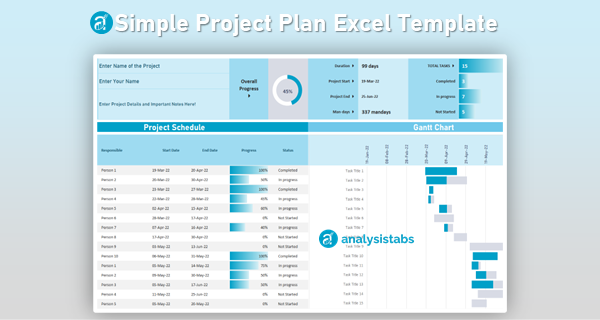
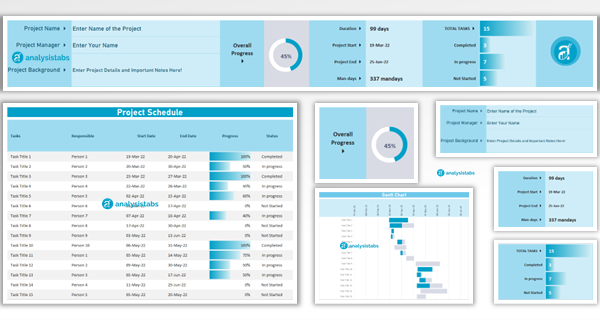
This Excel Simple Project Plan Template helps you to Manage a Single Project and Its Related Tasks. You can enter all tasks of the Project in a single Sheet and the Gantt Chart will update automatically.
TEMPLATE INCLUDES.
Project Details
Project Summary
Project Schedules
Gantt Chart
Deliver Successful Projects
with Analysistabs Templates
Whether you are a beginner, project manager, or executive, our templates provide the automated dashboards and data insights you need to succeed.
$ 49 Original price was: $ 49.$ 29Current price is: $ 29.
41% Off

Get Instant Access in 3 Simple Steps
Secure Checkout
Click Add to Cart and complete your purchase securely via PayPal or Credit Card.
Instant Access
Check your inbox for an automated email with a secure links to download your files instantly.
Download & Deliver
Extract the .zip file containing your templates and start hitting your project goals.
Yes! Pay once for use it forever. No monthly subscriptions, no hidden fees.
Questions? Contact us at Info@analysistabs.com
Trusted by 6,500+ users worldwide
Project Managers from the biggest brands in the world choose us for managing their Projects, Tasks and Resources.

Why choose us!
Instant Download
Rebrand As Needed
Rebrand our templates to suit your organization.
Secure payments
Your payment information is processed securely.
Easy to customize
Options to customize | Full Access to Sheets
Once-off pricing
One Time Payment - No annual or monthly fees!
Do not expire
Owing to the fact that the item you are purchasing is a digital product, you take ownership once delivery or download has been made, and we cannot give refunds or exchanges due to a change of mind. If you have technical issues with the product, or you can’t download the files, kindly contact us and we will be available to help.
Related products
Project Resource Management Excel Templates for Teams and Organizations
Advanced Project Plan & Portfolio Excel Template
50+ Essential Project Management Templates Pack
50+ PowerPoint Project Management Templates Pack
Project Charter Templates Pack – Excel, PowerPoint & Word
Reviews
Your feedback helps us grow! Please share your experience with this template or tool and help other users make informed decisions. We'd love to hear what you think!
Specifically, we'd appreciate your insights on how this premium Excel, PowerPoint, or Word template/VBA tool has helped you streamline your project management, personal finance, or life planning. Your honest review not only assists us in continuously improving our offerings but also guides fellow users in selecting the perfect tools to achieve their goals. Thank you for your valuable input!

Omar Hassan –
Exactly what I needed for a single project: one clean task table, instant Gantt, and a tidy Project Summary that executives actually read. Printing to Letter looked great without fiddling margins or resizing columns.
PNRao –
Thrilled it’s working, Omar! Keep “Project Details” authoritative, then enter tasks once and let the Summary and Gantt tell the story. For hallway prints, use Fit-to-One-Page and wrap task names to avoid clipping.
Marcus –
We replaced three chaotic trackers with this template. Entered tasks once, tagged phases, and exported a sharp PDF for clients. Reviews now focus on decisions instead of reconciling mismatched dates and color legends.
PNRao –
Excellent consolidation, Marcus. Save a “client view” with nonessential columns hidden, then reuse that print preset each review cycle. It keeps the deck lean and the story consistent.
Lucas –
Confluence embedding worked great. We exported a crisp PNG of the Gantt, and the date bands plus wrapped task names remained readable on widescreen monitors during remote walk throughs.
PNRao –
Great workflow, Lucas. For maximum clarity, export at 300 DPI and keep a generous right margin so long names don’t crop. We’ll add a tiny “Export Tips” note to the cover.
Diego –
A simple risk flag with a notes column that surfaces into the Project Summary would keep hazards visible without maintaining a separate register in another file.
PNRao –
Smart addition, Diego. Add a Risk? checkbox and a short Notes column; then feed a small COUNTIF into the Summary. You’ll get a prominent tile without extra maintenance overhead.
Derek –
For $49, this gave us a credible plan in an afternoon. The Gantt highlights due-this-week tasks beautifully, and the Project Schedules table keeps dependencies visible during triage without fancy tooling.
PNRao –
So happy it delivered, Derek. If you need lightweight sequencing, add a “Blocked By” column and filter it first during triage; you’ll catch risk chains before they bite.
Frank –
Can we start weeks on Monday and hide weekends on the Gantt for software sprints without breaking the Summary tiles or percent-complete math?
PNRao –
Yes. Hide weekend columns on the chart and keep the task table unchanged. The Summary references task values, not displayed columns, so KPIs remain accurate.
Kyle –
Is there a lightweight way to capture a baseline so we can compare planned versus actual on the same Gantt without turning this into a complex system?
PNRao –
Yes—add Baseline Start/Finish columns and draw a thin baseline bar beneath actuals using conditional formats. The Summary can show simple variance tiles without heavy mechanics.
Grace –
Data discipline improved overnight. Standard phase names and owners produce consistent Summary tiles leadership trusts. We finally retired ad-hoc color schemes that confused everyone every review.
PNRao –
Standardization FTW, Grace. Lock the phase and status columns, then funnel new values through a tiny list at the top. Your visuals will stay consistent quarter after quarter.