
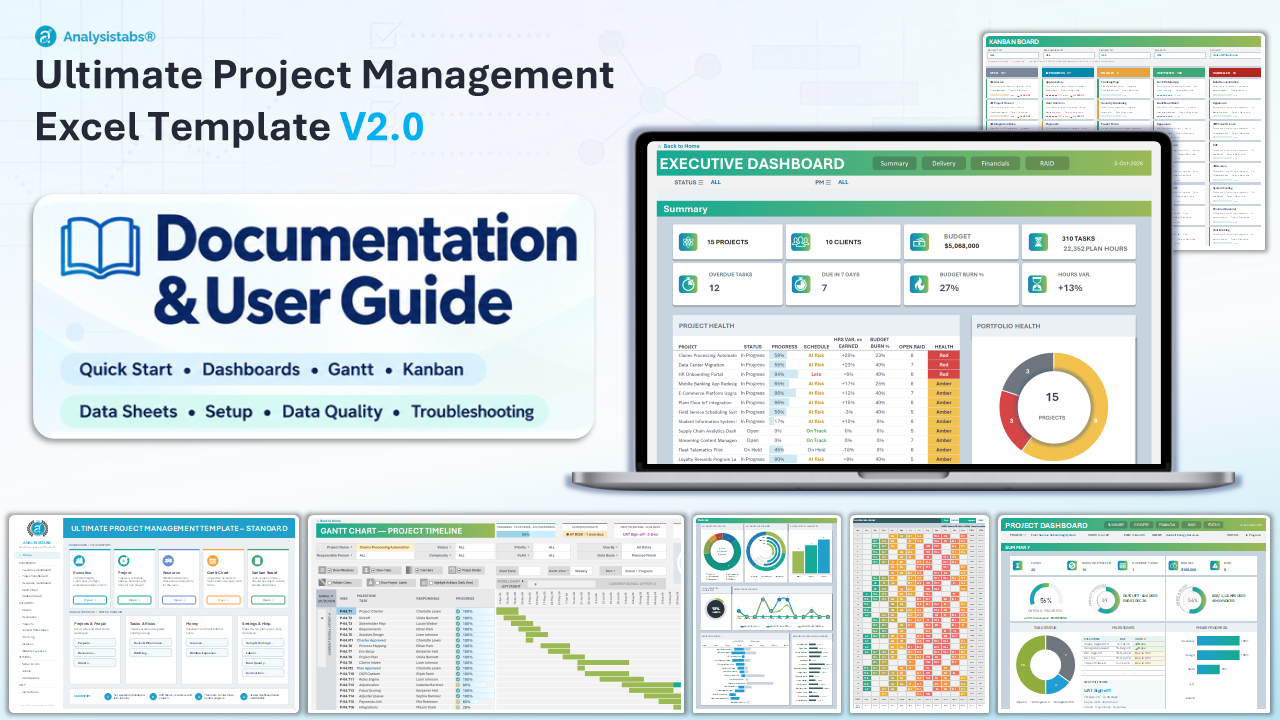
How to set up, fill in and use the Ultimate Project Management Template v2.0. Work top to bottom the first time; after that, just keep the data sheets up to date and the dashboards, Gantt and Kanban board update themselves.
Version 2.0Released 6 Oct 2026Excel 2016 · 2019 · 2021 · 2024 · 365.xlsx · no macrosWhat's new in v2.0 ↗
Requirements · Quick start · Sheet guide · Entering data · Data-entry sheets · Dashboards · Gantt · Kanban · Setup · Labels · Data Quality · Troubleshooting · FAQ · Upgrading · Version history · Full changelog ↗
Requirements
- Excel 2016, 2019, 2021, 2024 or Microsoft 365 on Windows or Mac. Excel 2013 and older, Google Sheets and Apple Numbers are not supported.
- A standard
.xlsxworkbook – no macros, no add-ins. It passes most corporate security policies. - Calculation mode must be Automatic (Formulas › Calculation Options). If numbers look stale, press
F9. - You receive two files: a Sample Data edition to explore every feature and a Blank edition to start your own portfolio.
Quick start – 8 steps
- 1Set up the basicsSetup sheet: company weekends, holidays, default values, RAID risk levels and heatmap colours. Lists you can freely edit (green headers): Departments, Phases, Response Strategy, Expense Categories, Client Status and Progress steps. Amber-header lists (Status, Complexity, Priority, Yes/No, Emp Type, RAID Type, RAID Status) feed the dashboards – don't rename or reorder their values. Labels sheet: rename or translate titles.
- 2Add clientsClient Management: one row per client – contact, company, status and payment terms (used for invoice due dates).
- 3Add your teamResource Management: name, type, department, bill rate, cost rate, max hours per day, start and end date.
- 4Add projectsProject Management: pick the responsible person and client from the dropdowns; enter budget, start date, duration (working days) and baseline end.
- 5Plan milestones & tasksTask Management: pick the project and phase, enter the task name, set IS MILESTONE = YES for milestones, plan start (a working day), duration, owner, hours and an optional predecessor.
- 6Track progressAs work happens, fill ACTUAL START, ACTUAL DURATION and ACTUAL PROGRESS (0–100%) and set STATUS. Update ACTUAL HOURS for effort tracking.
- 7Log RAID, invoices & expensesRAID Log for risks, assumptions, issues and dependencies; Invoice Manager for billing and payments; Expenses (Billable) for costs recharged to clients.
- 8ReviewDashboards, the Gantt and the Kanban board update automatically. Check Data Quality for anything that needs fixing.
Sheet guide
The Home sheet links to every sheet. Use the sidebar or the cards; each sheet has a ⌂ Back to Home link top-left.
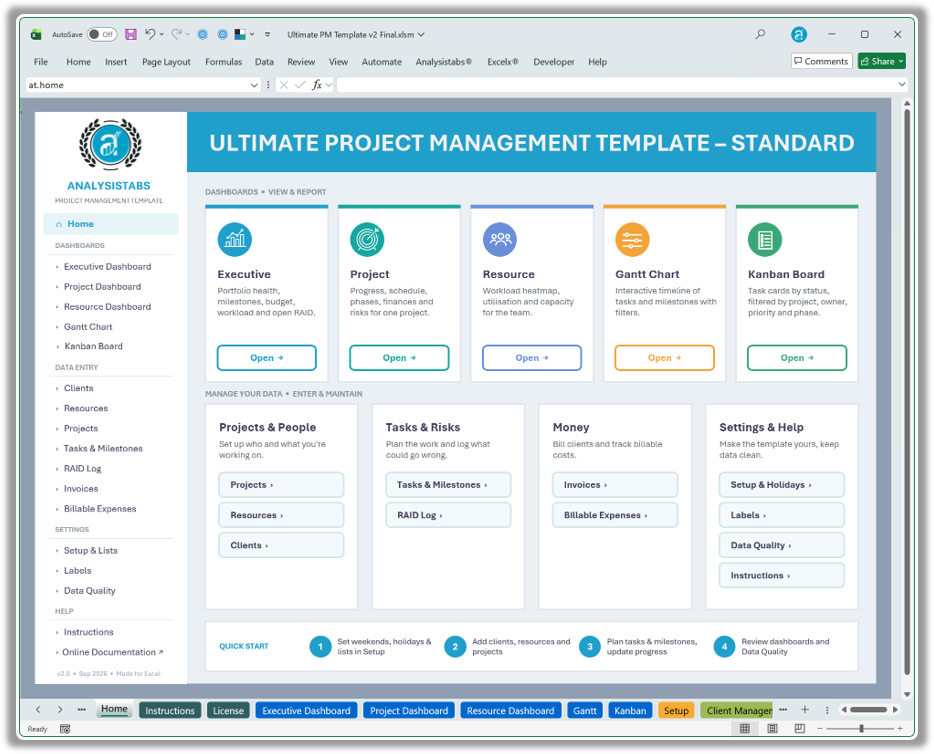
Home – one-click navigation to every view, data sheet and setting.
| Sheet | What it is for |
|---|---|
| Home | Start page with buttons to every sheet and a 4-step quick start. |
| Executive Dashboard | Portfolio view: project health, milestones, status / priority / complexity, timelines, workload, budget, hours and RAID. Filter by status and PM. |
| Project Dashboard | One project in detail – progress, schedule, milestones, phases, tasks, finances, RAID and a status report. Choose the project at the top. |
| Resource Dashboard | Workload, utilisation, capacity vs demand, availability and a daily heatmap. Choose one person or ALL RESOURCES. |
| Gantt | Interactive timeline of milestones and tasks with filters, due windows, zoom (Daily → Yearly) and bar styles. |
| Kanban | Task board by status – cards show project, phase, owner, due date, progress and an overdue flag. Filter by project, person, priority, phase and tasks / milestones. |
| Setup | Weekends, holidays, default values, dropdown lists and RAID / heatmap thresholds. |
| Data-entry sheets | Client, Resource, Project and Task Management, RAID Log, Invoice Manager, Expenses (Billable) – the only sheets you type into. |
| Data Quality | 100+ live checks across all input sheets with the first problem row and how to fix it. |
| Labels | Custom and translated titles for dashboards, Gantt and filters. |
| Instructions / License | This guide in short form, and the licence terms. |
Entering data
Add rows
Type in the first empty row of a table – it grows automatically. Ten spare rows are always kept ready.
Input vs calculated
Input columns are on the left. Grey columns with a thick left border at the end are calculated – don't type over them.
Dropdowns
Cells with a dropdown take their values from the Setup lists. Add or rename values there, not in the cell.
Dates & durations
Plan and actual start dates should be working days. Durations are in working days – weekends and holidays from Setup are skipped.
Milestones
A milestone is a 1-day item with IS MILESTONE = YES. Link tasks with PREDECESSOR (task ID) for finish-to-start order.
Custom column names
Row 10 above each table can show your own column names: type over row 10, then unhide row 10 and hide row 11.
Pasting data
Paste as values (Ctrl+Alt+V → Values) so formats and dropdowns stay intact. Add extra columns only at the right end of a table.
Data-entry sheets
Seven linked tables. Enter a row once – every dashboard, the Gantt and the Kanban board pick it up.
| Sheet | You enter | Calculated for you |
|---|---|---|
| Client Management | Client ID, name, company, country, address, email, phone, status, payment terms (days) | Used for invoice due dates and the Executive client charts (up to 10 clients charted) |
| Resource Management | Emp ID, name, type, department, rate per hour, max hours per day, email, cost rate, start and end date | Workload, project tasks, project risks, all tasks |
| Project Management | Project ID, name, responsible, client, budget, start date, days, complexity, priority, status, description, sponsor, baseline end | End date, invoiced, budget remaining, task progress, milestones (and completed), tasks (and completed), plan vs actual hours, billable expenses, risks, actual days, end vs baseline (slippage) |
| Task Management | Project, phase, milestone/task, IS MILESTONE, responsible, plan start & duration, actual start & duration, actual progress, status, complexity, priority, flag, plan & actual hours, predecessor, 6 custom fields, remarks | Task ID, WBS, plan and actual end dates, overdue and health flags that drive the Gantt and Kanban |
| RAID Log | Type (Risk / Assumption / Issue / Dependency), description, project, owner, identified on, last updated, likelihood, impact, status, response strategy, action / mitigation, due date, closed on, remarks | Score (likelihood × impact) and level (thresholds on Setup) |
| Invoice Manager | Invoice number, client, project, date created, amount, paid, remarks | Due date (from client payment terms), balance due, payment status |
| Expenses (Billable) | Project, date, merchant, PO number, ticket number, amount, category, billed to client, invoice number, remarks | Rolls up to project billable expenses and the Executive financials |
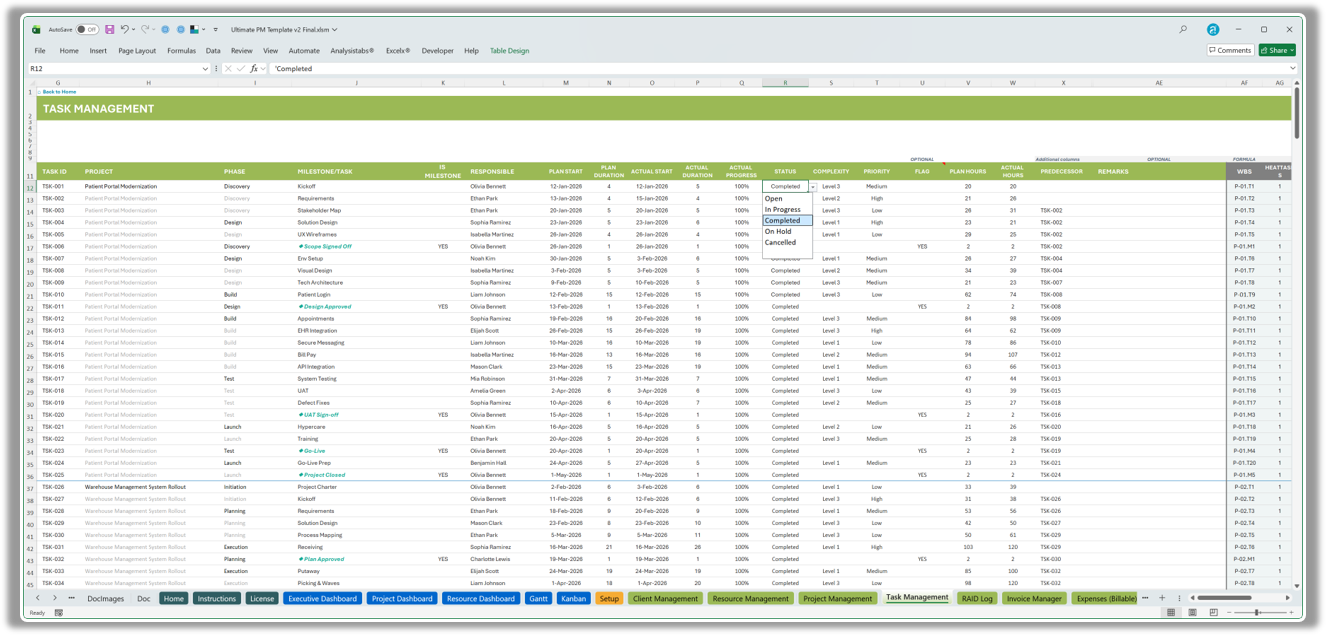
Task Management – input columns on the left with dropdowns; grey calculated columns on the right.
Dashboards
Labels with ☰ or ▾ are dropdown filters – choose ALL or a single item. Navigation buttons at the top of each dashboard jump to its sections. Each section is set to print on its own page (File › Print).
Executive Dashboard
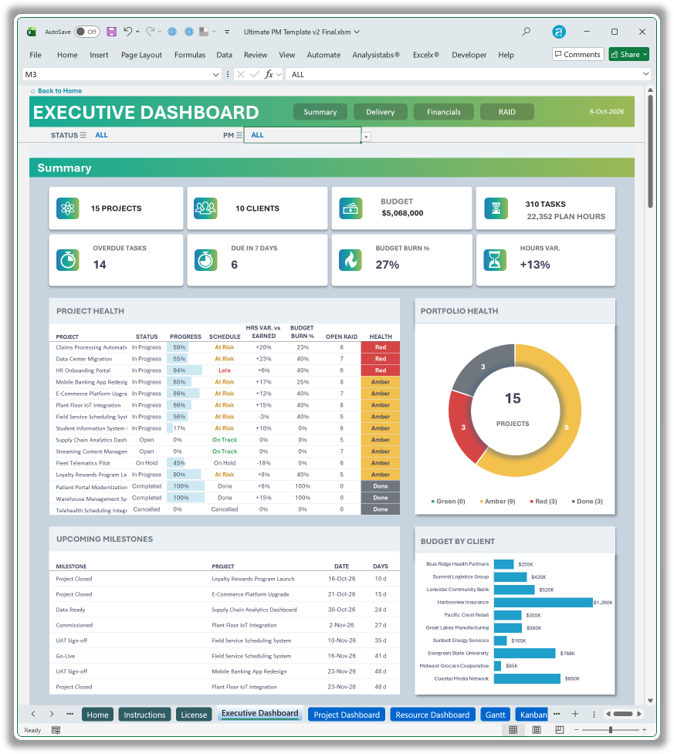
Four sections: Summary, Delivery, Financials, RAID.
- Summary – KPI cards (projects, clients, budget, plan hours, overdue, due in 7 days, budget burn, hours variance), Project Health table with progress, schedule and budget status, portfolio health donut, milestone list.
- Delivery – tasks by status, priority and complexity, completed %, due by month, project timelines, workload by resource.
- Financials – budget vs invoiced vs remaining by project, billable expenses, plan vs actual hours.
- RAID – open items donut, likelihood × impact matrix, items by type, level and project.
Project Dashboard
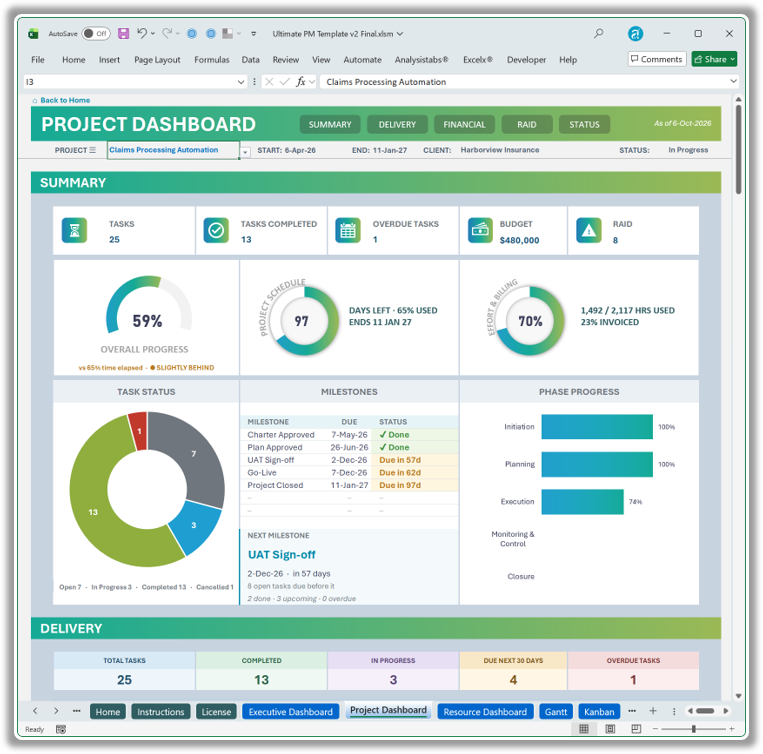
Pick a project in PROJECT ☰ – five sections update.
- Summary – progress and schedule gauges, days remaining, budget, milestones.
- Delivery – task status, phases, overdue and due-in-30-days lists.
- Financials – budget, invoices (with detail) and expenses for the project.
- RAID – the project's risks, issues and actions.
- Status Report – a one-page report; set the period to this week, month, year and more.
Resource Dashboard
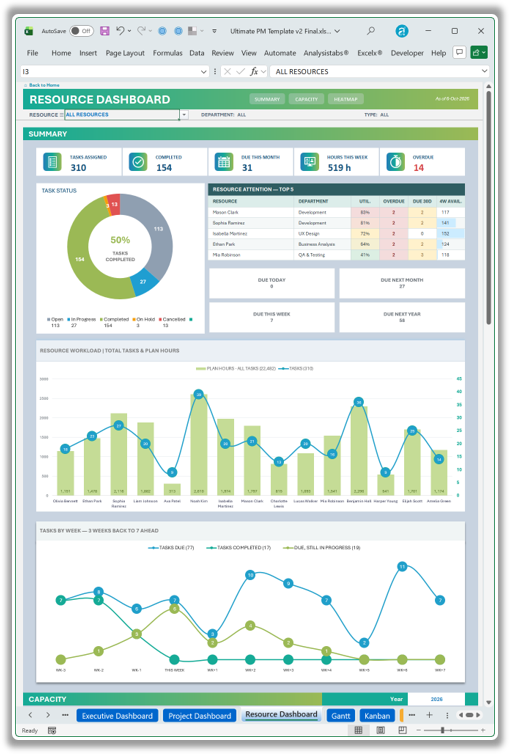
Choose one person or ALL RESOURCES; filter by department and type.
- Summary – tasks assigned / completed / due this month, hours this week, overdue; Resource Attention top-5; workload chart; tasks by week.
- Capacity – assigned vs capacity hours, utilisation vs target, availability next 4 weeks, capacity vs demand 12 weeks, over-allocated list, hours by department and type.
- Heatmap – planned tasks per person per day for the whole year, monthly totals and overload days.
Gantt chart
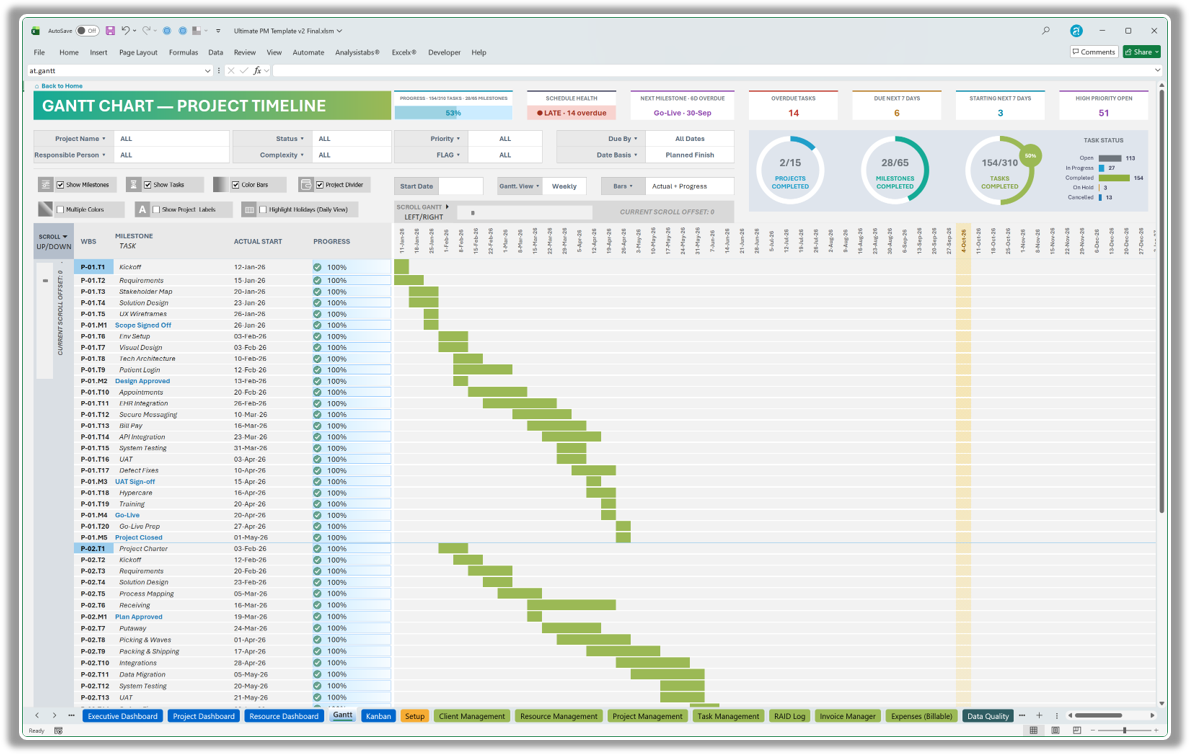
Everything is driven by the dropdowns at the top – no formulas to touch.
| Control | Options |
|---|---|
| Filters | Project, Responsible Person, Status, Complexity, Priority, Flag; Show Tasks / Show Milestones |
| Due window | Due By / Due Within a window (All Dates to show everything) |
| Gantt View | Daily · Weekly · Monthly · Quarterly · Yearly |
| Bars | Planned Schedule · Actual Schedule · Planned vs Actual · Actual + Progress (bars fill with each task's real % complete) |
| Date basis / scroll start | Choose which date the timeline is anchored on and where it starts |
| Gantt colours | Style 1 or Style 2 |
The header strip shows progress (tasks and milestones done), schedule health, next milestone, overdue tasks, due and starting in the next 7 days, high-priority open items, hours used vs plan and the latest plan end. Weekends and company holidays from Setup are respected in every bar.
Kanban board
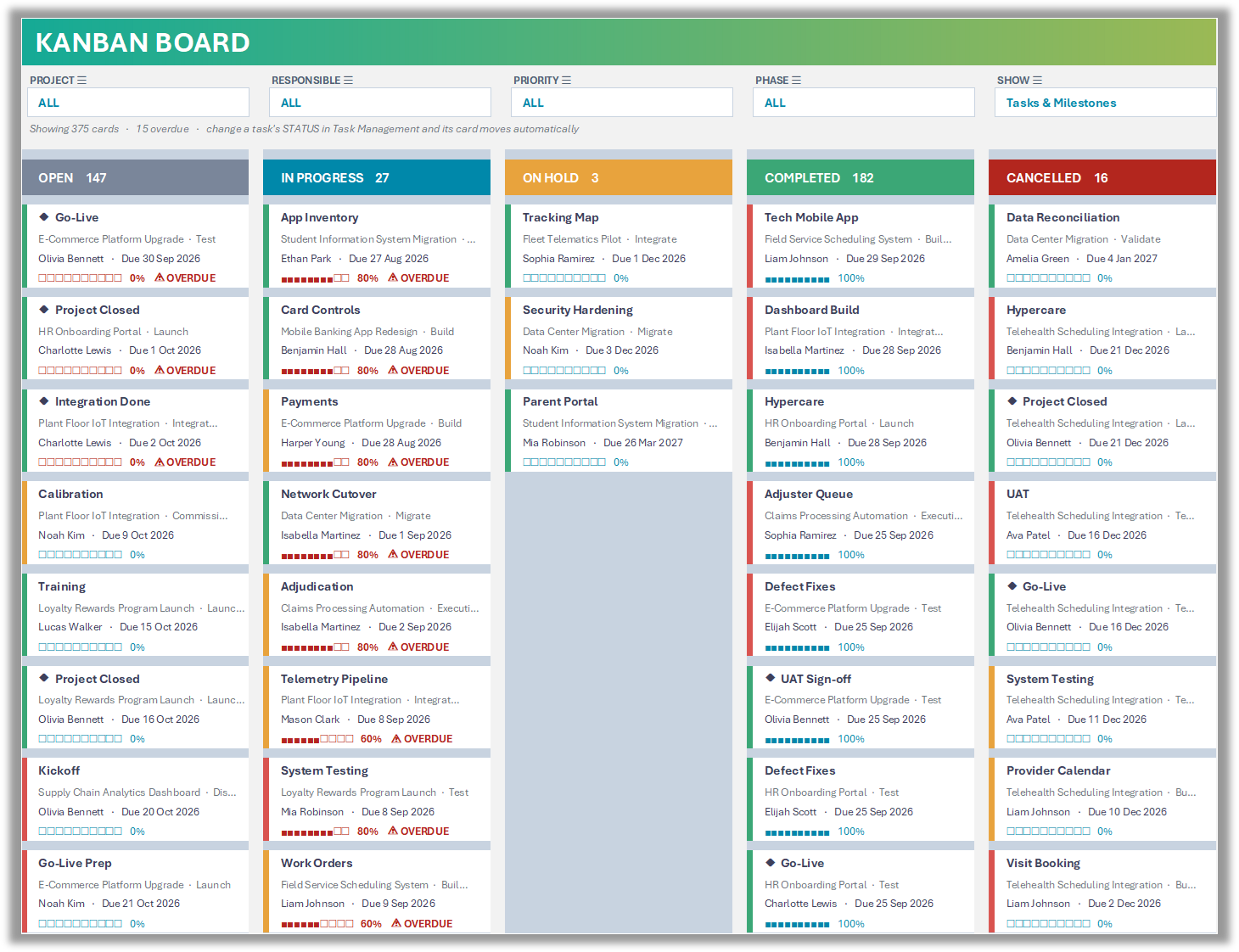
Five lanes – Open, In Progress, On Hold, Completed, Cancelled.
- Filter by Project, Responsible, Priority and Phase; SHOW = tasks, milestones or both.
- Each card shows project, phase, owner, due date, a progress bar, a priority colour stripe and a ⚠ overdue flag.
- Cards are sorted overdue-first, then by due date; up to 20 cards per lane, with a “+N more” count if there are more.
- There is no dragging: change a task's STATUS in Task Management and its card moves to the right lane.
Setup & customising
- Weekends & holidays – tick your weekend days and list company holidays; every date calculation, the Gantt and the heatmap skip them.
- Default values – defaults used when a cell is left blank.
- Dropdown lists – 13 lists. Green-header lists are safe to edit: Departments, Phases, Response Strategy, Expense Categories, Client Status, Progress steps. Amber-header lists feed dashboard formulas: Status, Complexity, Priority, Yes/No, Emp Type, RAID Type, RAID Status – don't rename values like YES, Completed, Closed, High or Risk, or add / reorder items, without updating formulas.
- RAID thresholds – score bands for Low / Medium / High / Extreme.
- Heatmap thresholds – colour bands for the Resource heatmap.
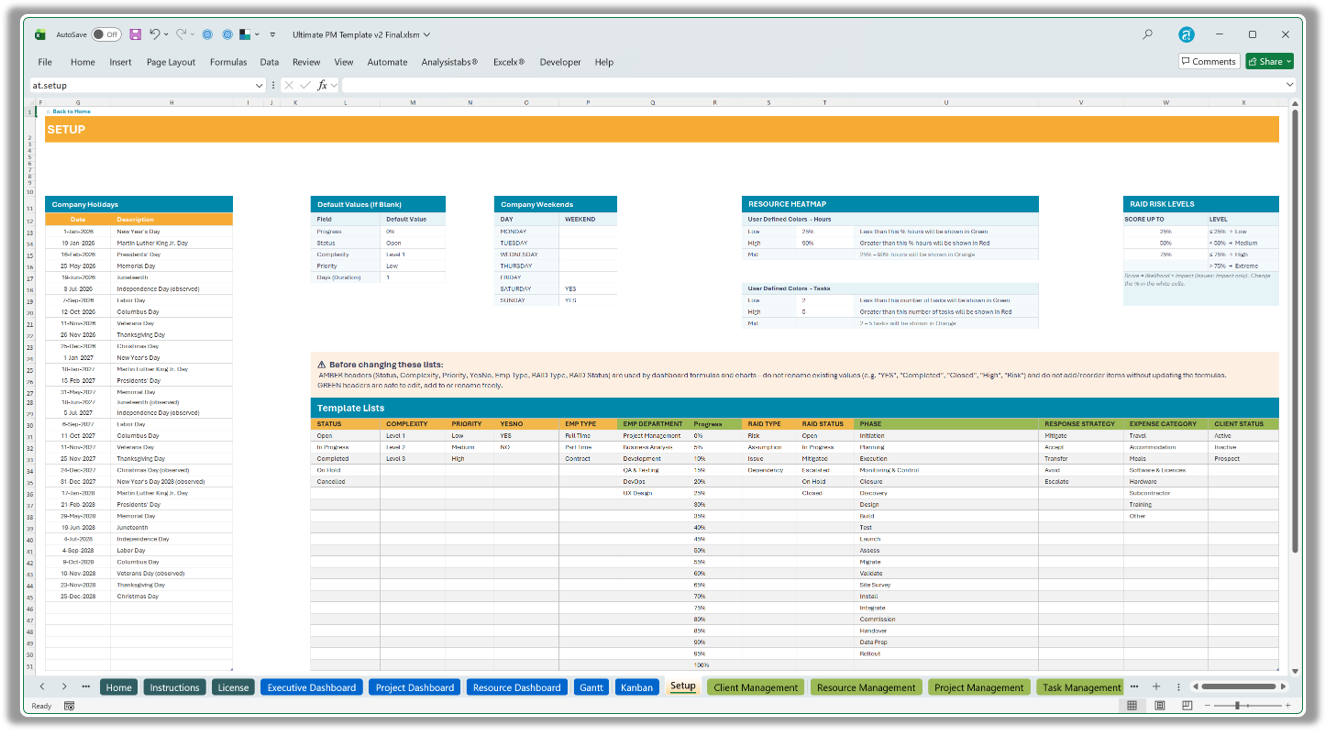
Setup – weekends, holidays, dropdown lists and RAID / heatmap thresholds.
Labels
Every title, heading and filter label (78 in total) lives on the Labels sheet. Type your own wording or translation in NEW LABEL; FINAL USE feeds the sheets. Rows marked in red are titles on shapes – edit those shapes directly.
Data Quality
100+ live checks across every input sheet, grouped by sheet. Each row shows the number of records failing, the first one, and how to fix it. The summary at the top shows total checks, passing, and how many need review.
- Missing or invalid owners, clients, projects, statuses and dates
- Start dates on weekends or holidays; end before start; durations ≤ 0
- Duplicate IDs, names, emails and milestones
- Overdue RAID items, open high-level risks without a response strategy
- Invoices over the project budget, unpaid past due, expenses without a project
- Chart-capacity warnings (15 projects, 15 resources, 10 clients)
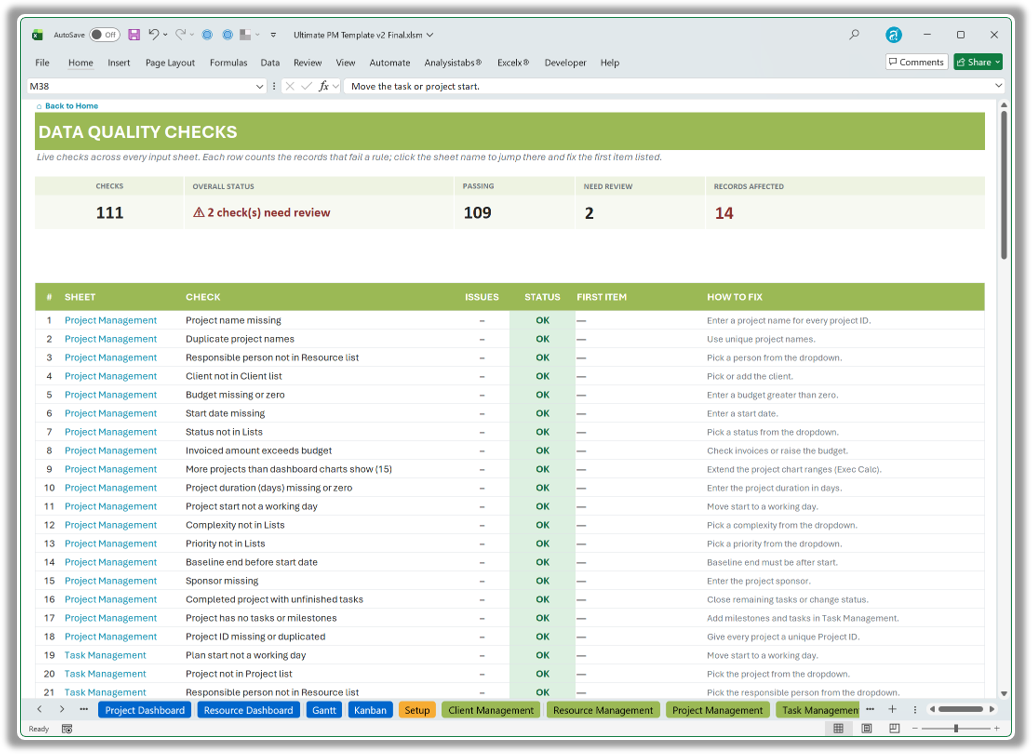
Data Quality – summary strip and checks grouped by sheet, each with the first problem and how to fix it.
Troubleshooting
| Symptom | What to check |
|---|---|
| Dashboard looks empty | Set the filters to ALL, and make sure tasks have a project, owner and plan start. |
| Task not on the Gantt | Check the Gantt filters, set Due window to All Dates, and make sure Show Tasks / Show Milestones are ticked. |
| Numbers not updating | Make sure calculation is Automatic (Formulas › Calculation Options) or press F9. |
| #NAME? or #VALUE! errors | You are on Excel 2013 or older, or the file was opened in Google Sheets / Numbers – the template needs Excel 2016 or later (incl. Microsoft 365). |
| Dropdown shows the wrong values | Edit the list on Setup, not the cell. Amber lists must keep their original values. |
| Card missing on the Kanban | Check the four filters and SHOW; lanes are capped at 20 cards – see the “+N more” count. |
| Can't edit a dashboard | Review › Unprotect Sheet (no password). |
FAQ
Can I see and change the formulas?
Yes. Nothing is password-locked and there are no macros. Unprotect a sheet to edit it.
How many projects and tasks can it handle?
Tables grow automatically for hundreds of tasks. Portfolio charts show up to 15 projects, 15 resources and 10 clients.
Can I translate it?
Yes – change the wording on the Labels sheet and the dashboards follow.
Can I print or share the dashboards?
Yes. Page layouts are preset so each dashboard section prints on one page, or export to PDF.
Is it a subscription?
No. Pay once and use it forever, with free updates for 12 months from purchase.
Upgrading from v1.x
v2.0 is a new workbook, not a patch. Copy your rows into the matching v2.0 tables (Clients, Resources, Projects, Tasks, RAID, Invoices, Expenses) using Paste → Values; the new columns are optional and can stay blank. Then review Data Quality for anything to fix.
Version history
| Version | Released | What's new |
|---|---|---|
| v2.0 | 6 Oct 2026 | Major update from v1.34 – rebuilt Executive, Project and Resource dashboards; Gantt bars filled by real progress (4 bar views); new Kanban board; full RAID log; 100+ data-quality checks; invoice due dates & payment status; Setup, Labels, Instructions and License sheets; new Home hub; works in Excel 2016 and later. |
See every change, fix and upgrade note in the full Ultimate PM Template – Standard changelog ↗.
Don't have the template yet?
One-time payment · instant download · Sample Data + Blank editions · free updates for 12 months.
Questions? Email info@analysistabs.com.