Gantt Chart Excel Template – Hourly, Daily, Weekly & Yearly

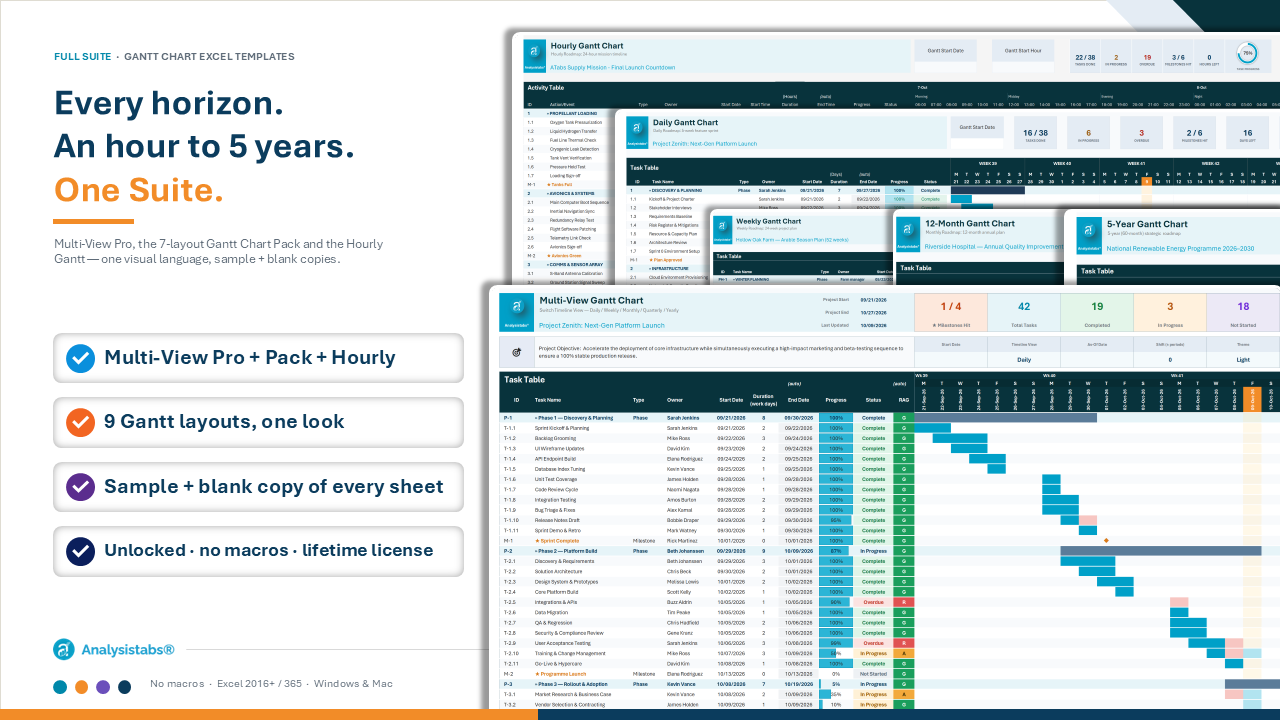
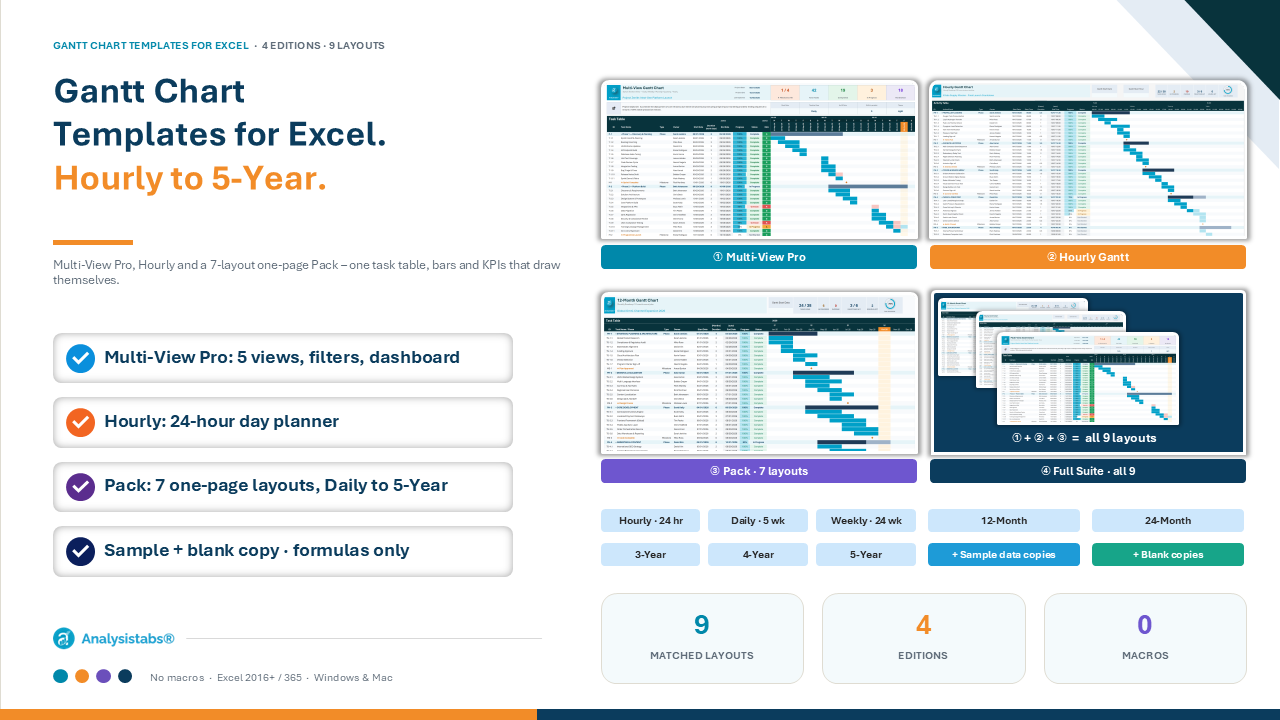
Plan any project — from a 24-hour cut-over to a five-year roadmap — in Excel. Nine matched Gantt layouts in four editions: Multi-View Pro (Daily / Weekly / Monthly / Quarterly / Yearly in one sheet), Hourly, and the Fixed-Scale Pack. No add-ins, no macros, no subscription.


  • Five views, one table: switch Daily → Yearly with one dropdown.
  • Filters that drive everything: by Owner or Status.
  • Overdue, surfaced: red bar segment, status pill and KPI.
  • Built-in dashboard: 7 KPI cards, 4 charts, auto-written status.
  • Ready to use: sample data + clean blank copy.
  • Fully editable: .xlsx, formulas only – Excel 2016+ / 365.

$ 39 From $ 19

51% Off

  • Works with Excel 2016+ & Microsoft 365

  • Instant download

  • Fully customisable — no password

  • Secure checkout

FOUR EDITIONS · ONE VISUAL LANGUAGE

Jump to your edition
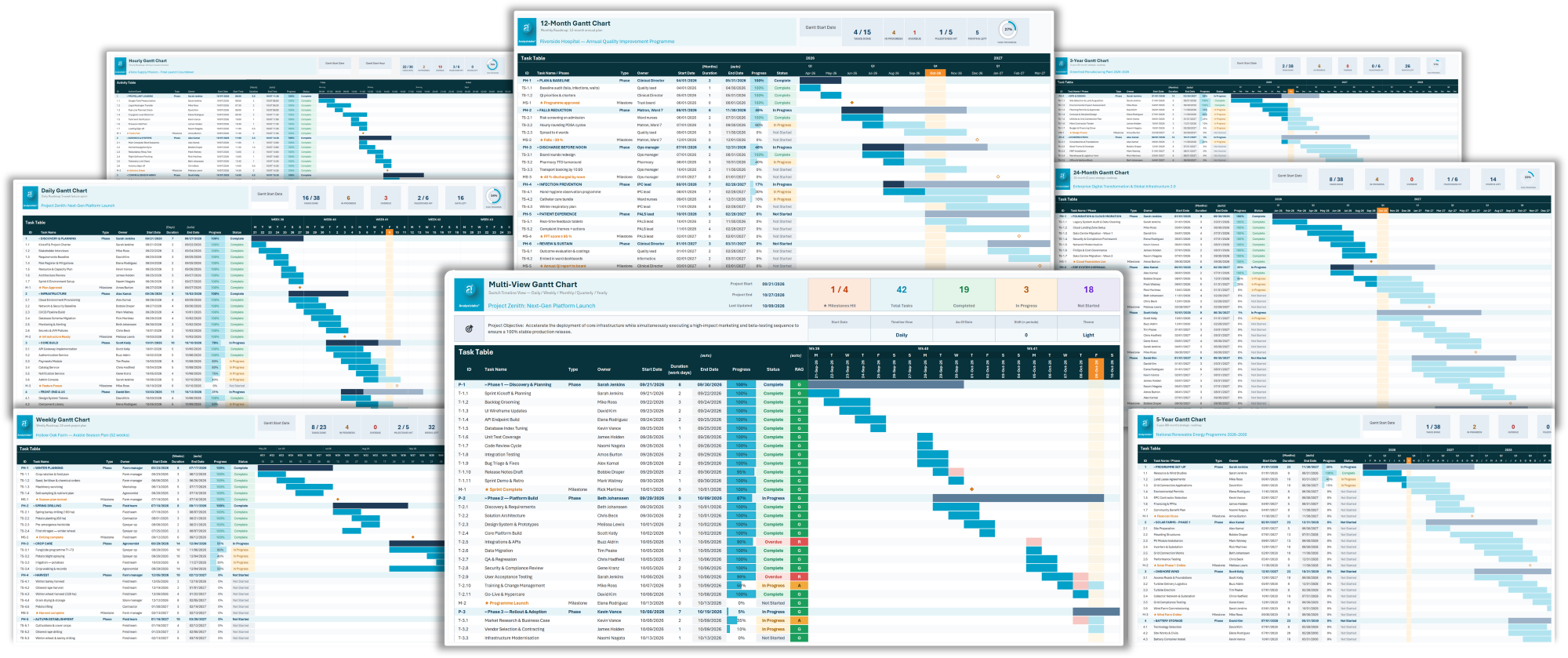
Gantt Chart Templates for Excel – Multi-View Pro dashboard, Hourly and Fixed-Scale layouts
0+
matched Gantt layouts – hourly to 5-year
0
timeline views in Multi-View Pro
0
task rows on every fixed-scale sheet
20
macros, add-ins or subscriptions

SOUND FAMILIAR?

One plan. Three audiences. Three spreadsheets.

One task table. The right timeline for every audience. Bars, KPIs and status that update as you type.

WHAT YOU GET

Why teams choose Multi-View Pro

Six jobs the template does for you, every day.

QUICK START

From blank sheet to finished plan in four steps

① EDITION 1 · MOST POPULAR

Multi-View Gantt Pro

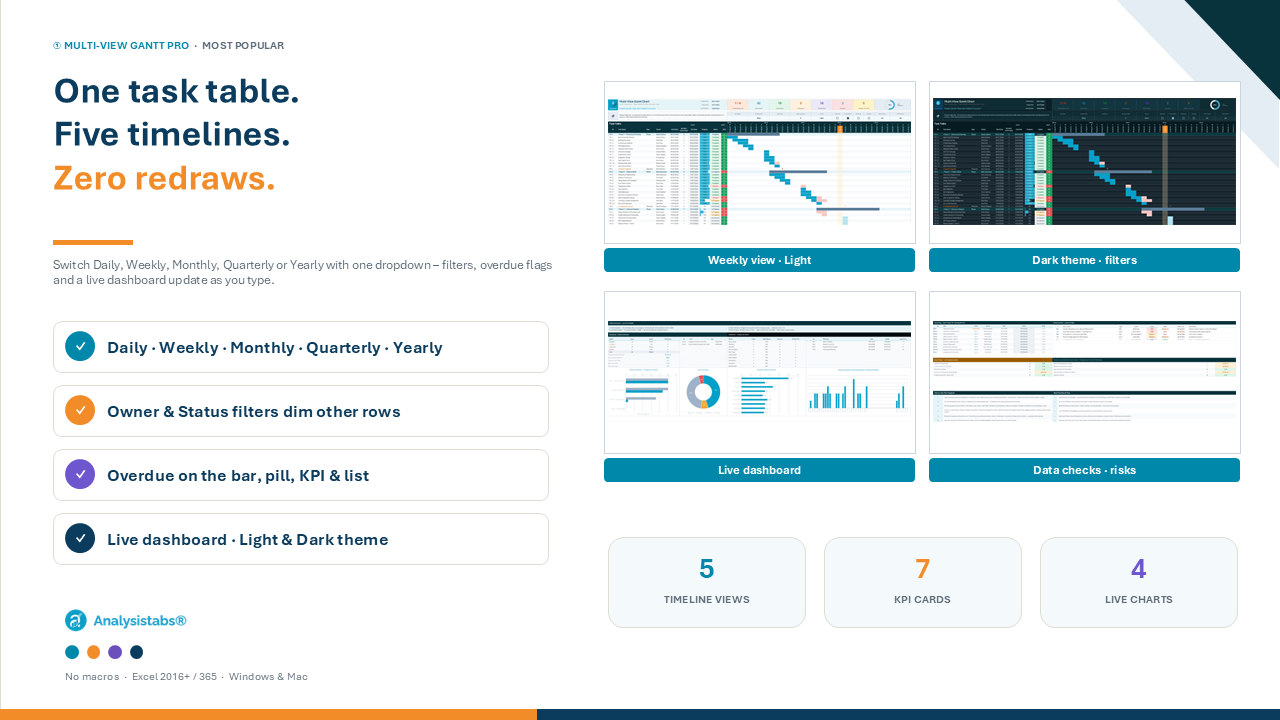
One task table, five timelines – Daily, Weekly, Monthly, Quarterly, Yearly – with filters, overdue tracking, dark theme and a live dashboard.
$39
Multi-View Gantt Chart Excel template – Daily, Weekly, Monthly, Quarterly and Yearly timeline views

① MULTI-VIEW PRO · FIVE VIEWS

Daily to Yearly from one dropdown

Plan once, zoom to any horizon – the timeline re-draws at whatever scale your audience needs.
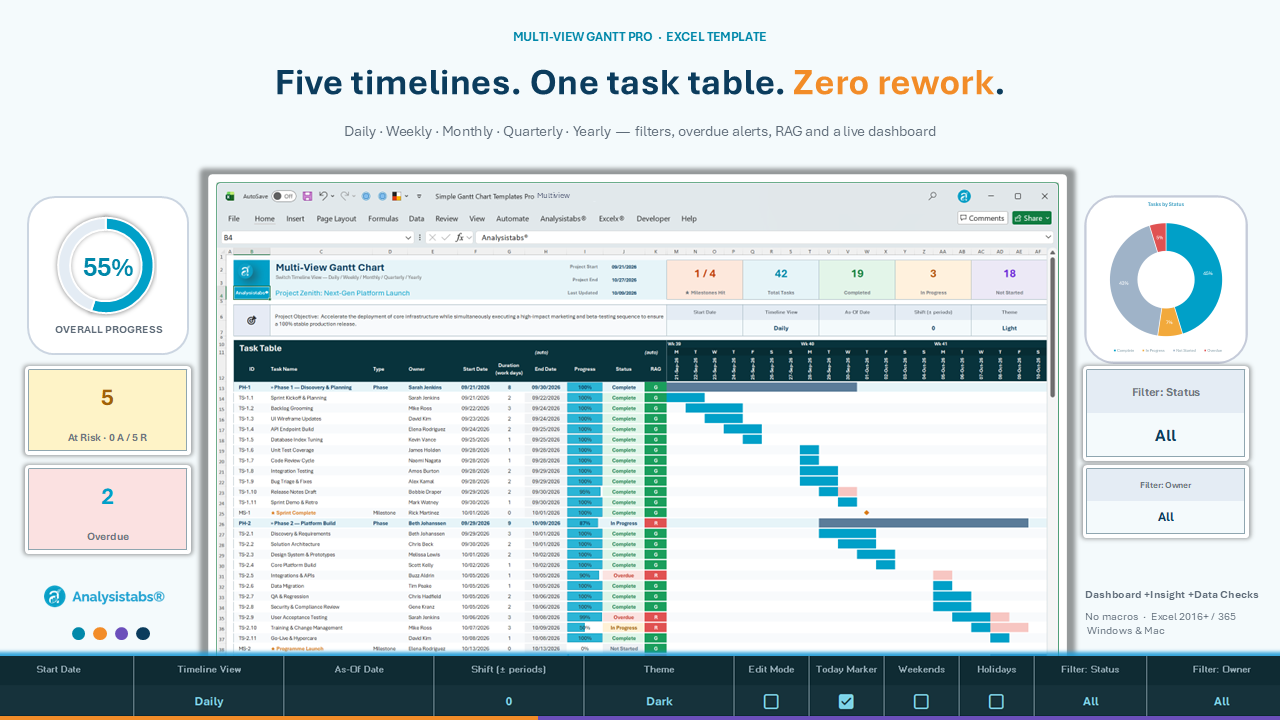
  • Daily / Weekly / Monthly / Quarterly / Yearly timeline
  • Shift control to scroll the window ± periods
  • Duration in working days – weekends & holidays skipped
  • As-Of date drives the today marker and overdue logic
  • Starting / Due / Completed counts under every period
Multi-View Gantt Chart Excel template – Daily, Weekly, Monthly, Quarterly and Yearly timeline views

① MULTI-VIEW PRO · BUILT-IN DASHBOARD

It writes itself as you update tasks

Everything below the chart is live – ready for the status meeting the moment you save.
  • 7 KPI cards + task progress ring
  • 4 charts: status, progress by owner, phase planned vs actual, tasks due
  • Project Summary – auto-written status lines
  • Upcoming and Overdue lists
  • Risks & Issues log and built-in Data Checks
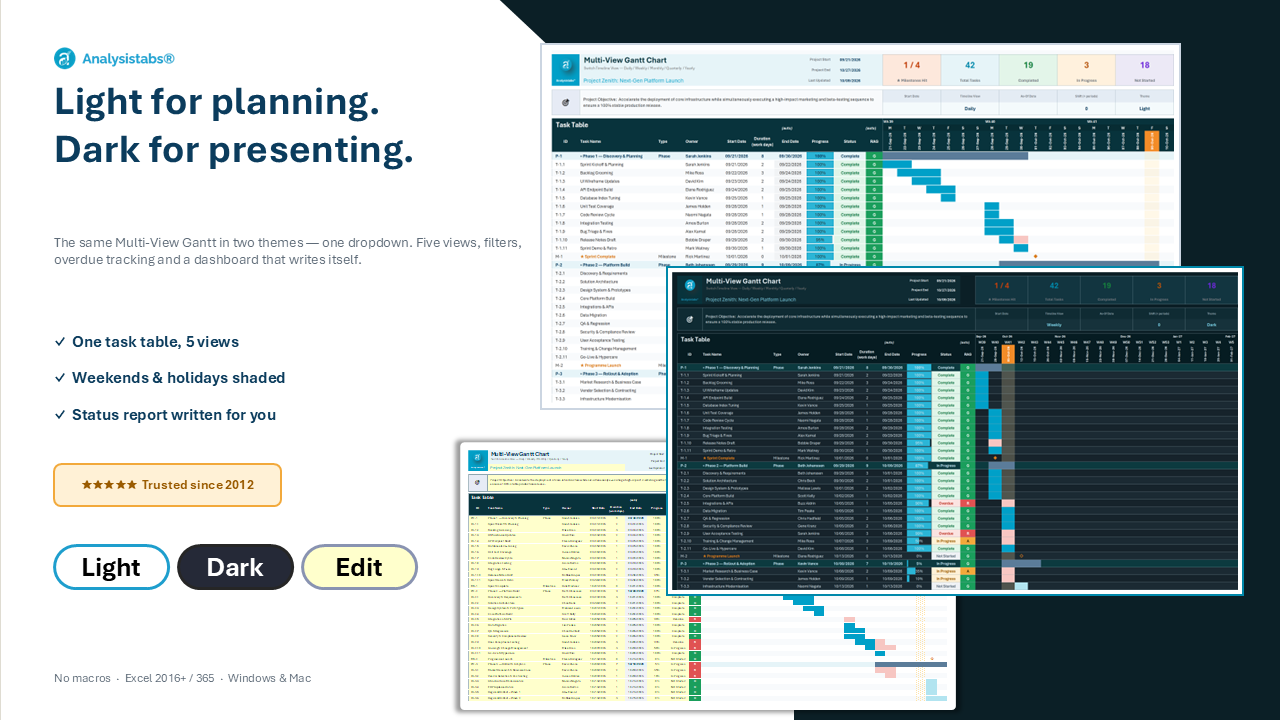
Same plan, presentation-ready

① MULTI-VIEW PRO · LIGHT & DARK · FILTERS

Same plan, presentation-ready

Flip to Dark for the big screen, filter to one owner for a one-to-one – without touching the data.
  • Light / Dark theme from a dropdown
  • Filter: Status and Filter: Owner dim every non-matching row
  • Weekend & holiday shading, today marker toggle
  • Edit Mode highlights every input cell
  • Phases stay visible while you filter
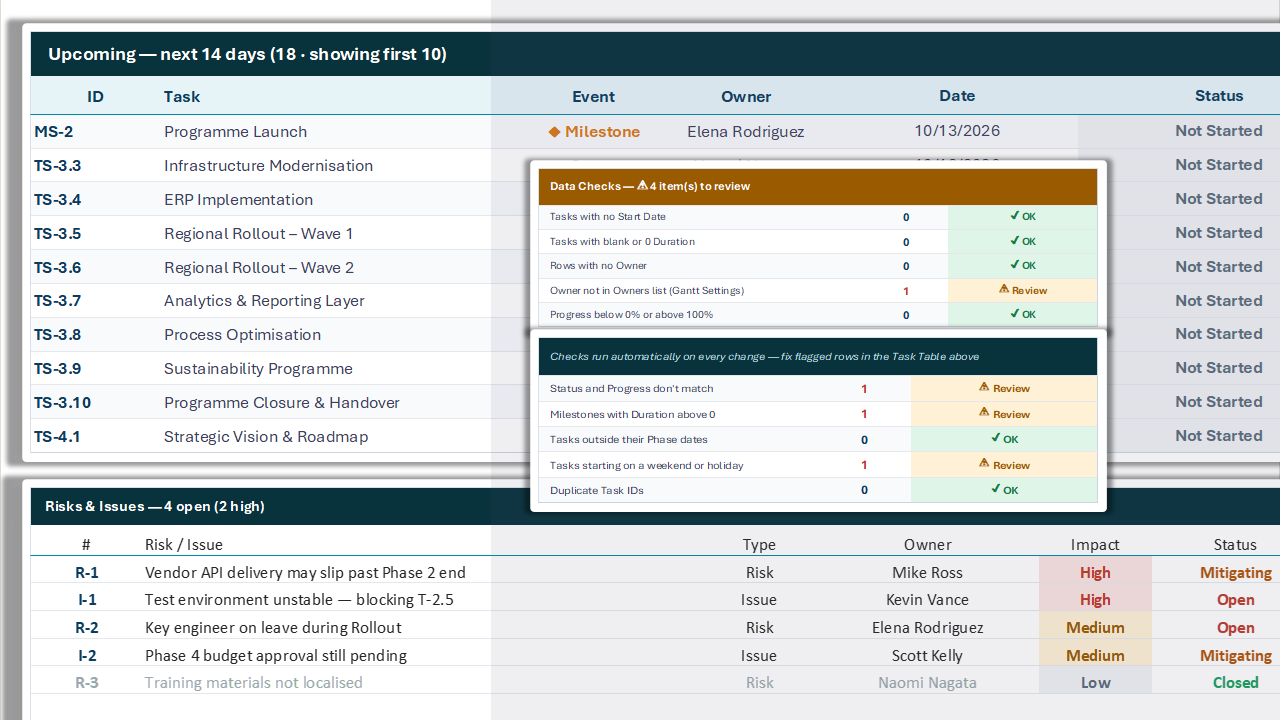
Catch mistakes before your sponsor does

① MULTI-VIEW PRO · DATA CHECKS · RISKS & ISSUES

Catch mistakes before your sponsor does

Built-in checks scan the task table as you type – the title turns amber with a count when something needs review.
  • Missing start dates, durations or owners
  • Owners not on the Owners list · duplicate IDs
  • Progress outside 0–100 % · Status vs Progress mismatches
  • Milestones with a duration · tasks outside their phase
  • Weekend or holiday starts
  • Upcoming list (next N days) and a Risks & Issues log with dropdowns
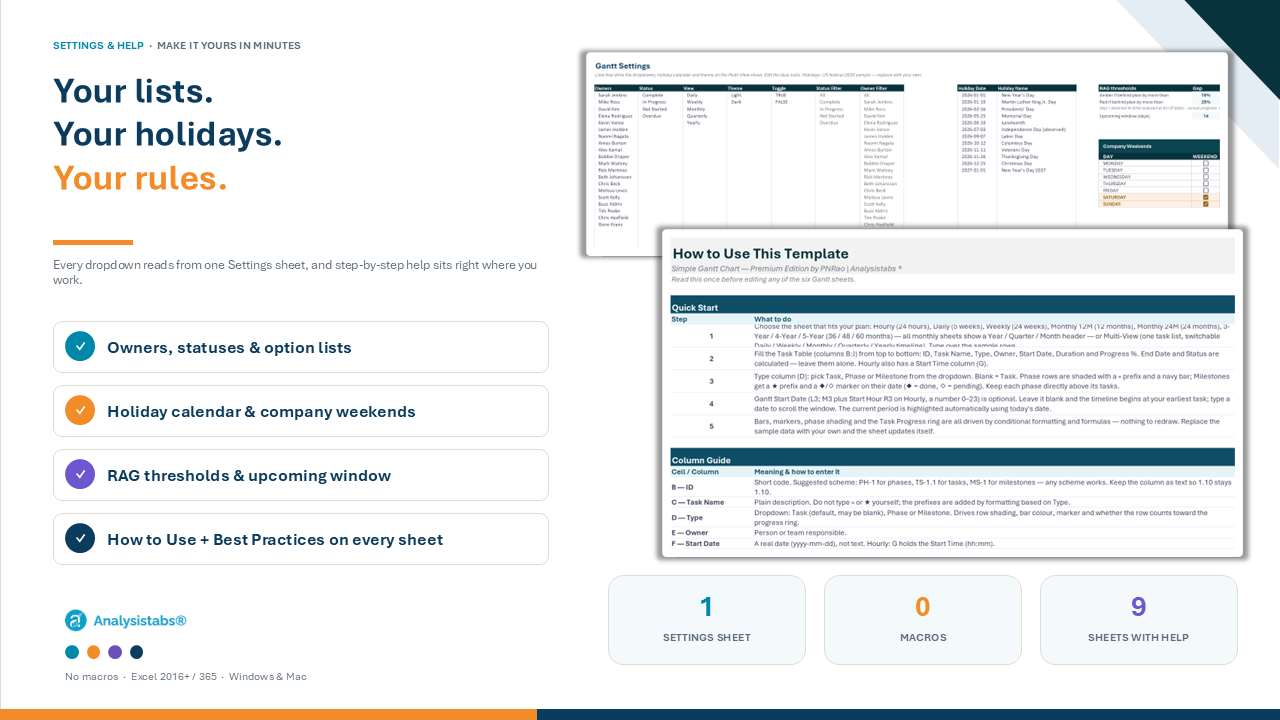
Your lists, holidays and rules – in one place

① MULTI-VIEW PRO · SETTINGS & HELP

Your lists, holidays and rules – in one place

On Multi-View Pro, every dropdown reads from one Gantt Settings sheet. Hourly and the fixed-scale sheets need no setup – lists are built in; just set the Gantt Start Date.

  • Owners, statuses, holidays and option lists in one place
  • Company Weekends table for working-day durations
  • Upcoming window (N days) for the Multi-View list
  • Instructions sheet plus How to Use & Best Practices under every Gantt (all editions)
  • Tips on every input cell · amber warning if a formula cell is cleared

In Multi-View Pro: Multi-View Gantt sheet · dashboard · Gantt Settings · Instructions · sample data

② EDITION 2

Hourly Gantt

A 24-hour day planner for shifts, event run-sheets, lab bookings and cut-overs – start time + duration, End Time calculated.

$19

② HOURLY GANTT · 24-HOUR DAY PLANNER

One day, hour by hour

Shifts, event run-sheets, lab bookings, launches and production changeovers.
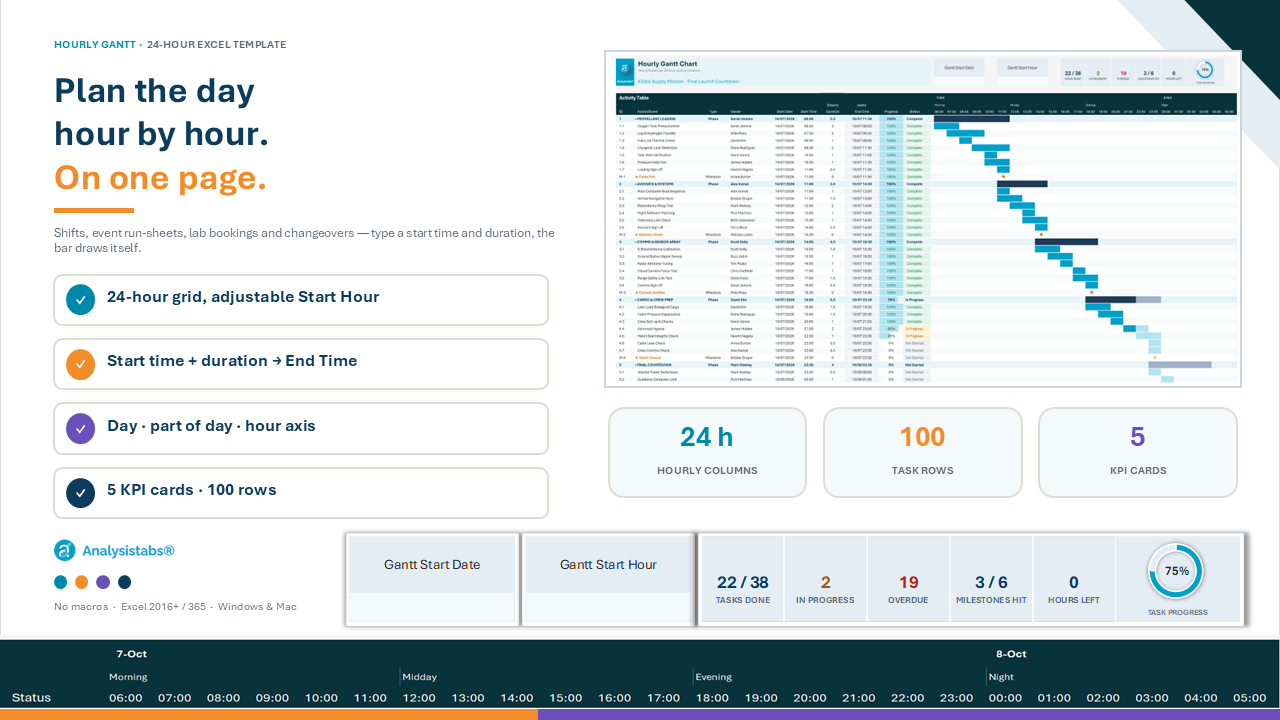
  • 24-hour grid with an adjustable Start Hour
  • Start time + duration; End Time calculated
  • Duration in hours or minutes – one dropdown
  • Day / part-of-day / hour header and current-hour marker
  • 5 KPI cards, progress ring and 100 task rows
Hourly Gantt Chart Excel template – 24-hour day planner with KPI cards

In Hourly: Hourly Gantt with sample data + blank copy · Instructions

③ EDITION 3

Gantt Chart Pack – 7 layouts

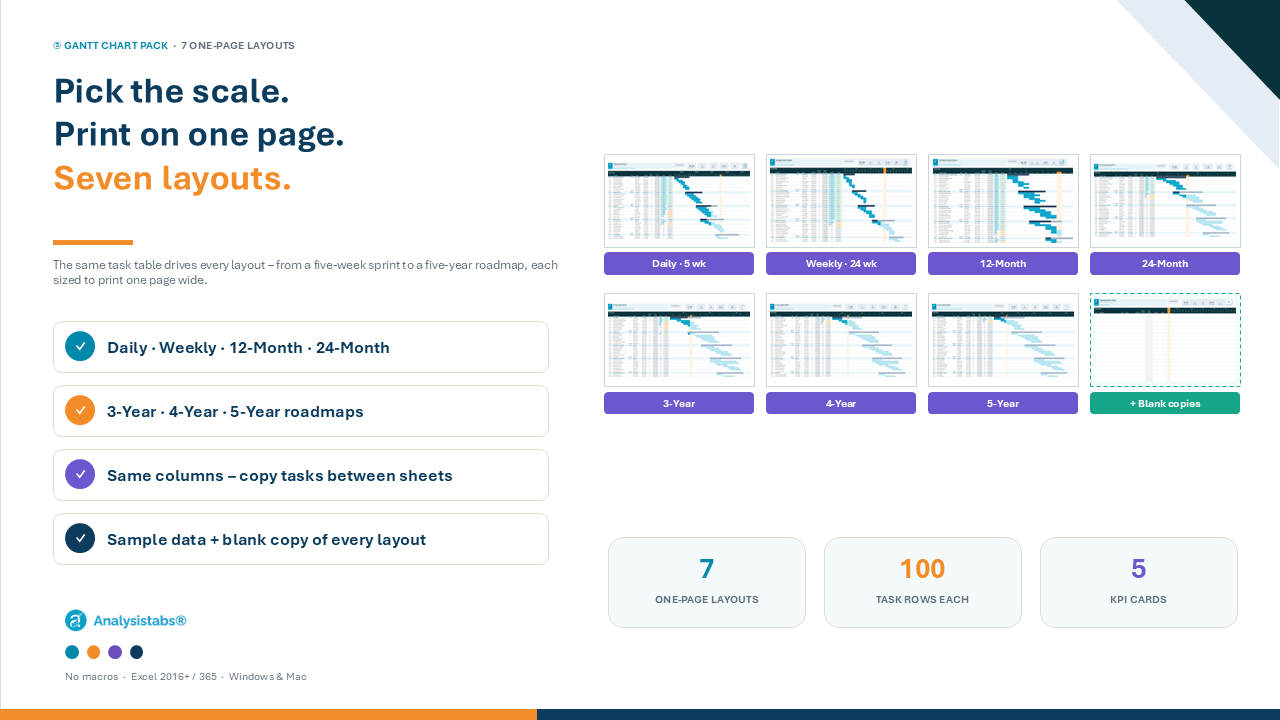
Fixed scales that each print on one page: Daily (5 weeks), Weekly (24 weeks), 12-Month, 24-Month, 3-, 4- and 5-Year.
$29
Hourly Gantt Chart Excel template – 24-hour day planner with KPI cards

③ GANTT CHART PACK · 7 ONE-PAGE LAYOUTS

Pick the scale. Print on one page.

The same task table drives every layout – choose the horizon that fits the audience, from a five-week sprint to a five-year roadmap.
  • Same columns on every sheet – copy tasks between layouts
  • 5 KPI cards + progress ring
  • Phases with calculated progress · ◆ / ◇ milestones
  • 100 task rows · sample data + blank copy
  • Fits one page wide on A4 / US Letter
Sprints and six-month plans, one page each

③ PACK · DAILY · WEEKLY

Sprints and six-month plans, one page each

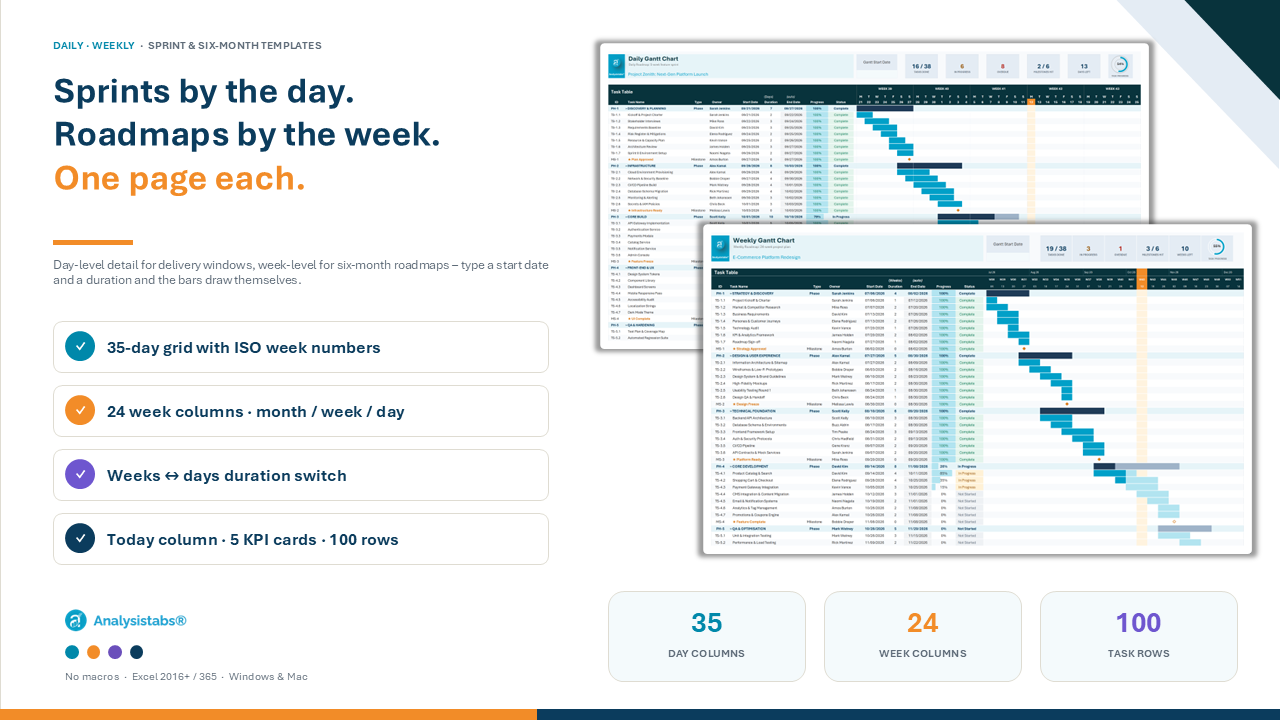
Day-level detail for delivery windows and week-level for roadmaps – both print one page wide.
  • Daily: 35-day grid with ISO week numbers and day initials
  • Weekly: 24 week columns with a Month / Week / Day header
  • Weekly durations in weeks or days – one dropdown
  • Today column highlighted automatically
  • 5 KPI cards, progress ring and 100 task rows
Annual plans and two-year programmes

③ PACK · 12-MONTH · 24-MONTH

Annual plans and two-year programmes

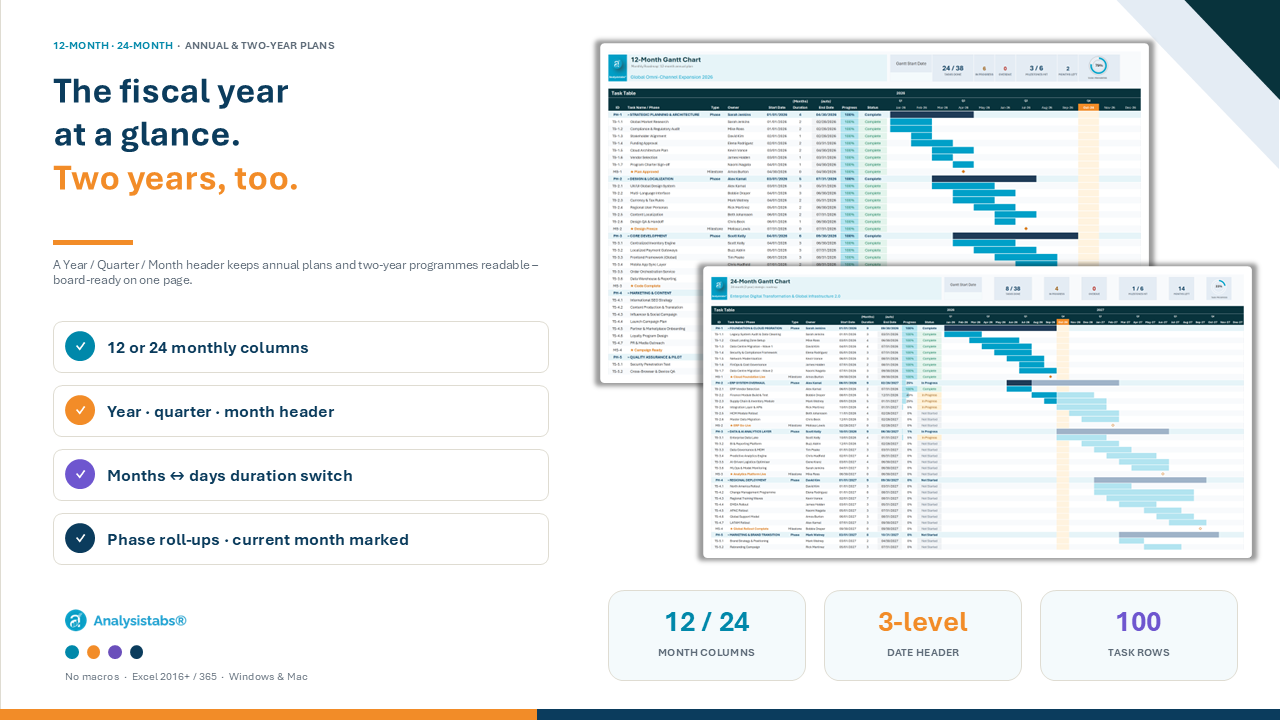
A Year / Quarter / Month header keeps fiscal-year plans readable at a glance.
  • 12 or 24 monthly columns
  • Durations in months or days
  • Current month highlighted
  • Phase roll-ups with calculated progress
  • Board-ready one-page print
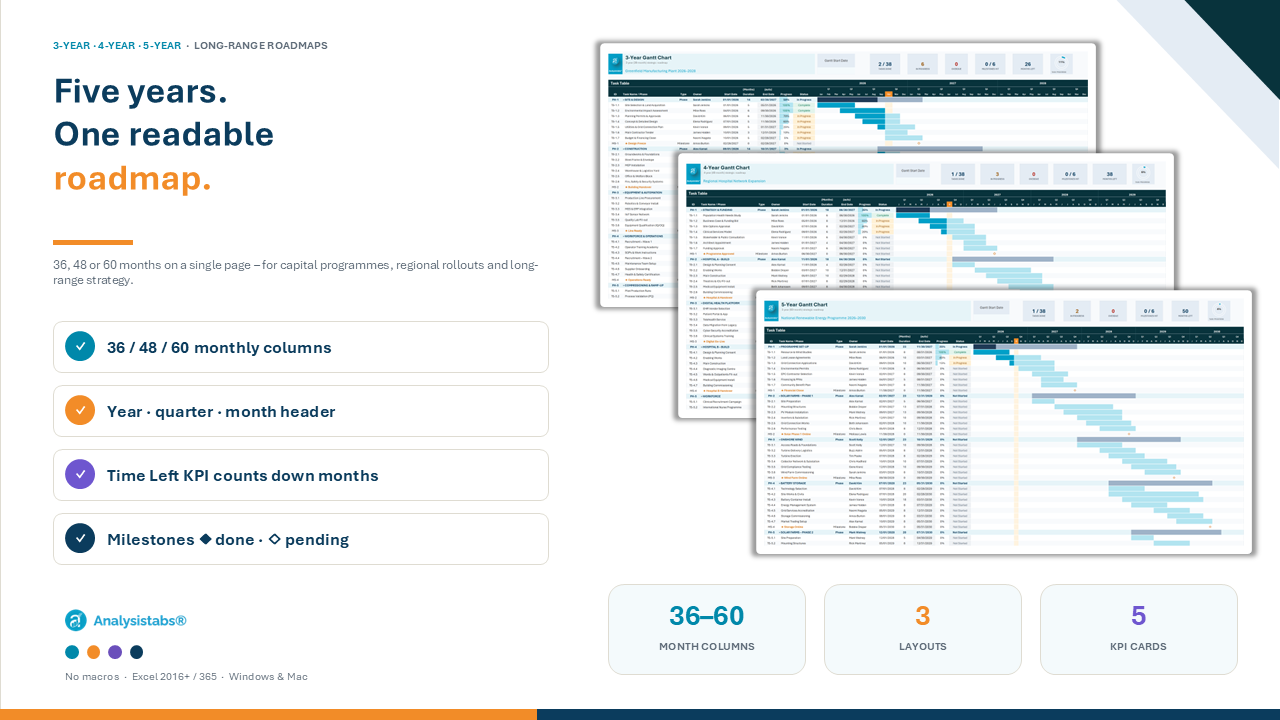
Long-range roadmaps you can actually read

③ PACK · 3-YEAR · 4-YEAR · 5-YEAR

Long-range roadmaps you can actually read

36, 48 or 60 months on one page – for capital programmes, rollouts and strategy.

  • 36 / 48 / 60 monthly columns with Year / Quarter / Month header
  • Durations in months or days
  • Time Left KPI counts down the remaining months
  • Milestones marked ◆ when done, ◇ when pending
  • Fits one page wide on A4 or US Letter

In the Pack: 7 layouts, each with sample data + blank copy · Instructions

④ EDITION 4 · BEST VALUE

Full Suite – all three for $49

Multi-View Pro + Hourly + the 7-layout Pack – all 9 layouts, one download. Save $38 vs buying separately ($87).

① Multi-View Pro
① Multi-View Pro
② Hourly
② Hourly
③ Pack – 7 layouts
③ Pack – 7 layouts

COMPARE EDITIONS

Which Gantt is right for you?

Hourly Gantt Gantt Chart Pack Multi-View Pro ★ Full Suite
Timeline 24-hour grid Daily · Weekly · 12/24-Month · 3/4/5-Year Daily / Weekly / Monthly / Quarterly / Yearly All of them
Best for Shifts, events, labs One-page plans at a known scale Reporting one plan to many audiences Everything
Layouts 1 7 1 (5 views) 9
Filters & Dark theme — — ✔ ✔
Dashboard 5 KPIs + ring 5 KPIs + ring 7 KPIs + 4 charts ✔
Overdue tracking KPI KPI Bar, pill, KPI, list ✔
Sample + blank copy ✔ ✔ ✔ ✔
Gantt Settings sheet (owners, holidays, lists) — — ✔ ✔
Formulas only – no macros ✔ ✔ ✔ ✔
Price $19 $29 $39 $49

EVERYTHING INCLUDED

Type it once. See it at every scale.

Dropdowns, entry checks and a tip on every input – so the plan stays clean.

BUILT FOR EVERY ROLE

One plan – the right view for everyone

Project Manager

Plans and delivers the work

Multi-View · Weekly · Daily

Executive / Sponsor

Wants the big picture

Quarterly / Yearly view · 12-Month to 5-Year

Team Lead

Balances people and dates

Owner filter · overdue list · KPI cards

Event & Shift Lead

Runs the day, hour by hour

Hourly Gantt · current-hour marker

WHAT’S IN THE DOWNLOAD

Everything you need, in one download

  • Multi-View Gantt Pro – 5 timeline views and live dashboard
  • Hourly Gantt – sample data + blank copy
  • Gantt Chart Pack – 7 fixed-scale layouts, each with sample data + blank copy
  • Gantt Settings (Multi-View Pro) – owners, statuses, holidays and lists
  • Instructions, How to Use & Best Practices on every sheet
  • License sheet · free updates to this version

Your edition includes the sheets listed for it in the comparison table.

REQUIREMENTS

Will it work on my computer?

  • Excel 2016, 2019, 2021, 2024 or Microsoft 365
  • Windows or Mac desktop Excel
  • No add-ins, macros or internet needed
  • Not for Excel 2013 or older
  • Not for Google Sheets, Numbers or LibreOffice

Excel for the web: view and light edits only.

CUSTOMER REVIEWS

What project managers say about Analysistabs

FAQ

Questions, answered

Most buyers pick Multi-View Pro. Choose Hourly for shift or event days, the Gantt Chart Pack for one-page fixed layouts, or the Full Suite for everything.
Yes – email support with your order number and pay only the difference.
A standard Excel workbook (.xlsx) – formulas and conditional formatting only. No macros, so it opens without security prompts.
Excel 2016, 2019, 2021, 2024 and Microsoft 365 on Windows or Mac. Excel 2013 and older, Google Sheets and Numbers are not supported.
Yes. Type a start date and a duration – bars, phase roll-ups, milestones, KPI cards and the progress ring recalculate as you type.
100 task rows on every fixed-scale sheet and 50 on Multi-View. On Multi-View, insert rows inside the task table and every formula, filter and dashboard range stretches.
Yes. Every Hourly and Pack layout ships with sample data and a ready-to-type blank. Multi-View ships with sample data – type over it to start.
Yes. Nothing is password-locked. On Multi-View Pro, owners, statuses, holidays and option lists live on the Gantt Settings sheet; on the other sheets, edit the dropdowns directly.
Yes – the fixed-scale layouts are sized to print one page wide in landscape on A4 or US Letter.
Yes. One payment, instant download, no subscription – free updates to this version.

Stop maintaining three plans. Start presenting one.

Gantt Chart Templates for Excel – one-time payment, instant download

$ 39 From $ 19

51% Off

⚡ Instant download · 🔒 Secure checkout · .xlsx – no macros · Excel 2016+ / Microsoft 365

Deliver Successful Projects
with Analysistabs Templates

Whether you are a beginner, project manager, or executive, our templates provide the automated dashboards and data insights you need to succeed.

$ 39 From $ 19

51% Off

Gantt Chart Templates for Excel – Multi-View Pro dashboard, Hourly and Fixed-Scale layouts

Get Instant Access in 3 Simple Steps

Yes! Pay once for use it forever. No monthly subscriptions, no hidden fees.
Questions? Contact us at Info@analysistabs.com

Trusted by 6,500+ users worldwide

Project Managers from the biggest brands in the world choose us for managing their Projects, Tasks and Resources.

Why choose us!