
Documentation: Advanced Project Plan – Multiple Projects
Table of Contents:
Quick View:
Index:
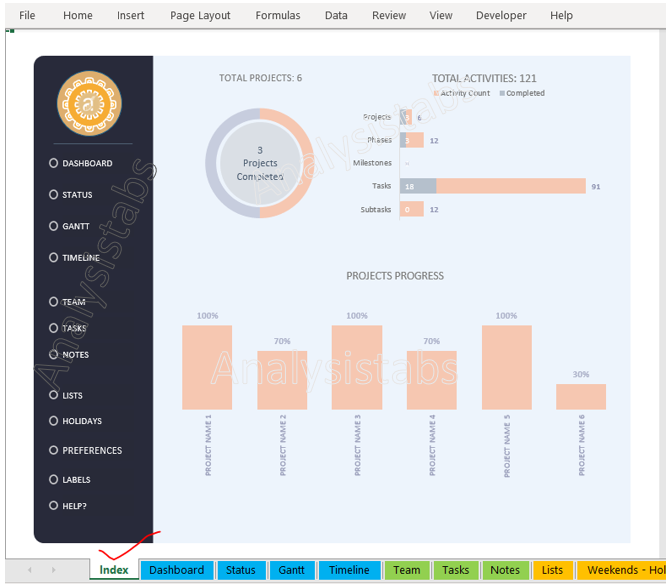
The Index sheet helps to navigate to other sheets within the template. And also you can view overall project count, Number of activities, and Project progress.
Screenshot : Here is the screenshot for your reference.
Dashboard Sheets:
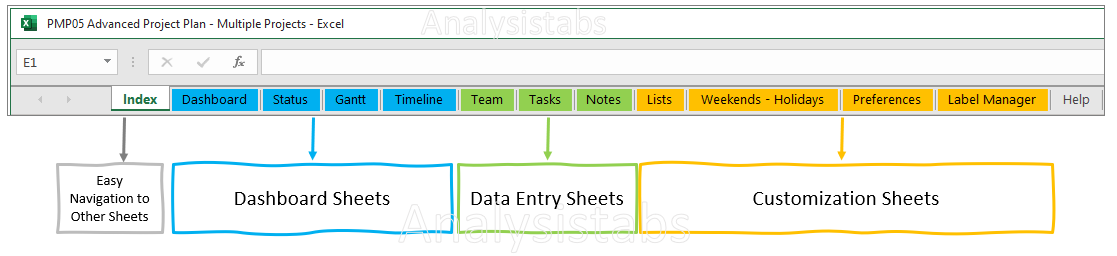
In the Advanced Project Plan – Multiple Projects we have dashboard sheets to view different kind of reports.
Those are Dashboard, Status, Gantt, and Timeline Worksheets.
Data Entry Sheets:
We have three data entry sheets where user or client has to input the data to view dashboards. Those are Team, Tasks, and Notes.
Team:
In this sheet user has to input only Person name field. All other fields has formulas which will update automatically.
*User Input Column(s): Only Person Name field has to update.
Tasks:
In this sheet user has to input data in the below mentioned fields. Remaining columns/fields has formulas which updates data automatically.
*User Input Column(s): Activity column and Responsible columns has drop down option to choose option from the available list as shown in the below screen shot.
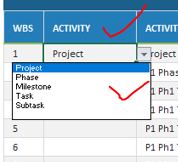
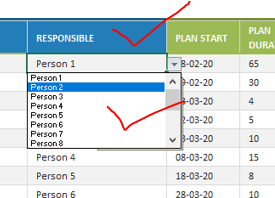
And also Enter or fill the following fields ACTIVITY TITLE,PLAN START, PLAN DURATION, BASELINE START,BASELINE DURATION, ACTUAL START, ACTUAL DURATION, ACTUAL PROGRESS, ACTUAL STATUS, ACTUAL COMPLEXITY, and REMARKS.

Columns/Fields With Formulas(Automatically Calculated: WBS and fields which are shown in the below screenshot.

Notes:
In this sheet you can enter Company details, Project specifications, and Project Contacts details.
Customization Sheets:
There are 4 customization sheets. Those are Lists, Weekends – Holidays, Preferences, Label Manager, and Calculations.
Lists:
You can change predefined list of values – Project Status, Project Complexity, and Project Progress if required. Remaining fields are calculated fields.
Weekends – Holidays:
In this sheet you can change weekdays and weekend preference if required. Define Company holidays in the specified fields.
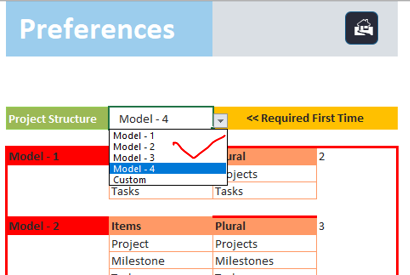
Preferences:
You can change Project Structure models.
Label Manager:
You can change template labels if required.
Calculations:
You can un hide sheets to see calculation sheets.